Recently, the National Internet Emergency Center (CNCERT) and the National Computer Virus Emergency Response Center (CVERC) have successively issued risk alerts and special crackdown notices, pointing out that the "Silver Fox" Trojan (also known as "Youshe," "Guduo Dadao," or "Silver Fox") cybercriminal group not only builds highly realistic phishing websites in batches to spread malicious installers but also intensively distributes phishing files disguised as "quarterly disciplinary lists," "layoff compensation plans," and "internal investigation results."
What enterprise managers and IT operations should be more vigilant about is that sample analyses recently disclosed by multiple security agencies show that Silver Fox is no longer a single remote control program but a highly industrialized attack ecosystem. An office computer being infected is often just the beginning of the crisis—it can directly threaten corporate account funds and may also become a springboard for attackers to laterally penetrate the internal network, steal trade secrets, and even deploy ransomware.
When an employee mistakenly clicks a shortcut disguised as .pdf or downloads fake software from a search engine, what underlying risks does the enterprise actually face? Why does a full scan by conventional antivirus software show "no abnormalities" while the computer is still being remotely controlled at night? This article combines the recent evolution characteristics of the Silver Fox Trojan to outline a practical emergency response plan covering endpoint cleanup, account session control, and protection of core internal assets.
I. Three Recent Trends of the Silver Fox Trojan: Why Conventional Defenses Frequently Fail
In recent incident response and intelligence monitoring, the delivery and persistence techniques of the Silver Fox Trojan have shown significant escalation in countermeasures, which is the core reason why many enterprises "still get infected despite having antivirus software installed":
1. Baits Expand from "Tax Notices" to All-Employee HR and Daily Office Software
In the past, Silver Fox mainly targeted finance and cashier positions, but recent variants have significantly expanded the attack surface to HR, administration, R&D, and ordinary office staff.
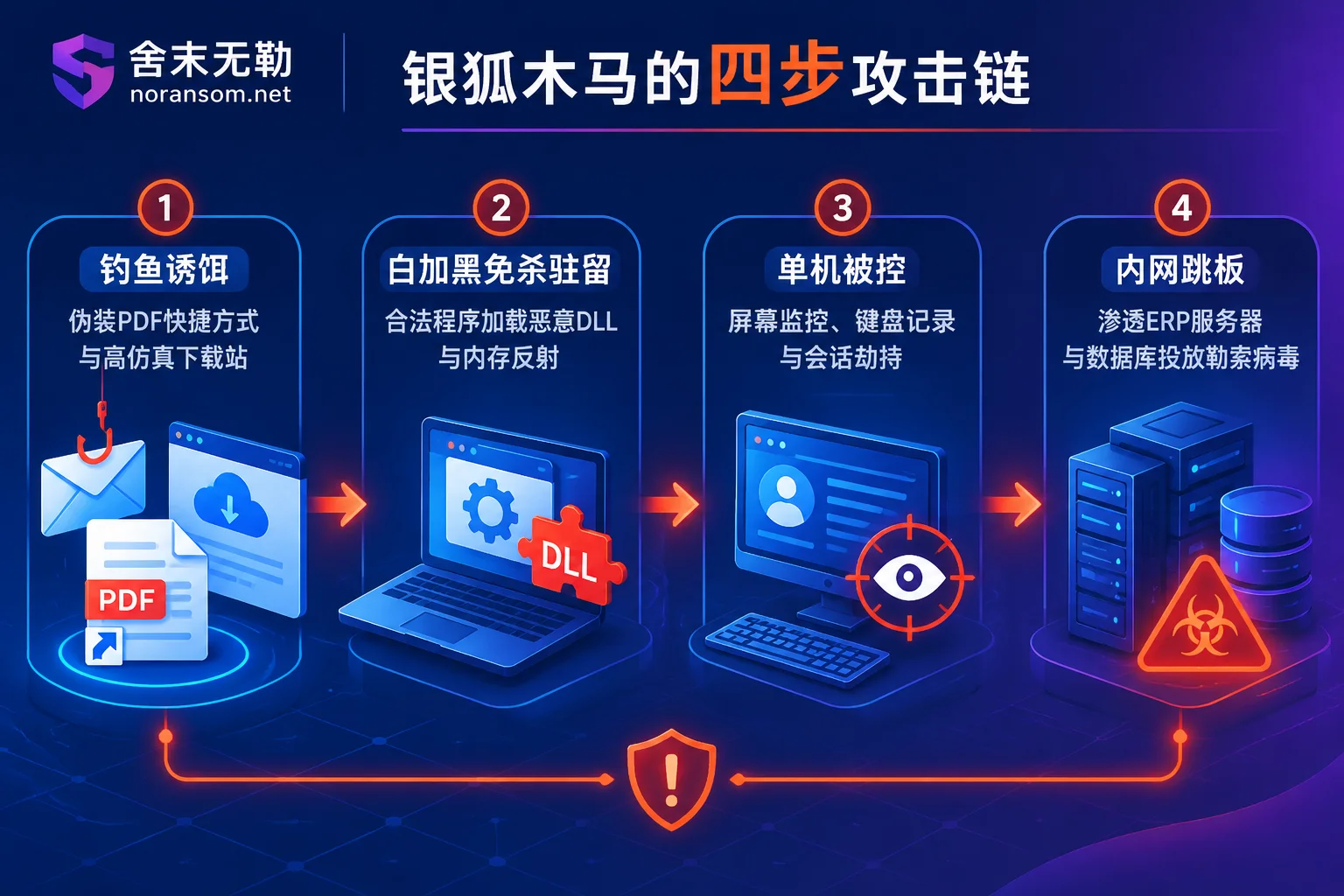
- Highly Deceptive Social Engineering Files: Attackers infiltrate work groups on WeChat, QQ, Feishu, or DingTalk and send compressed packages named "XX Quarterly Disciplinary List" or "Layoff Compensation Plan." After extraction, they appear to be folders, recycle bin icons, or documents with
.pdftext, but are actually carefully disguised malicious shortcuts (LNK) or executable programs. - Highly Realistic Phishing Sites for Poisoning: Cybercriminal groups use search engine promotions or fake official websites to bundle Trojans into installers of common office tools, remote assistance software, emulators, and even security software. Some samples even steal or purchase newly issued legitimate enterprise digital signatures to bypass initial system interception.
2. Three-Stage Progressive Loading and "White Plus Black" In-Memory Persistence
Recently captured Silver Fox variants generally adopt a multi-stage loading architecture:
- Stage 1 (Environment Screening and Privilege Escalation): After the initial downloader runs, it first detects CPU core count, memory size, and real user interaction behavior to avoid security sandboxes and analysis virtual machines, then silently escalates privileges via
runasand other methods. - Stage 2 (White File Hijacking and Cloud Pulling): The Trojan releases legitimate programs (white files, such as
installer.exe) and malicious loaders (such aslog.dll) in system directories likeC:\Program Files\Internet Explorer\, using "white plus black" DLL hijacking technology to pull subsequent payloads from public cloud storage (OSS) or through encrypted DNS-over-HTTPS (DoH) channels. - Stage 3 (Fileless In-Memory Reflection and Process Guarding): The core remote control module (such as Win0s and Gh0st-derived modules) is directly reflectively loaded in memory, without creating obvious standalone virus files on disk, and injected into legitimate system processes such as
tracerpt.exeto achieve guard and resurrection.
3. Evolution from "Single-Machine Fraud" to "Internal Penetration + Ransomware"
After controlling a terminal, in addition to using background screen monitoring, keylogging, and clipboard hijacking to initiate fake transfer instructions in office groups, attackers also actively collect ERP credentials, server Remote Desktop (RDP) passwords, VPN configurations, and internal network topology stored on the host. Once a compromised host is found to be able to connect to the core internal network area, the compromised terminal is used as a springboard to deploy subsequent ransomware or data theft tools onto database servers and NAS storage.
II. Why "Antivirus Software Reports No Threat" Does Not Mean It Is Clean
Many enterprises, upon discovering that the mouse moves by itself (see "Mouse Controlled by Someone Else, Antivirus Reports No Threat: First Disconnect Network and Remove USB Key, Then Use Another Device to Handle Accounts") or that WeChat automatically sends files, first react by having IT staff run a full antivirus scan or delete the suspicious "layoff list" compressed package on the desktop, and then continue normal work and insert USB keys for transfers after seeing the antivirus prompt "computer is safe."
This approach is extremely dangerous. In the practice of Silver Fox Trojan special handling, antivirus software not reporting a threat absolutely does not mean the Trojan has been removed, because:
- Whitelisted Process Cover: Silver Fox loads malicious code through system programs with legitimate digital signatures or third-party legitimate software, and conventional antivirus software often allows whitelisted processes to pass.
- Interference and Blinding of Defense Software: Some new variants in 2026 have driver-level countermeasures, and even use Bring Your Own Vulnerable Driver (BYOVD) technology to directly weaken or suspend endpoint security software monitoring hooks, leaving antivirus software "blind."
- Multi-Persistence Backdoors: In addition to releasing files, attackers also plant multiple trigger points in scheduled tasks, registry startup items, WMI event subscriptions, and system services, and even silently install hidden legitimate remote control components on the computer (for such troubleshooting, see "Strange Remote Control Software Automatically Appears on Computer: First Disconnect Network and Remove USB Key, Then Troubleshoot in This Order").
- Account Sessions Long Gone from the Host: Even if you directly format and reinstall the computer, the WeChat/QQ/Feishu login states, browser cookies, email authorization codes, and various backend passwords saved locally that attackers stole during the Trojan's latent period remain valid in the hands of hackers.
III. Three-Pronged Parallel Handling Method After Suspected Infection: Host, Account, and Internal Network Isolation
Facing a composite threat like Silver Fox, relying solely on "scanning and killing" is not enough. Host cleanup, account sessions, funds, and internal network risks must be handled separately and simultaneously.
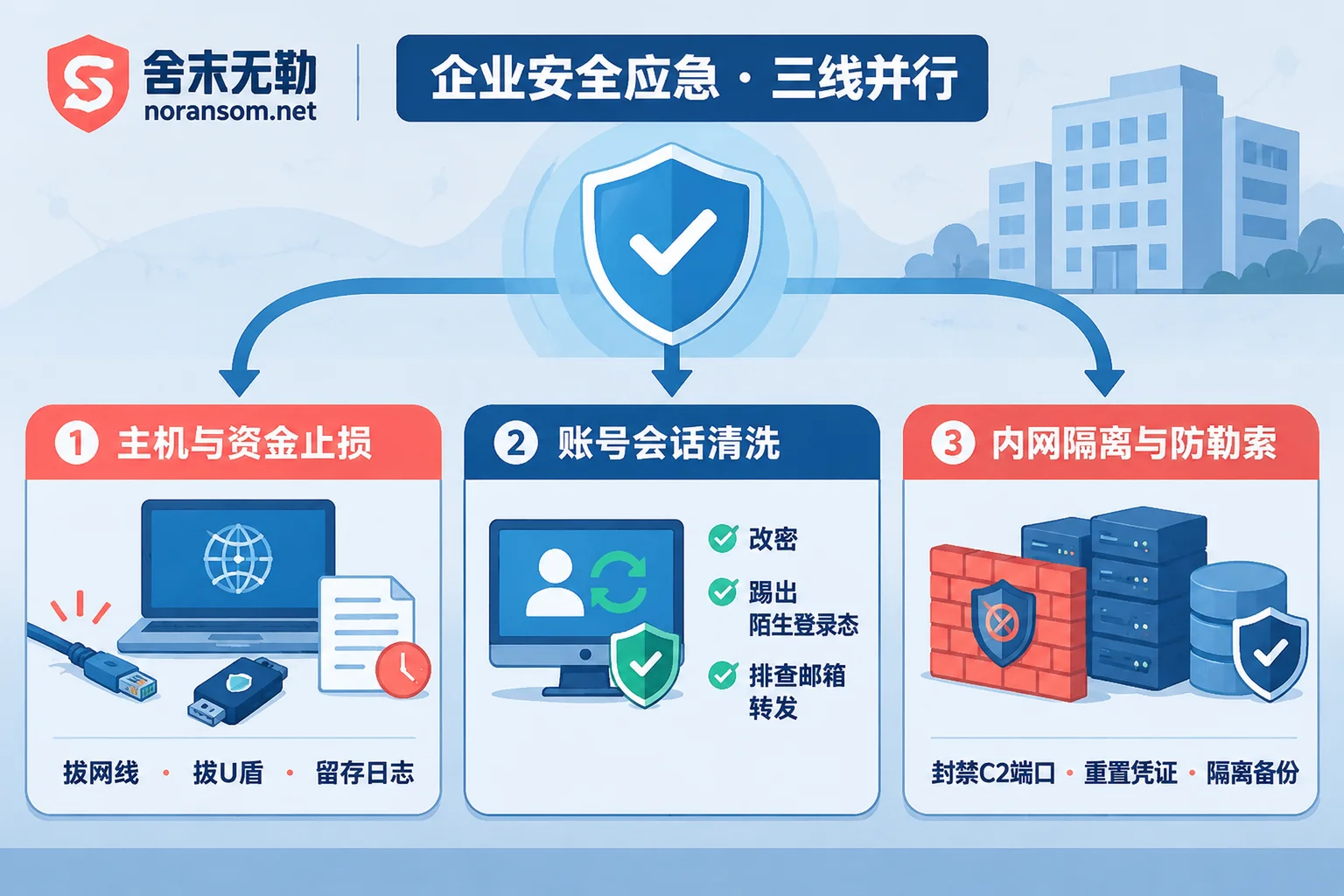
First Line: Emergency Stop-Loss for the Involved Host and Funds (First 15 Minutes)
- Physically Disconnect Network and Remove USB Key: Once you find that a suspicious "disciplinary notice/layoff list" file has been clicked, or the screen briefly goes black, flickers, or the mouse goes out of control, immediately unplug the network cable, turn off Wi-Fi, and first remove the bank USB key, tax golden tax disk, or dongle inserted in the computer.
- Preserve On-Site Evidence: Do not blindly reinstall the system or use a cleanup tool to粉碎 logs with one click. If funds have been stolen or you need to report to the police, preserve key evidence first (see "After Being Infected with Silver Fox Trojan, Keep These Four Types of Things Before Reinstalling the System").
- Downgrade Financial Verification Mechanism: Immediately notify enterprise executives, finance, and business group members by phone or in person that an employee's computer or social account is suspected of being controlled; before thorough troubleshooting, all transfer, payment, and payee account change instructions must be changed to offline face-to-face signing or multi-channel phone voice verification. If funds have been fraudulently transferred, contact the account opening bank immediately for emergency stop payment and report to the local public security organ.
Second Line: Comprehensive Cleaning of Account Sessions (Must Be Done on a Clean Device)
Note: Absolutely do not change passwords on the original suspected infected computer! Because keylogging and screen monitoring modules will synchronize the new password you enter in real time.
- Force Logout of Login States: Borrow a confirmed clean computer or use a mobile phone (do not connect to the same high-risk office LAN Wi-Fi), log in to WeChat, QQ, DingTalk, Feishu, and enterprise email, enter the "Device Management/Login Devices" list, and remove all unfamiliar PC and web sessions (for specific steps, see "After Being Infected with Silver Fox Trojan, How to Handle WeChat and QQ Accounts: First Disconnect Network, Then Use Another Device to Kick Logins").
- Reset Credentials and Check Forwarding Rules: Change passwords for social software, ERP systems, online banking operators, cloud platforms, and VPN accounts. Focus on checking whether the enterprise email has been set with "automatic forwarding rules" or new client authorization codes by attackers (for a complete verification checklist, see "After Cleaning Silver Fox Trojan, How to Confirm Accounts Are Really No Longer Controlled").
Third Line: Internal Lateral Movement Troubleshooting and Core Server Ransomware Prevention
Since recent Silver Fox variants heavily target internal networks of organizations, after a single computer is infected, IT staff must immediately troubleshoot internal spread risks (for troubleshooting ideas, see "One Computer Infected with Silver Fox Trojan, How to Troubleshoot Other Office Computers: First Get the Spread List, Then Check Traces One by One"):
- Block Abnormal Outbound Connections: On enterprise firewalls or internet behavior management devices, check whether any internal IP is initiating high-frequency connections to abnormal ports (such as the recently reported
8880port/getinstall64path, suspicious Hong Kong/overseas C2 nodes, or unfamiliar cloud storage domains), and block them in a timely manner. - Cut Off Springboard Paths: Check whether the compromised computer has saved administrator credentials for internal file servers (SMB shares), Synology NAS, SQL Server databases, UFIDA/Kingdee/Guajiapo and other ERP servers, and ESXi/Hyper-V virtualized hosts. If so, immediately change passwords on the server side and tighten remote access permissions to prevent attackers from following the springboard into the server to deploy poison.
IV. If the Attack Has Spread to Servers: What to Do When Remote Control Evolves into Ransomware Encryption?
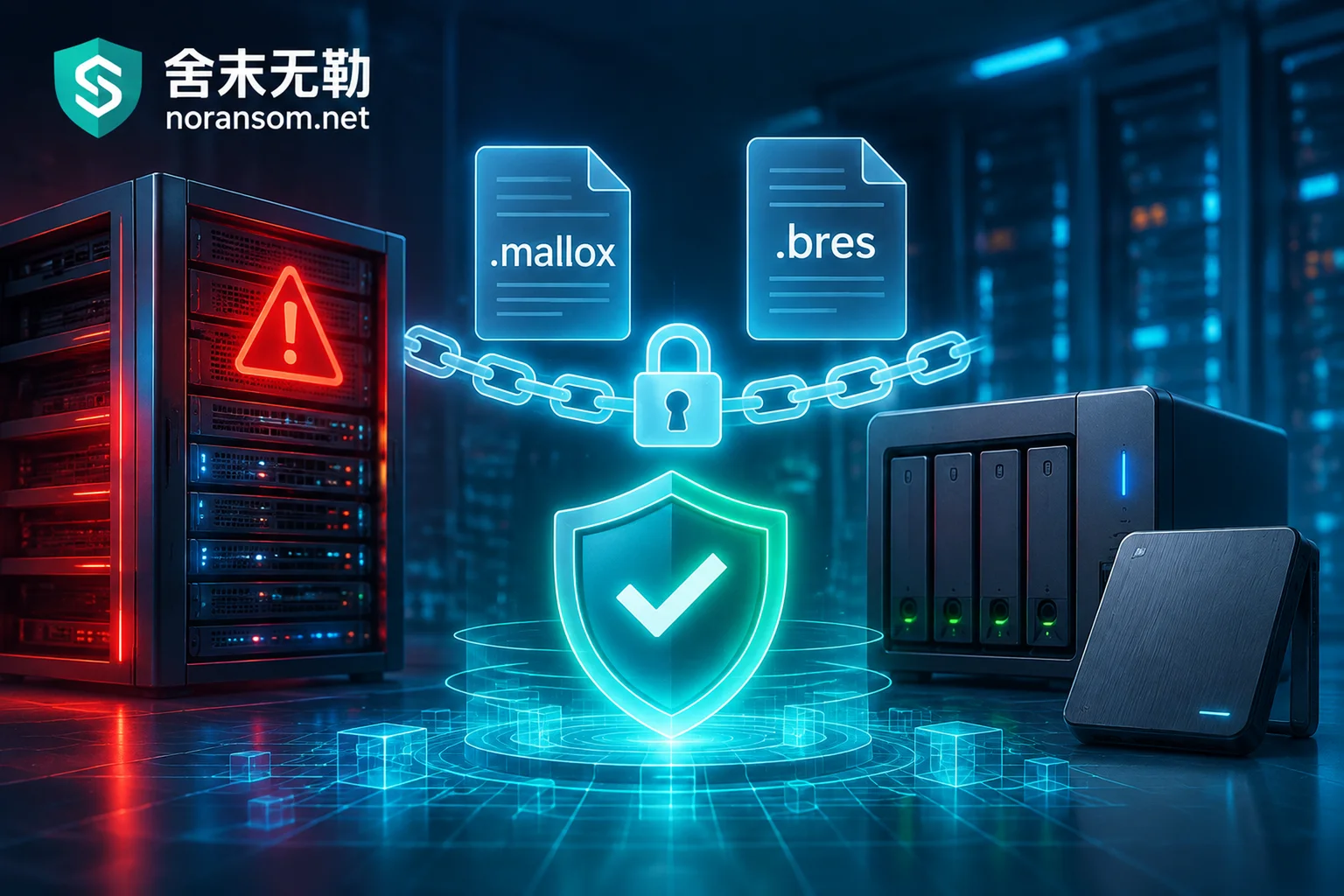
In actual emergency cases, many enterprises initially only had one office machine infected with remote control Trojans such as Silver Fox. Because the persistent backdoor was not thoroughly removed, a few days later the attackers used the stolen domain control or server passwords to deploy ransomware such as Weaxor, Sorry, Mallox, or Phobos in batches across the internal network, causing core databases, ERP account sets, and virtualization platforms to be completely paralyzed.
If your enterprise has unfortunately reached this stage, please stay calm and respond according to the following principles:
- Do Not Pay Ransom or Arbitrarily Try Third-Party Crackers: Compromising with hackers not only risks paying without receiving keys and secondary extortion, but blindly running decryption tools of unknown origin can easily cause permanent overwrite damage to the underlying page structure of the database.
- First Identify the Family and Assess Recoverable Space: First, use the free Ransomware Online Identification Tool or refer to the Ransomware Extension Master List, enter the encrypted extension and ransom note name, and confirm the specific ransomware family and variant version.
Customize Rescue Plans for Core Business Scenarios:
- When direct decryption is not feasible, do not format the hard drive. Through professional data recovery services, core business data can be rescued using technologies such as database file-level repair, virtualized volume fragment extraction, and unencrypted residual reassembly.
- For common enterprise disaster areas, Shemowule provides mature scenario-based rescue paths, including SQL Server database encrypted, UFIDA/Kingdee/Guajiapo and other ERP encrypted, ESXi / Hyper-V virtual machines encrypted, and backups deleted or corrupted and other special solutions.
V. How Shemowule Helps Enterprises Thoroughly Remove "Silver Fox" and Ransomware Hidden Dangers?
Facing the Silver Fox Trojan with strong evasion capabilities and multi-layer in-memory loading, as well as the resulting internal network intrusion incidents, relying solely on enterprise IT to reinstall one or two computers often treats the symptoms but not the root cause. As a security agency focusing on ransomware and remote control Trojan handling, Shemowule (Zhengzhou Shemo Information Technology Co., Ltd.) provides closed-loop services from endpoint troubleshooting to network-wide hardening:
- Silver Fox Trojan Special Handling: Beyond conventional antivirus signature scanning, through low-level process and memory analysis, boot auto-start chain review, hidden scheduled task and registry cleanup, abnormal outbound communication blocking, and account session security verification, thoroughly remove "white plus black" persistent Trojans (for detailed inspection dimensions, see "What Checks Are Included in Silver Fox Trojan Handling Service: Seven Inspection Aspects, Plus a Separate Line for Accounts and Funds").
- 7×24 Security Emergency Response: Provides rapid remote and on-site intervention, following the principle of "stop loss first, then forensics, then recovery," quickly isolating compromised internal nodes, removing latent backdoors, and avoiding secondary control or secondary encryption while restoring business.
- Attack Traceback and Forensics: Based on system logs, disk images, and memory evidence, accurately reconstruct the Trojan intrusion entry point (such as locating the initial phishing file and C2 callback timeline), determine whether sensitive business data or financial materials have been leaked, and issue professional forensic reports usable for police reporting and internal compliance audits.
- Security Hardening Protection: After cleanup, assist enterprises in reducing external exposure, governing weak passwords and unauthorized remote access, tightening cross-segment permissions between office networks and server areas, and rebuilding an isolated backup system that is tamper-proof and cannot be easily deleted by remote control Trojans.
Our service process and pricing system adhere to transparency and openness: first receive the alert and isolate, conduct sample analysis and in-depth assessment, deliver clear assessment conclusions and handling plans to the customer first, and then let the customer decide whether to proceed.
If your enterprise finds abnormal remote control signs on financial or office computers, suspects infection with the latest Silver Fox Trojan variant, or internal servers have suffered derivative ransomware attacks, do not run online while infected. You can visit Contact Us at any time, or call Shemowule's 24-hour emergency response hotline 15639272850 (emergency email: help@noransom.net) to obtain one-on-one professional stop-loss guidance and troubleshooting support.


Comments(0)