Arriving at the office in the morning, the finance team reports that they cannot connect to the accounting system (UFIDA or Kingdee), or the workshop reporting system suddenly throws errors. The IT staff remotely connects to the server and sees: an English ransom note on the desktop, and on drives D and E, the .mdf database, .bak backup packages, and .vmdk virtual machine disk files all have their extensions changed.
After a server ransomware attack, the pressure of business downtime instantly falls on IT and company leaders. However, in frontline rescue assessments, we have found a very cruel pattern: many servers that originally had the potential to recover 80-90% of data through low-level repair ultimately become completely unrecoverable, often not because the ransomware's encryption algorithm is perfect, but because the administrator made several seemingly "normal" moves in the first two hours after discovering the infection.
If you have already read "What to Do If You're Hit by Ransomware: A Complete Emergency Decision Checklist from the First 30 Minutes to Business Resumption", you know that the core of emergency response is "stop the bleeding first, then assess." For enterprise servers hosting core databases, ERP, and virtualization platforms, the first priority of stopping the bleeding is protecting the disk-level scene.
Before attempting any recovery, please check against the following five forbidden zones to ensure you haven't personally overwritten the last chance for rescue.
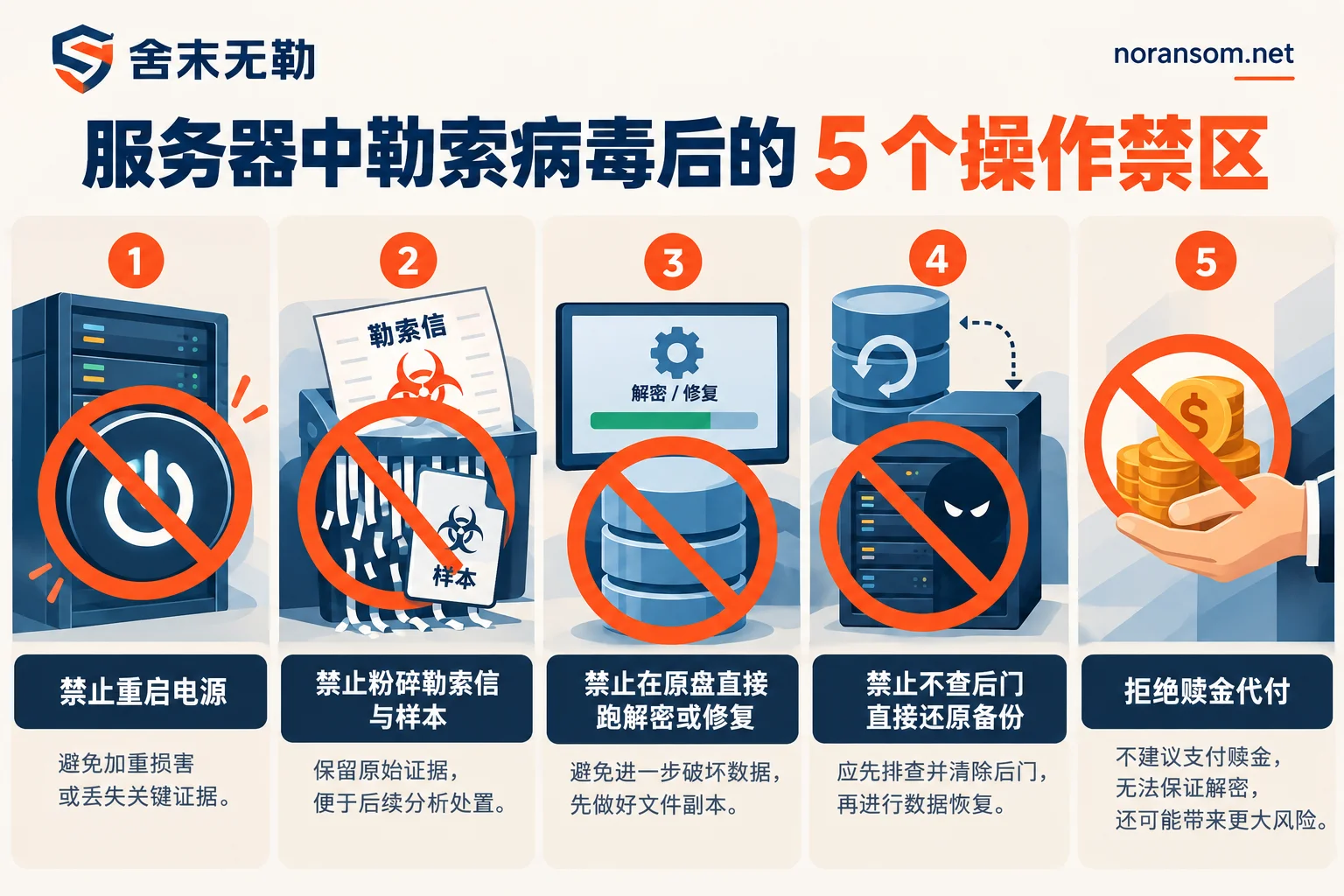
Forbidden Zone 1: The first reaction to a server freeze or error is to reboot
Many ransomware strains consume extremely high disk I/O and CPU when encrypting large database files or virtual machine images, causing remote desktop lag and unresponsive business systems. At this point, many IT staff's first reaction is to "try rebooting."
Why not reboot?
- Trigger secondary damage or continued encryption: Some ransomware families register themselves as system services or scheduled tasks. A reboot not only fails to interrupt encryption but may restart the unfinished encryption process or trigger destructive logic targeting the system boot area.
- Wipe critical forensic clues from memory: How did the attacker get in? What are the current abnormal network connections? Temporary key remnants and fileless attack payloads needed for decryption or tracing often exist only in memory (RAM). Once power is cut and the system reboots, memory data is cleared.
- Trigger scheduled cleanup tasks: Windows or business software often includes temporary file cleanup, log rotation, or automatic backup overwrite tasks at startup. These disk write operations directly overwrite the remaining unencrypted fragments at the底层.
Correct approach:
Unplug the server's network cable or disable the corresponding port on the core switch (for cloud hosts, immediately disconnect the network in the security group and take a full-disk snapshot). Keep the server powered on, and suspend or freeze existing non-essential business processes.
Forbidden Zone 2: Running a full antivirus scan or deleting the ransom note
Upon seeing the server infected, many immediately download antivirus software or EDR tools for a full scan and shred the flagged abnormal programs along with the ransom notes in each folder (such as ReadMe.txt, ![id]._INFO.txt, etc.).
Why is this a major taboo?
- Destroying virus samples and configuration files: Different ransomware families (even different variants of the same family) have vastly different encryption logic. When security engineers perform ransomware decryption analysis, they often need to reverse-engineer the original virus sample to determine whether it uses full-file encryption, header encryption, or intermittent encryption. Shredding the sample with antivirus software is equivalent to destroying the basis for judging the opponent's hand.
- Losing the unique identifier: Ransom notes usually contain a unique victim ID (Personal ID), email, or poison signature left by the attacker. As we mentioned in "How to Identify an Unknown Ransomware Extension", many families share common extensions (such as
.locked,.888,.air). Without the ransom note for comparison, it is difficult to pinpoint the variant version.
Correct approach:
Do not delete any ransom notes or suspicious executable files. You can first enter the ransom note filename and the encrypted file extension into a free ransomware identification tool or check the ransomware extension lookup table to preliminarily determine whether it belongs to Weaxor, Mallox, Sorry, or other common families.
Forbidden Zone 3: Running various "free decryption tools" on the original disk or forcing database mounts
In desperation, administrators often search online for various third-party decryption tools and run them directly on the production server's original disk, or when SQL Server or Oracle databases report errors, forcefully use repair commands and repeatedly attempt to attach .mdf files.
Why does this destroy data?
- Encryption on top of encryption / decryption damage: If you blindly run an incompatible decryption tool without identifying the specific variant, the tool will rewrite the file header or data blocks using the wrong key stream, completely corrupting the otherwise structurally intact ciphertext (see "Files Won't Open After Ransomware Decryption: First Determine If It Wasn't Decrypted or Was Decrypted Incorrectly").
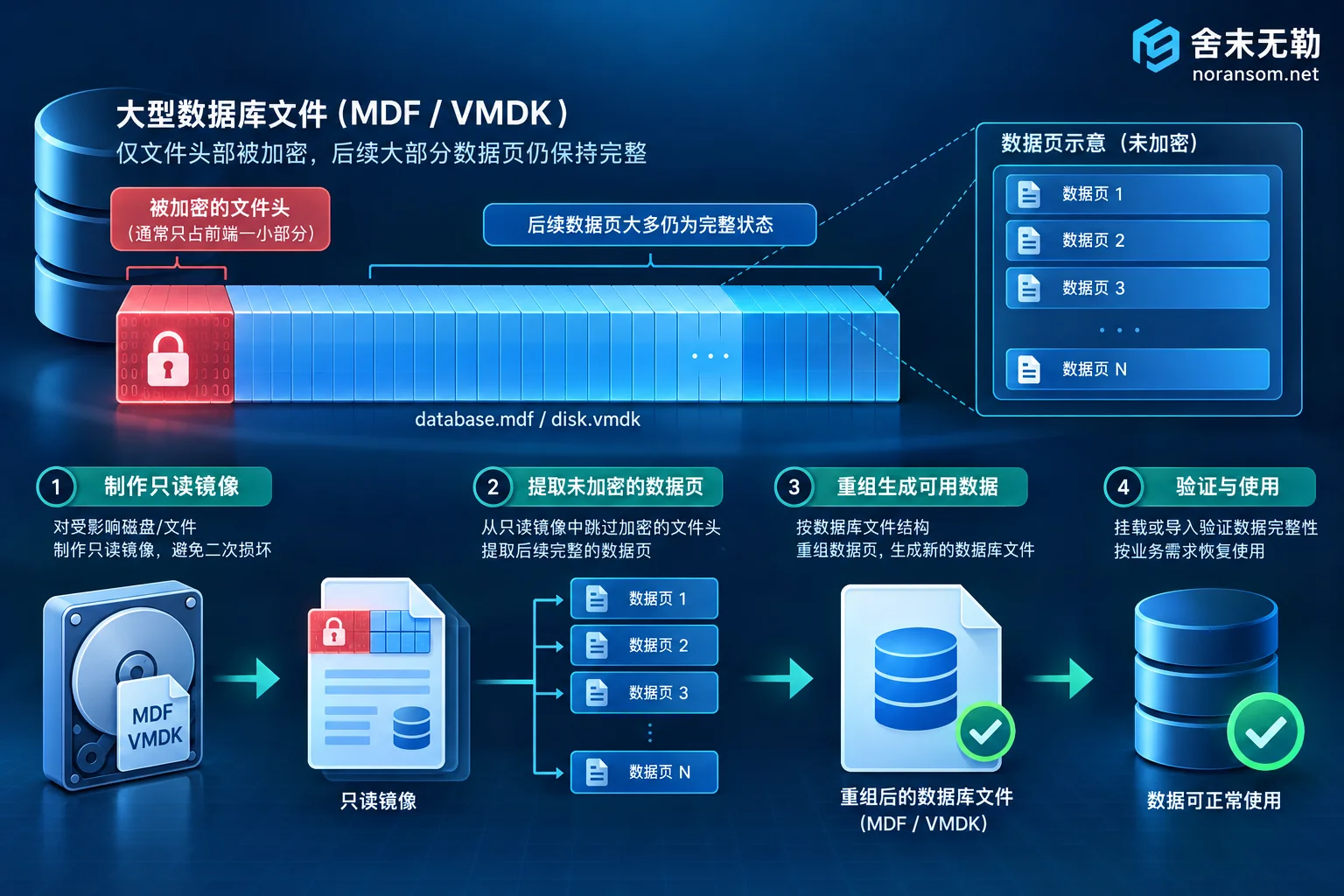
- Destroying database page structures and virtual volume fragments: Many ransomware strains, to speed up encryption, only encrypt the first few MB to tens of MB of large
.mdfdatabases or.vmdkvirtual disks that are tens or hundreds of GB in size. This means more than 90% of the underlying data pages inside the file are actually intact. If you forcefully attach the database on the original disk, rebuild logs, or create a new virtual machine on the virtualization platform, the new writes will directly overwrite these valuable unencrypted data blocks.
Correct approach:
Strictly prohibit any write, repair, or decryption tests on the original disk! All rescue operations for encrypted SQL Server, encrypted ESXi / Hyper-V virtual machines, or encrypted Kingdee/UFIDA ERP must be performed on read-only images or cloned copies (for specific assessment logic, refer to "How to Recover an Encrypted SQL Server Database" and "Can Data Be Extracted from an Encrypted VMDK File?").
Forbidden Zone 4: Restoring backups or reinstalling on the original server without investigating the entry point
If the company happens to have an offline backup or offsite snapshot, IT staff often feel relieved and immediately copy the backup back to the server for restoration, or reinstall the system and directly reopen the business to the outside.
The result is often: less than two days after recovery, the server is encrypted a second time by the same hacker, and even the newly plugged-in portable hard drive backup is compromised.
Current ransomware attacks are no longer isolated single-machine infections. Attackers typically enter the internal network through weak password brute force (RDP/SSH), historical high-risk vulnerabilities in OA or ERP, VPN credential leaks, etc., lurk in servers or domain controllers for days, leave backdoors, and only strike after understanding backup locations. We specifically analyzed this in "Why Data Gets Encrypted Again After Ransomware Recovery". If you do not first use security incident response to remove scheduled tasks, hidden accounts, webshells, and remote-control Trojan residencies, restoring data in an infected environment is tantamount to giving the attacker a second round of bargaining chips.
Correct approach:
Before connecting any clean backup media, the backup storage must be physically isolated (refer to "Backup Files Also Encrypted by Ransomware: Freeze Storage First, Then Determine What Can Be Saved"). The restored business system should first be deployed in an isolated clean environment, and simultaneously conduct attack tracing and forensics and security hardening to block the initial entry point.
Forbidden Zone 5: Trusting online "100% guaranteed decryption" promises and becoming prey to ransom middlemen
When companies find that mainstream security vendors and open-source communities have no ready-made free decryption tools, they are easily attracted by institutions in search results claiming "professional hacker technology, 100% lossless decryption of any extension, no success no fee."
Here is a reminder for company leaders and IT: most mainstream ransomware currently uses mature commercial-grade asymmetric + symmetric hybrid encryption algorithms. Without the private key and assuming no flaws in the algorithm implementation, no one in the world can "brute-force decrypt" all families with pure computing power.
Those teams that dare to pat their chests and guarantee "100% restoration of every file" are mostly not doing technical recovery at all. They secretly contact the hackers to pay the ransom on your behalf and then earn a high markup as "ransom payment middlemen." This not only makes the company bear a high premium but also leads to three serious consequences:
- Financial and compliance risks: Funds flow to overseas black and gray industries, cannot issue compliant technical service invoices, and may even face regulatory accountability;
- Data leakage and secondary extortion: Attackers know the company has the ability to pay and weak security defenses. They often change their guise and extort again a few months later, or use stolen data for secondary extortion;
- Receiving fake keys or damaged decryptors: Hackers take the money and run, or the provided decryption tool has bugs that directly corrupt the original server files.
For how to identify service providers, we recommend first reading "How to Judge the Reliability of a Ransomware Decryption Company's Plan".
After a server ransomware attack, what is a reliable rescue route?
After protecting the server scene and avoiding the above five forbidden zones, companies should proceed in the order of "first identify the family and extent of damage, then determine the technical path." In She Mo Wu Le's standardized service process, we adhere to not paying ransoms and not negotiating with attackers on your behalf, but help companies recover core assets through the following two technical paths:
- Path 1: Family identification and targeted decryption assessment
First analyze the specific family and variant version through the ransom note and encrypted samples (you can also first check the corresponding family characteristics in the ransomware database). If the variant has known algorithm flaws or key extraction conditions, formulate a decryption plan through ransomware decryption service. - Path 2: Bypass the encryption algorithm and directly perform low-level data recovery
When direct decryption is not feasible (which is also the norm for most new variants), there is no need to despair. For SQL Server, Oracle, MySQL databases hosted on servers, ERP accounting sets such as UFIDA/Kingdee/Guanjiapo/SAP, and storage environments like VMware ESXi, Hyper-V, and Synology NAS, we can intervene through data recovery service—using low-level technologies such as database file-level parsing and repair, virtual disk fragment reassembly, and volume shadow copy and deleted backup rescue—to extract and reconstruct the undamaged core business tables and accounting set data, and deliver for verification with completeness marked by system and time point.
Emergency Contact and Assessment Preparation
If your server has just been encrypted by ransomware, please keep the disk read-only and do not reboot or format. Before contacting rescue, you can refer to "Before Contacting a Ransomware Recovery Company, Prepare These Five Types of Materials" and first organize locally:
- The original text of the ransom note (do not modify);
- 2–3 small encrypted file samples that do not contain sensitive secrets;
- The affected business type (e.g., SQL Server version, ERP brand, or virtual machine type) and approximate data volume.
All recoverability assessment conclusions and quotes will be clearly delivered to the customer before formal work begins, and you decide whether to proceed after confirming feasibility. For emergency stop-loss guidance or sample identification, you can submit information through the Contact Us page or directly call She Mo Wu Le's 24-hour emergency response hotline 15639272850 (email: help@noransom.net).


Comments(0)