Recently, IT operations personnel in many domestic manufacturing, trading, and engineering design enterprises have frequently encountered two types of troublesome encryption scenarios when troubleshooting failures: one is database servers running financial and ERP systems suddenly reporting errors, with files uniformly rewritten to .mallox, .malox (or homologous branch extensions such as .weax, .rox); the other is office terminals booting normally without system lag, but when opening LAN NAS shared drives, engineering drawing directories, or even mounted backup drives, all business documents, CAD drawings, and database export files (such as .dmp, .bak) are found to have been appended with the .bres extension.
Why do enterprises, despite deploying firewalls, mounting NAS, or regularly inserting mobile hard drives for synchronization, still fall into a passive situation where both primary databases and backups are compromised when facing Mallox ransomware and bres ransomware? When core data is locked down, what technical paths remain for enterprises to rescue account sets, databases, and drawings without paying high bitcoin ransoms?
This article combines recent frontline emergency response observations to deeply analyze the attack methods of these two high-incidence threats and outlines a practical response plan from on-site loss containment to underlying data rescue.
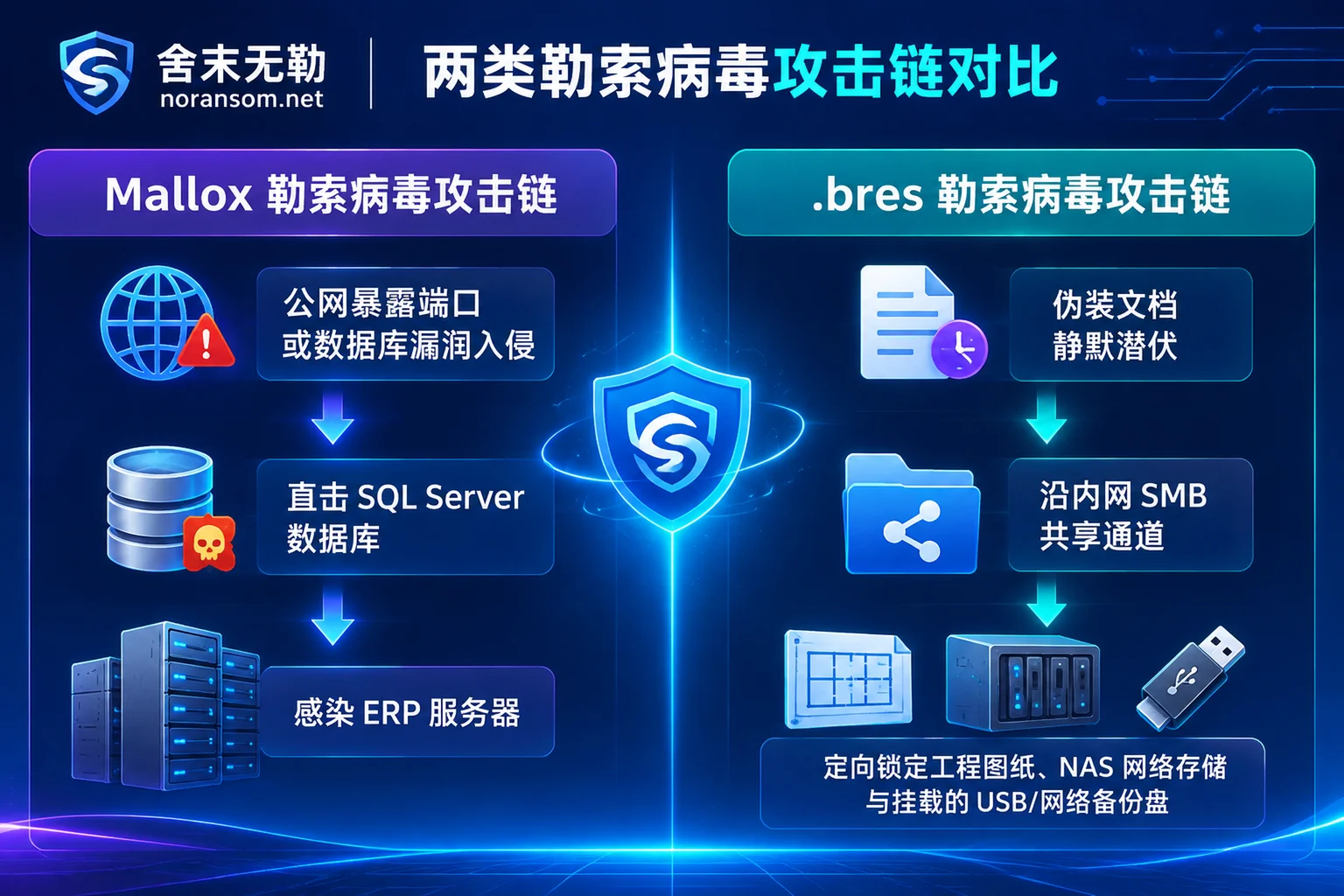
I. Threat Profile Comparison: Mallox Assaulting Databases vs. .bres Targeting Shared Backups
Although the final result is turning core enterprise assets into "digital hostages," Mallox ransomware and bres ransomware have significant differences in code systems, intrusion entry points, and internal network targets. Before starting recovery, operations personnel must first distinguish the opponent's background.
1. Mallox Ransomware: A "Heavy Assault Trooper" Using Databases and OA as Springboards
Mallox ransomware (also known as TargetCompany) is an active family with strong destructive power in the government and enterprise server field in recent years. It later evolved into a rebranding branch Weaxor that frequently changes extensions (for a dedicated analysis of this branch, refer to our recent article 《National Emergency Center Warns of Weaxor Ransomware: After Files Become .weax/.rox/.wxx, How to Rescue Databases and ERP?》).
- Core Intrusion Path: Mallox heavily favors MS-SQL (SQL Server) database ports and Remote Desktop (RDP) exposed on the public internet or with weak protection. Attackers often obtain initial access through dictionary brute-force of weak passwords or by exploiting unpatched remote code execution (RCE) vulnerabilities in databases and mainstream domestic OA/ERP systems, then deliver payloads and move laterally via PowerShell scripts.
- Typical Encryption Characteristics: Uses high-strength algorithms such as ChaCha20 or AES to encrypt files one by one, appends extensions like
.mallox,.malox, and drops ransom notes namedFILE RECOVERY.txtorHOW TO RECOVER FILES.TXTin directories. - Key Affected Assets: ERP account backends such as UFIDA, Kingdee, and Guanjiapo, SQL Server databases (
.mdf/.ldf), as well as Linux business servers and VMware ESXi virtualization environments.
2. .bres Ransomware: A "Stealthy Hunter" That Camouflages, Lurks, and Precisely Harvests NAS and Backup Drives
Unlike Mallox's large-scale server assaults, the .bres ransomware frequently seen recently in manufacturing and design institutes belongs to an independently operating ransomware family, with a more covert and targeted attack chain:
- Camouflage and Long Dormancy:
.bressamples often disguise themselves as ordinary business documents or compressed packages to trick end users into executing them. To extend the dormancy period and maximize encryption results, it deliberately avoids core Windows operating system files—infected computers can still boot and run smoothly, and ordinary employees are almost unaware in the early stages. - Prioritizing High-Value Files: Once established in the internal network,
.brestargets engineering design drawings, R&D documents, virtual machine images, and export backup files of Oracle/SQL databases (such as.dmp,.bak). - New Targeted "Backup Hunting" Logic: This is the most fatal upgrade of recent
.bresvariants. It not only clears Windows Volume Shadow Copies (VSS) but also actively enumerates all disk drive letters in the system—including USB mobile hard drives, SMB mapped network drives, iSCSI storage, and NAS mounted drives such as Synology. As long as directory names contain words likebackup,bak,备份and are online and mounted, they are prioritized for encryption and uniformly changed to the.bresextension.
Don't know which variant you're infected with?
Attackers often change extensions within the same family. Do not blindly try generic repair scripts from the internet based solely on file extensions. You can use SheMoWuLe's free ransomware identification tool or ransomware extension lookup table to enter the encrypted extension or ransom note file name and quickly compare the family and current recoverability assessment baseline.
II. Why Did "Timely Backups" Fail at the Critical Moment?
When handling Mallox and .bres emergency scenes, the most heartbreaking sentence from enterprise leaders is: "We specifically bought a NAS and configured mobile hard drives for daily scheduled backups, why did the backup files also become .mallox and .bres?"
Analyzing many affected sites reveals that traditional backup systems fail against modern ransomware due to three hidden misunderstandings:
- "Online Mounting" Equals "Open Door": Many small and micro enterprises, for convenience, keep mobile hard drives plugged into servers year-round or directly map NAS shared directories as local drive letters (such as Z:) on business hosts, with default read-write permissions. When
.bresor Mallox performs disk enumeration, these online backup drives are no different from local D drives in the eyes of the virus. - Internal Network Shares Become High-Speed Spread Channels: Manufacturing enterprise R&D departments habitually use LAN SMB shared folders to transfer large engineering drawings. Even if the core NAS itself is not exposed to the public internet, as long as an ordinary office computer in the internal network is infected with
.bresby clicking a disguised document, the virus can follow the shared channel with saved credentials on that computer to encrypt all historical drawings in the NAS across devices (for emergency handling of shared directories, see 《Shared Folders Encrypted by Ransomware: First Disconnect Sharing, Then Find the Computer Actually Encrypting》). - Backups Not Verified for a Long Time, "Sick Backups" Unnoticed: Because
.breshas a long dormancy period and modifies files in batches, some enterprises are unaware that scheduled backup software has already synchronized and overwritten encrypted.bresfiles into historical backup pools, completely contaminating valid rollback points.
III. Golden Loss Containment Rules: What to Do in the First 30 Minutes After Discovering .mallox or .bres?
When a ransom note pops up on the screen, or the database cannot be connected and shared drawings cannot be opened, the on-site operations in the first 30 minutes directly determine the success rate of subsequent data recovery (for detailed operation pitfalls, refer to 《Don't Make These Five Mistakes After a Server Ransomware Infection: Only with On-Site Protection Can Databases and Virtual Machines Be Saved》).
- Immediately Physically Disconnect Network and Shares, Do Not Directly Shut Down or Restart
Immediately unplug the network cables of affected servers and abnormal terminals, disable Wi-Fi, and temporarily disable SMB/NFS sharing services and iSCSI connections on the storage side (such as Synology NAS backend) to cut off ongoing cross-network encryption by.bresor Mallox. Note: Try not to forcefully power off or repeatedly restart the system, because restarting may trigger residual scripts to complete cleanup, erase residual process evidence in memory, and even cause disk fragments being written to overwrite unencrypted residual areas. - Physically Remove Unaffected External Media
Check whether USB drives, mobile hard drives, or remote disaster recovery dedicated lines are still plugged into server room servers and financial computers. Immediately physically disconnect them and check whether the backups inside are intact in another absolutely clean, offline environment. Strictly Prohibit "Antivirus Cleaning, Forcibly Attaching Databases, or chkdsk Repair" on Original Disks
- If antivirus software directly shreds encryptor samples or ransom notes, it increases the difficulty of subsequent reverse analysis of encryption logic and variant versions;
- For SQL Server
.mdffiles or Oracle.dmpfiles appended with.malloxor.bres, never forcibly perform database Attach, rebuild logs, or use free repair tools to overwrite on the original disk. Any write operation to the original disk will damage the underlying binary data page structure.
- Immediately Create a Low-Level Read-Only Image
Regardless of the final recovery solution chosen, the first step is always to make a sector-level read-only image backup of the affected hard drive, RAID array, or virtualized storage volume, and all analysis and repair should be performed on the image copy.
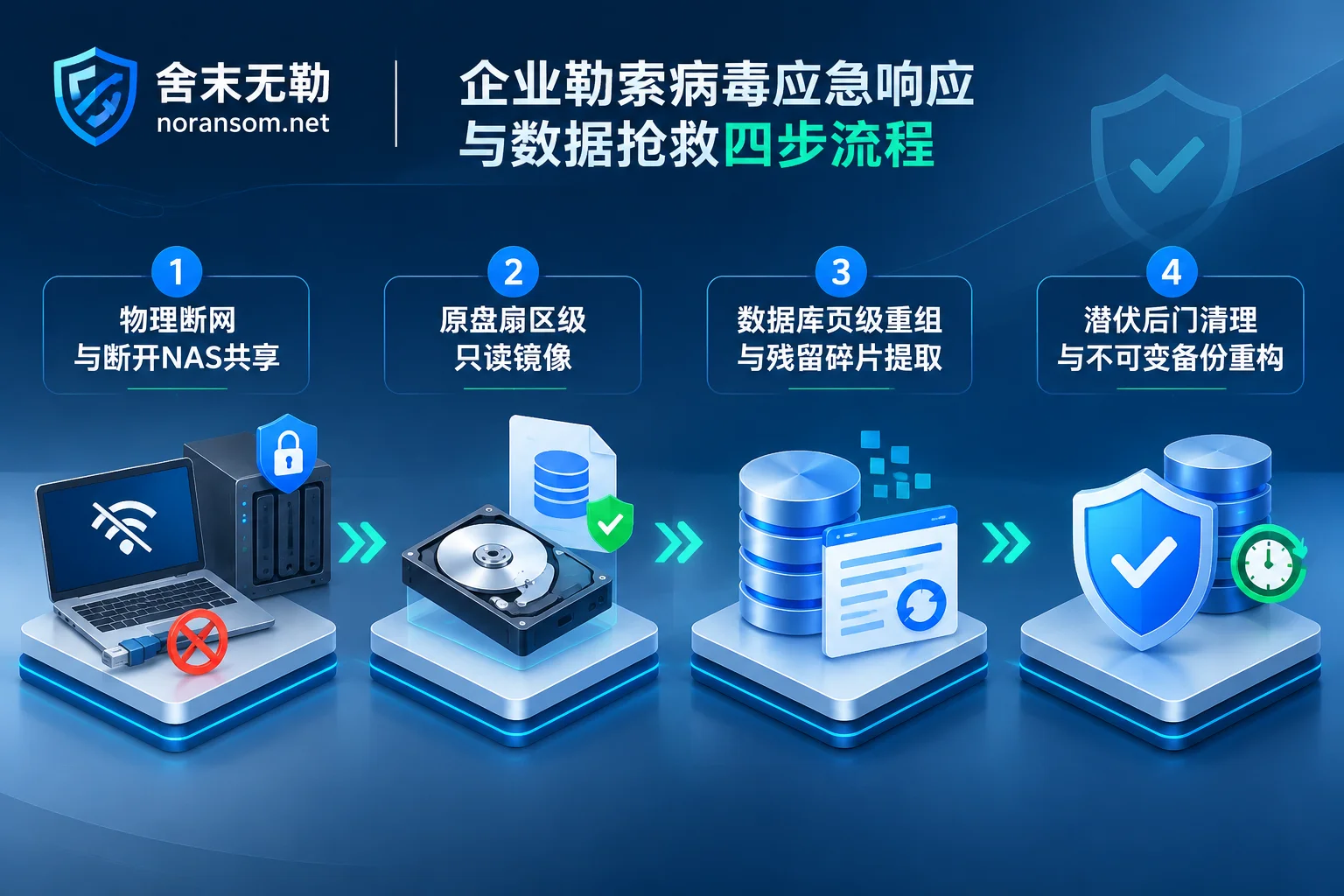
IV. How to Rescue Without Paying Ransom? Scenario-Based Rescue Plans for Databases, ERP, and Engineering Drawings
Facing the high bitcoin ransoms demanded by attackers, SheMoWuLe (noransom.net) always adheres to the principle of not paying ransom and not negotiating with hackers on your behalf. Payment not only risks the hacker taking the money and running, giving the wrong key causing secondary data damage, but also marks the enterprise as a "high-quality paying target" and invites repeated extortion.
For the complex affected sites caused by Mallox and .bres, we need to first identify the specific variant through samples and damaged file header/footer structures, issue a clear recoverability assessment, and then follow customized ransomware decryption and underlying data recovery paths based on business scenarios:
Scenario 1: SQL Server / Oracle Databases and ERP Account Sets Encrypted (.mdf / .dmp / .bak)
Whether Mallox directly locks the running database or .bres encrypts exported Oracle .dmp backups and SQL .bak files, because database files are usually large (several GB to hundreds of GB), many ransomware variants, to pursue rapid encryption and prevent中途 discovery by administrators, often adopt header encryption, interval sampling encryption, or segmented encryption strategies rather than full-byte encryption.
- Rescue Path: By analyzing the encryptor's damage patterns to file headers and data pages, using database file-level underlying repair technology, stripping contaminated file headers and damaged pages, and directly parsing, reorganizing, and extracting core table structures and business transaction records from underlying data blocks (Page/Block).
- Applicable Systems: For scenarios such as SQL Server encrypted and ERP systems encrypted including UFIDA (U8/NC/Chanjet T+), Kingdee (K/3/KIS/Cloud Cosmic), Guanjiapo, and Suda, the extracted data can be re-imported into a newly created clean account database, and after debit-credit balance and business verification, order creation and bookkeeping can be restored.
Scenario 2: Synology NAS Shared Drives and Virtualization Platforms (ESXi / Hyper-V) Locked
When manufacturing enterprise engineering drawings and R&D code become .bres in NAS, or the server virtualization layer is compromised by Mallox:
- For NAS Storage: Refer to Synology NAS encryption solution. Under the premise of immediately freezing writes to the storage pool, deeply explore the underlying block allocation mechanism and hidden metadata tree of the Btrfs or ext4 file system to find historical block versions and residual snapshot fragments not completely overwritten by new encrypted blocks.
- For Virtual Machine Images: Refer to virtualization platform encryption solution. When
.vmdkor.vhdxflat volumes have only headers or partial areas overwritten, bypass the damaged virtual disk descriptor and directly perform sector-level scanning and internal file system reorganization on the underlying image to "extract" the database and business documents inside the virtual machine.
Scenario 3: Local and Mounted Backup Drives Simultaneously Destroyed (Backup Failure)
When an enterprise encounters targeted backup hunting by .bres and finds that .bak files in mounted drives are also encrypted, or volume shadow copies are cleared, you can initiate special rescue for deleted or damaged backups:
- If the virus adopts the logic of "read original file → generate encrypted new file → delete original file," as long as disk space has not been overwritten by subsequent massive writes, engineers can rescue residual unencrypted historical files or old backup packages through underlying unallocated cluster scanning, file signature carving, and fragment reorganization technology, and deliver them with completeness annotated by system and time point.
V. Data Recovery Is Only the First Half: Thoroughly Remove Lurking Backdoors and Block Secondary Encryption
In many cases where enterprises attempt recovery themselves, the most painful lesson is: after spending days finally setting up ERP with old backups, it was encrypted again within half a day of going online (for cause analysis, see 《Why Ransomware Re-Encrypts After Data Recovery: Rescuing Data Is Only the First Step, Don't Rush Online Without Cleaning These Four Types of Backdoors》).
This is because whether it's the Cobalt Strike/Sliver remote control framework delivered by Mallox or the weeks-long internal network lurking and penetration by .bres, attackers have already planted hidden scheduled tasks, WMI persistence, high-privilege shadow accounts, or even WebShell backdoors in multiple hosts on the internal network before pressing the "encrypt button." If only data is repaired and backdoors are not cleared, attackers can return at any time.
Therefore, a complete closed-loop handling must include the following three professional steps:
- Security Emergency Response (Contain First, Then Clean Source): Conduct deep memory and startup item inspections on all network terminals and servers, identify the "source chicken" actually sending encryption packets to NAS shares, and thoroughly remove registry persistence, abnormal services, and remote control Trojans.
- Attack Traceback and Forensics (Find Entry, Define Boundary): Combine system logs, database logs, and traffic mirrors to restore whether the attacker entered through brute-forcing SQL Server port 1433, or breached the boundary through OA vulnerabilities or phishing emails, and determine whether core engineering drawings and customer data have prior leakage risks, and issue forensic reports usable for police reporting and enterprise compliance.
Security Hardening and Protection (Reduce Exposure, Rebuild Defense Lines):
- Strictly Control Exposure: Prohibit direct exposure of 3389 Remote Desktop, 1433 database ports, and NAS management backends on the public internet; switch to VPN or zero-trust gateway access and enforce multi-factor authentication (MFA);
- Converge Share Permissions: Break the "everyone read-write" communal LAN sharing, and segment VLANs and SMB access control by department and least privilege principle;
- Rebuild "Immutable" 3-2-1 Backups: Say goodbye to online mobile hard drives plugged into hosts year-round, introduce immutable backup mechanisms with WORM (Write Once, Read Many / tamper-proof locking) features and true physical offline (Air-Gap) cold backups, and establish monthly backup recovery drills and integrity verification systems, making it impossible for viruses like
.bresthat specifically target backups to operate.
VI. Conclusion and Emergency Rescue Channel
Whether it's the Mallox ransomware ferociously compromising database servers or the bres ransomware quietly sneaking into internal networks and sweeping away NAS engineering drawings and backup drives, when data encryption has occurred, panicked system reinstallation, blindly running repair scripts, or trusting hacker ransom promises will only push originally recoverable data into complete despair.
Protect the first scene, follow the standardized emergency service process of "Alarm and Isolation → Sample Analysis and Family Identification → Recoverability Assessment and Quotation → Data Recovery and Business Verification → Traceback Forensics and Hardening" to get enterprise business back on track with minimal time and cost. We will first provide you with a clear recoverable scope and risk assessment conclusion, and then you decide whether to proceed with subsequent recovery.
If your enterprise's databases, ERP account sets, virtual machines, or NAS shared storage are under attack by .mallox, .bres, or other unknown ransomware, please immediately freeze the scene and contact us through the following methods for one-on-one emergency response and data rescue support:
- 7×24 Emergency Response Hotline: 15639272850
- Technical Support and Sample Submission Email: help@noransom.net


Comments(0)