The ERP on the server suddenly couldn't connect to the database, the finance staff found that Kingdee or Yonyou account sets reported errors, and when they opened File Explorer, they saw that the originally familiar .mdf, .bak, and .xlsx files all had a string of unfamiliar letters neatly appended to them—this is the first scene most enterprises and IT staff encounter when hit by a ransomware attack.
Seeing a screen full of ransomware extensions, many people's first reaction is to search for those letters in a search engine, or try to delete the extension to see if the file opens. But in actual emergency response, "just looking at the last few letters" is exactly where people most easily fall into traps: some families frequently change extensions within just a few months (for example, the recently active Weaxor and Sorry variants); different families may collide with the same extension (for example, .air, .locked); and some families simply generate random characters for each infection.
If you haven't distinguished the underlying family and variant version and directly run a so-called "universal tool" on the server, at best it will say it's not supported, and at worst it will completely corrupt database fragments that could still have been recovered through low-level repair.
This article helps you sort out a clear sequence for "what to check after seeing an unfamiliar extension and how to determine a plan."
1. Why searching only the last few letters often fails to find accurate information?
In early ransomware attacks, an extension often corresponded to a fixed virus family. But from the recent attack landscape, attackers are becoming more flexible in extension naming, with three common situations:
1. The same family frequently changes its extension
Take the persistently prevalent Weaxor ransomware as an example. Many victims only start searching after seeing files become .weax, but in fact this family has used multiple extensions during propagation, including .rox, .weax, .wxx, and .xor.
Similarly, the Sorry ransomware, which has been repeatedly warned about by security agencies recently, in addition to the typical .sorry extension, has recently seen a new variant that appends the .ths extension to both business files and backups and drops hello.txt. If you only use the extension of the new variant to search old posts from years ago, you will most likely find nothing.
2. Different families collide with the same extension
Some extensions are very short or contain generic words (such as .locked, .crypt, .air). As we analyzed in "Can Files with the .AIR Extension Still Be Saved: First Distinguish Whether It's Makop or Dharma Variant", the same .air ending may be backed by Makop or by the Dharma (Crysis) family. Their encryption algorithms and file header/tail structures are completely different, and the methods for assessing recovery paths are also entirely different.
3. Random extensions: searching the letters themselves is meaningless
Some ransomware (or specific variants) generates a random alphanumeric combination as the extension based on the machine code each time it infects a machine. In this case, you simply cannot find an identical extension online, and you must rely on ransom notes and internal file characteristics for identification.
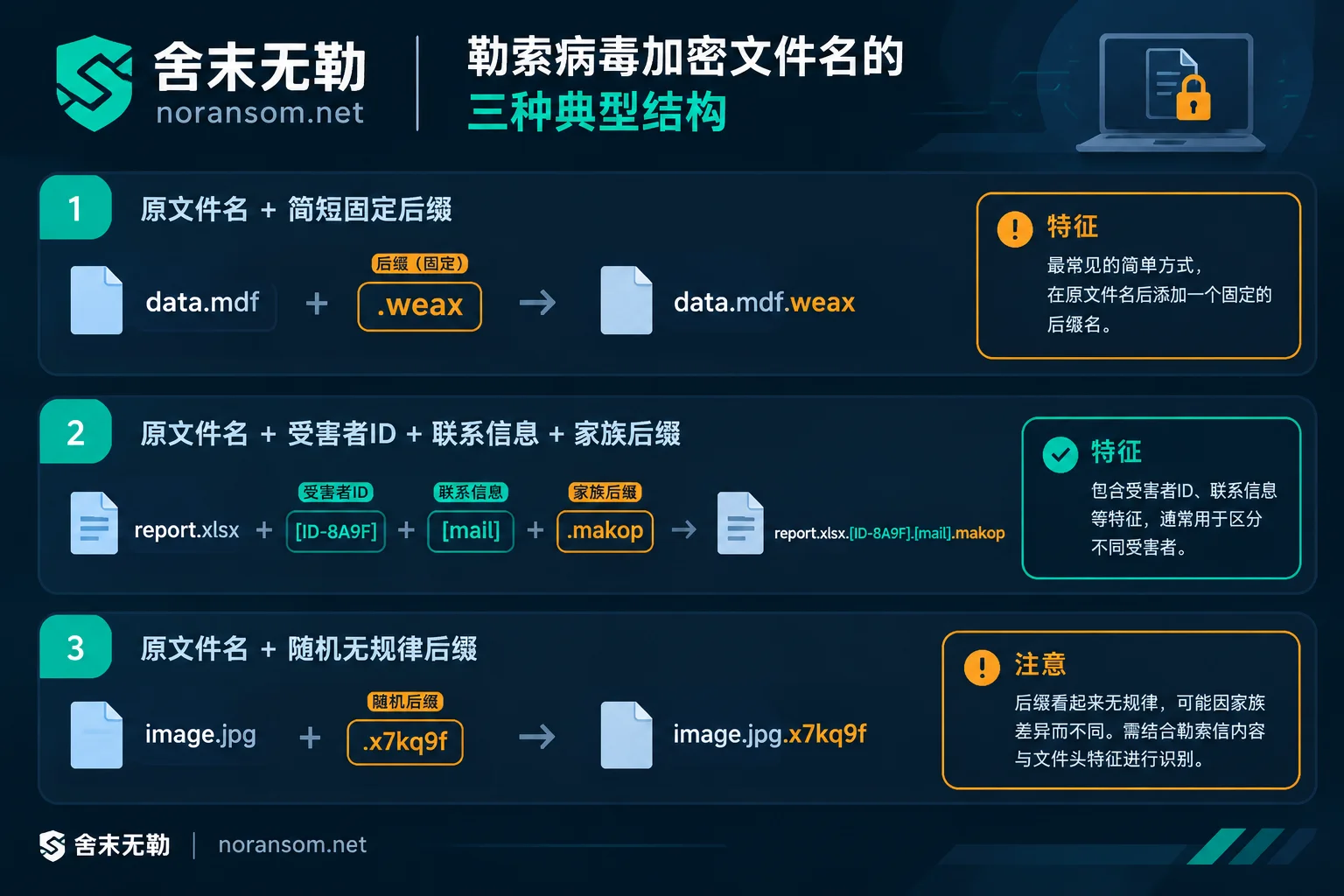
2. Understand the "full name": extract real clues from the file naming structure
When investigating, don't just stare at the letters after the last dot; instead, record the complete encrypted file name. Currently, mainstream ransomware extensions usually present the following three structures:
Directly appended short extension
- Format examples:
财务报表.xlsx.weax,backup.bak.mallox,data.mdf.sorry - Common families: Weaxor, Mallox, Sorry, etc.
- Identification focus: These extensions are short and direct, easily confused with variants of the same name, and must be cross-verified with the ransom note file names in the directory (such as
RECOVERY INFORMATION.txt,FILE RECOVERY.txt,hello.txt, etc.).
- Format examples:
Multi-part structure (including victim ID and contact information)
- Format examples:
合同.pdf.[8位或10位字符].[攻击者邮箱或标识].makopor数据库.mdf.id-XXXX.[邮箱].phobos - Common families: Makop, Phobos, Dharma, etc.
- Identification focus: The characters in the middle brackets of the file name are usually the unique ID assigned by the attacker and the contact channel. When querying, not only look at the final family extension but also observe the formatting of the middle brackets; this is an important basis for distinguishing legitimate families from imitation variants.
- Format examples:
Irregular random characters or replacement of original extension
- Format examples:
账套.bak.a8f9k2dor directly erasing the original extension. - Common families: Some LockBit variants or custom encryptors.
- Identification focus: Such cases cannot be directly searched using an extension master list alone; they require comprehensive analysis combining the layout of the ransom note text, abnormal host logs, and sample file header bytes.
- Format examples:
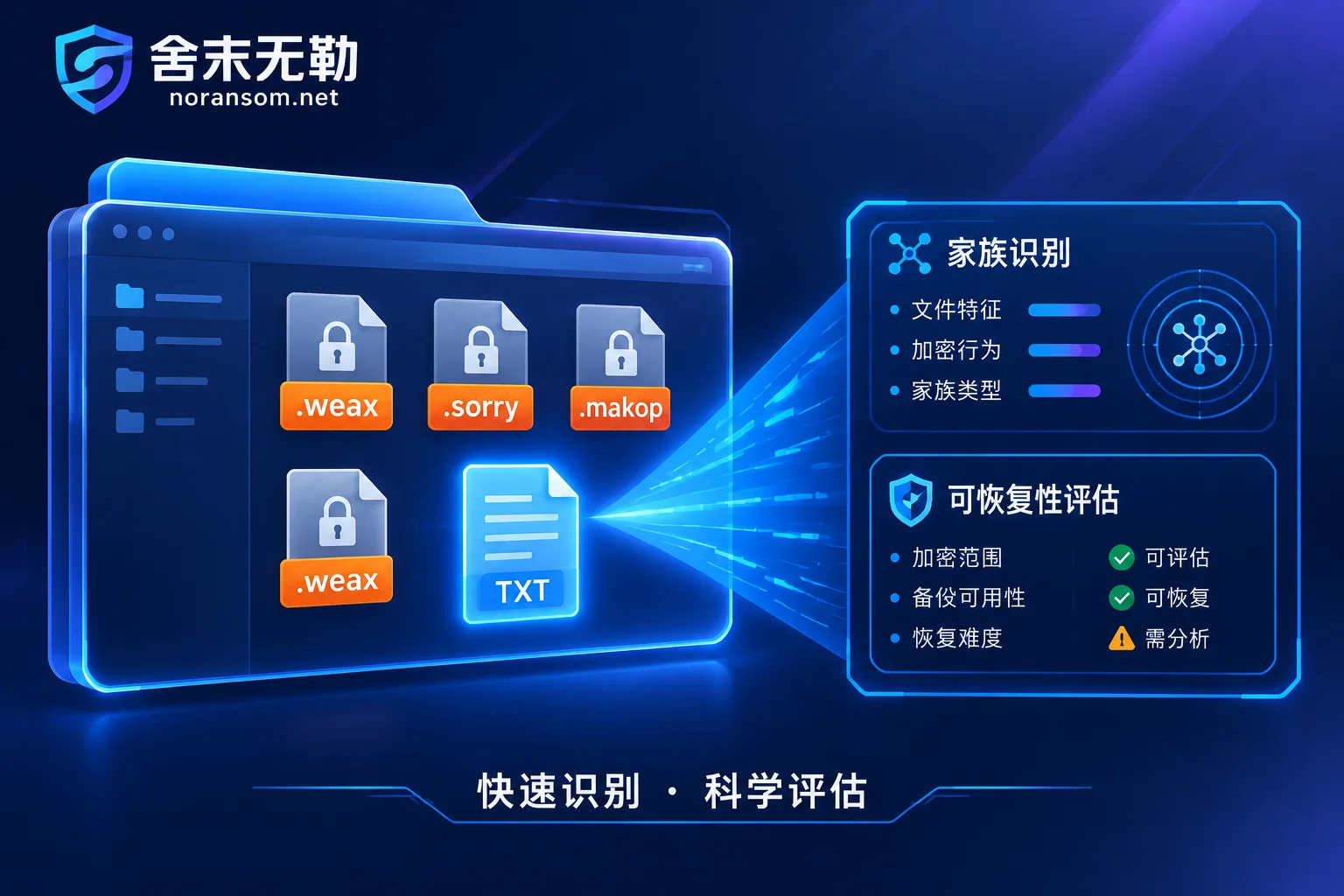
If you want to quickly check known extensions first, you can directly consult the Ransomware Extension Query Master List compiled by Shemowule, or open the free online Ransomware Identification Tool and enter both the "encrypted extension" and "ransom note file name" to quickly screen the corresponding family attribution and basic characteristics.
3. Before checking the extension, never do these three things
Before you have figured out the specific family and recoverability, several habitual actions by on-site administrators often push data closer to the brink than the virus itself:
- Don't manually batch-delete extensions or change file extensions
Ransomware actually rewrites the internal data blocks of files using encryption algorithms; changing the file name only changes a "label" and cannot undo the encryption. More dangerously, if you forcibly rename the encrypted.mdfdatabase file back to its original name and try to attach it to SQL Server, the database engine may attempt to repair or overwrite verification pages, directly destroying the conditions for subsequent low-level file repair (see "How to Recover SQL Server Database Encrypted by Ransomware: Don't Force Attach MDF First"). - Don't casually run online "decryptors" on the original disk
There are indeed free decryption tools released by third-party organizations such as No More Ransom or security vendors, but they usually only target early old versions of specific families or specific batches with leaked keys. If the family or variant version doesn't match, blindly running the tool will not only prompt "Decryption Tool Says 'File Not Supported'" but may even cause secondary damage to files due to incorrect write operations. "Files Won't Open After Ransomware Decryption: First Distinguish Whether It Wasn't Decrypted or Was Decrypted Badly" tells exactly this kind of lesson. - Don't delete ransom notes, and don't rush to reinstall the system
The extra.txtor.htmlransom notes in each folder contain key information for determining the variant version and encryption identifiers; system logs and traces remaining in memory and temporary directories are core clues for determining whether the attacker left backdoors and whether residual data can be extracted.
4. Standard three-step identification method: from "looking at the extension" to "determining the plan"
Facing a screen full of encrypted files, the scientific handling process is not to search everywhere for tools by trial and error, but to clarify the bottom line in three steps (you can also refer to "What to Do When Hit by Ransomware: A Complete Emergency Decision Checklist from the First 30 Minutes of Loss Control to Business Restoration" to do the initial network isolation and loss control):
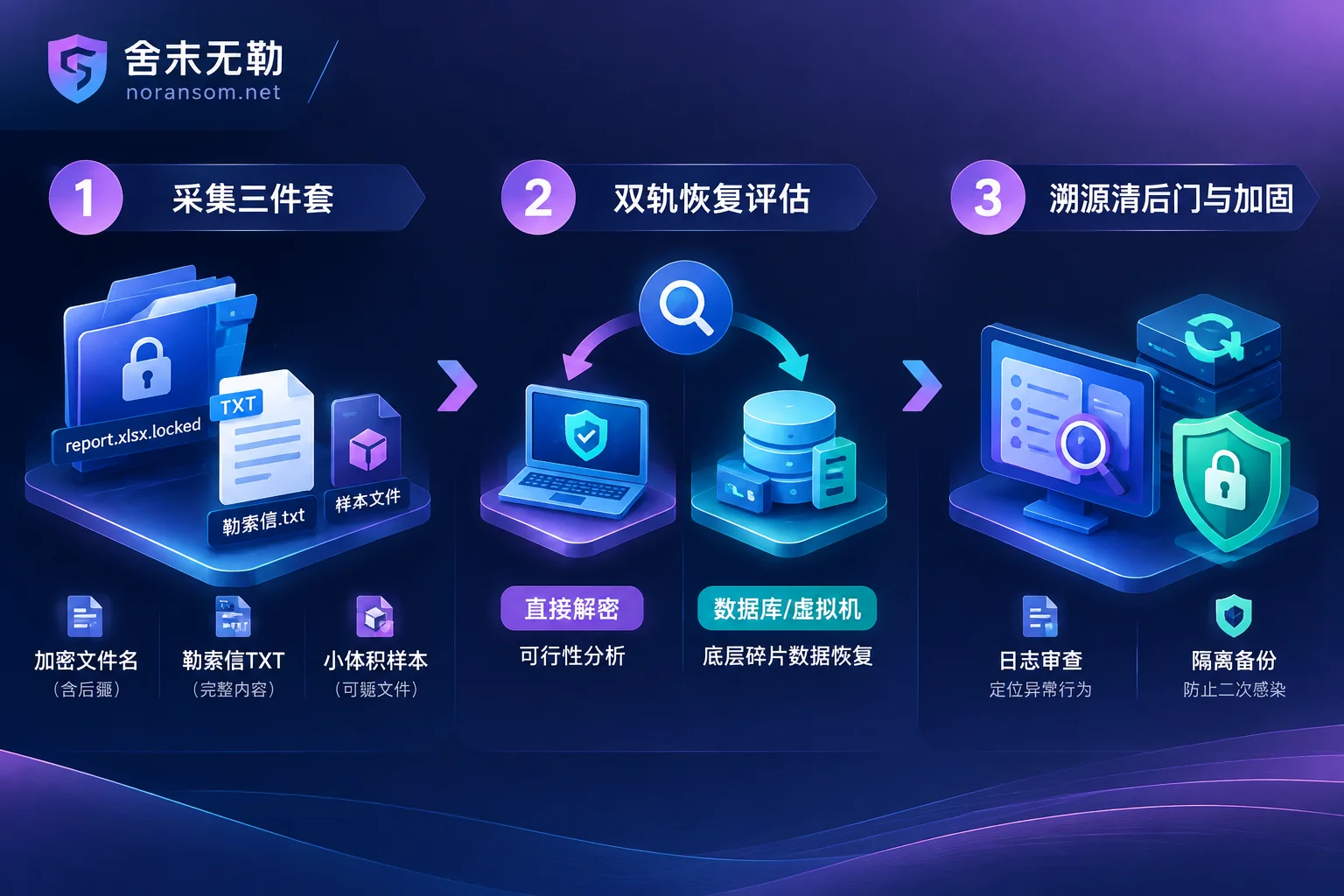
Step 1: Collect the "three pieces" for precise identification
After isolating the network of the infected host, extract the following three types of information from non-system disks (be careful to keep the originals and operate on copies):
- Complete file name characteristics: Record the complete names of 2–3 encrypted files of different formats (including dots, brackets, IDs, and extensions).
- Original ransom notes: Extract the
.txt/.html/.htaransom note files generated on the desktop or in business directories. - Small encrypted samples: Pick 1–2 regular office documents or small files originally ranging from tens of KB to a few MB (preferably find historical unencrypted originals of the same files for comparison).
Only by comparing the encryption markers at the file header and tail, the padding structure, and the encryption ratio (whether it's full-disk full encryption or intermittent encryption of only the first few MB of files) can you truly determine which family and which specific variant in the Ransomware Library it belongs to.
Step 2: Separately assess "whether direct decryption is possible" and "whether data recovery is possible"
Many business leaders easily equate "this virus currently has no public free decryptor" with "the data is completely hopeless." In fact, in professional emergency response, these two paths are assessed separately (see also "Ransomware Has No Free Decryption Tool, Can Data Still Be Recovered: These Paths Remain Beyond Decryption"):
- Ransomware decryption assessment: For a specific family and variant version, analyze its encryption implementation mechanism and assess whether there is a feasible path and applicable scope for direct decryption and restoration.
Data recovery assessment: When direct decryption is not feasible, focus shifts to the underlying data structure. Because many ransomware families, in pursuit of encryption speed, use partial encryption (header or sampled encryption) for large files of tens of GB (such as database files and virtual machine images).
- If it is SQL Server database encryption or Yonyou, Kingdee, Guanjiapo, SAP, and other ERP encryption, you can analyze the proportion of unencrypted data pages in
.mdf,.ndf, or.bakand proceed with file-level low-level parsing, fragment extraction, and account set reconstruction. - If it is ESXi / Hyper-V virtual machine encryption or Synology NAS encryption, focus on assessing the flat volume (such as
-flat.vmdk), the coverage of virtual disks, and the residual snapshots and unallocated space at the storage level. - Even if you encounter backups deleted or corrupted, as long as large-scale new data overwriting has not occurred, there is still room to rescue backup images from the disk's underlying level.
- If it is SQL Server database encryption or Yonyou, Kingdee, Guanjiapo, SAP, and other ERP encryption, you can analyze the proportion of unencrypted data pages in
Step 3: Identify the intrusion entry point and thoroughly remove resident backdoors
Whether it's Weaxor, Sorry, or Mallox, they rarely "fall into the server out of thin air." Attackers often lurk in the internal network through weak RDP passwords, unpatched Web / OA / ERP vulnerabilities, and may even deploy remote-control Trojans or obtain domain controller privileges.
If you only focus on removing the extension and recovering the account set but do not perform security incident response and attack traceback and forensics, the scheduled tasks, hidden accounts, or Webshells left by the attacker may trigger secondary encryption at any time within a few days (this is why we specifically wrote "Why Ransomware Data Recovery Is Followed by Re-encryption"). Only by completing security hardening protection while restoring business, reducing external exposure, and establishing isolated backups that cannot be easily deleted, can the emergency response loop be truly closed.
5. What can you do when you need assistance with identification and assessment?
The extent to which data can ultimately be recovered varies greatly depending on the ransomware family, variant version, and the enterprise's own storage environment (physical machines, virtualization, or cloud hosts). The current status and support for specific families are subject to the official website Ransomware Library and actual assessment.
Shemowule (Zhengzhou Shemo Information Technology Co., Ltd.) adheres to the principle of not paying ransom and not negotiating with attackers on your behalf. If you are facing an unfamiliar ransomware extension and are unsure how much rescue space remains for your data:
- You can first use the free online Ransomware Identification Tool for preliminary screening;
- You can also follow our standard Service Process: an engineer will first assist with sample analysis and family identification, provide a clear recoverability assessment (including recoverable scope, optional paths, expected results, and risks) and quotation, and after you receive the assessment conclusion, you decide whether to proceed with recovery.
If you encounter an emergency shutdown of servers, databases, or core business systems, you can get 7×24 emergency response support through Contact Us (24-hour emergency hotline: 15639272850, email: help@noransom.net). Before contacting, it is recommended to keep the infected host disconnected from the network and stop write operations to preserve valuable underlying data conditions for subsequent assessment.



Comments(0)