Arriving at the office in the morning, the finance team reports that Kingdee or UFIDA login fails with "Cannot connect to the database", the MES system screen in the workshop is frozen, and the IT admin logs into the server to find that the SQL Server service has stopped. In the data directory, all .mdf, .ndf, .ldf, and even the locally scheduled .bak backup files now have a strange extension appended (e.g., .rox, .mallox, .mkp, or .lockbit).
Recent industry security reports indicate that attackers first destroy backup and recovery infrastructure (Inhibit System Recovery) and forcibly stop database services before launching encryption—this has become a standard tactic. This is why many companies find that "even though daily automatic backups were configured, none can be used at the critical moment."
When core business is halted and departments are pushing for restoration, the first question IT admins and business leaders ask is: "Can this database still be saved?" The various "standard database repair tutorials" found in a panic are exactly the biggest risk that leads to total data loss.
1. When SQL Server is Found Encrypted, Avoid These Three Mistakes in the First 30 Minutes
When handling emergency cases of SQL Server encryption, we find that maximizing data recovery often depends on the administrator's first actions after discovering the anomaly. Immediately stop the following three things (for complete initial containment actions, see also "What to Do When Hit by Ransomware: Complete Emergency Decision Checklist from First 30 Minutes Containment to Business Restoration"):
1. Don't Rename the Extension Back to .mdf and Force Attach or Run DBCC CHECKDB
Many administrators have dealt with database "Suspect" states and habitually remove the encrypted file extension, try to attach to a new database with the same name, or enter emergency mode and run DBCC CHECKDB (dbname, REPAIR_ALLOW_DATA_LOSS).
Why you shouldn't do this: Ransomware does not cause ordinary disk bad sectors or transaction interruptions; it directly overwrites the file header and system table pages with high-entropy ciphertext. Forcing a repair command with allow-data-loss parameters will cause the SQL Server engine to truncate or zero out unrecognizable encrypted blocks, destroying the contextual structure that could still be used for stitching and correlation.
2. Don't Run "MDF Repair Tools" Downloaded from the Internet on the Original Disk
Running scans, exports, or temporary database creation scripts directly on the original server disk will cause extensive disk writes that overwrite extremely valuable unallocated clusters, old temporary files, and residual database fragments. If even .bak is corrupted (see "Backup Files Also Encrypted by Ransomware: Freeze Storage First, Then Determine What Can Be Saved"), the free space on the original disk is often the last line of defense for extracting historical snapshots or temporary table remnants.
3. Don't Restart the Server Casually Before Making a Mirror
Some ransomware families get stuck during encryption, or cache data not yet written to disk and traces of attacker resident processes remain in memory. A direct restart may trigger unfinished scheduled encryption tasks and erase memory forensics clues.
The correct first reaction is: Immediately unplug the network cable or disable the network adapter, disconnect all shared directories and offsite sync tasks; then copy the damaged .mdf, .ndf, .ldf, and .bak as-is (or make a read-only sector-level image of the entire disk) to independent clean storage media. All subsequent analysis should be performed on the copies.
2. Without the Private Key, Why Is There Still a Chance to Recover Encrypted MDF Files?
Many users, after learning online that their ransomware family "currently has no free decryption tool," think there is no option but to pay the ransom. In reality, for database files that are often tens of GB or even several TB, ransomware data recovery often succeeds not through "cryptographic brute force" but by exploiting the virus's encryption strategy characteristics and the database's underlying storage structure.
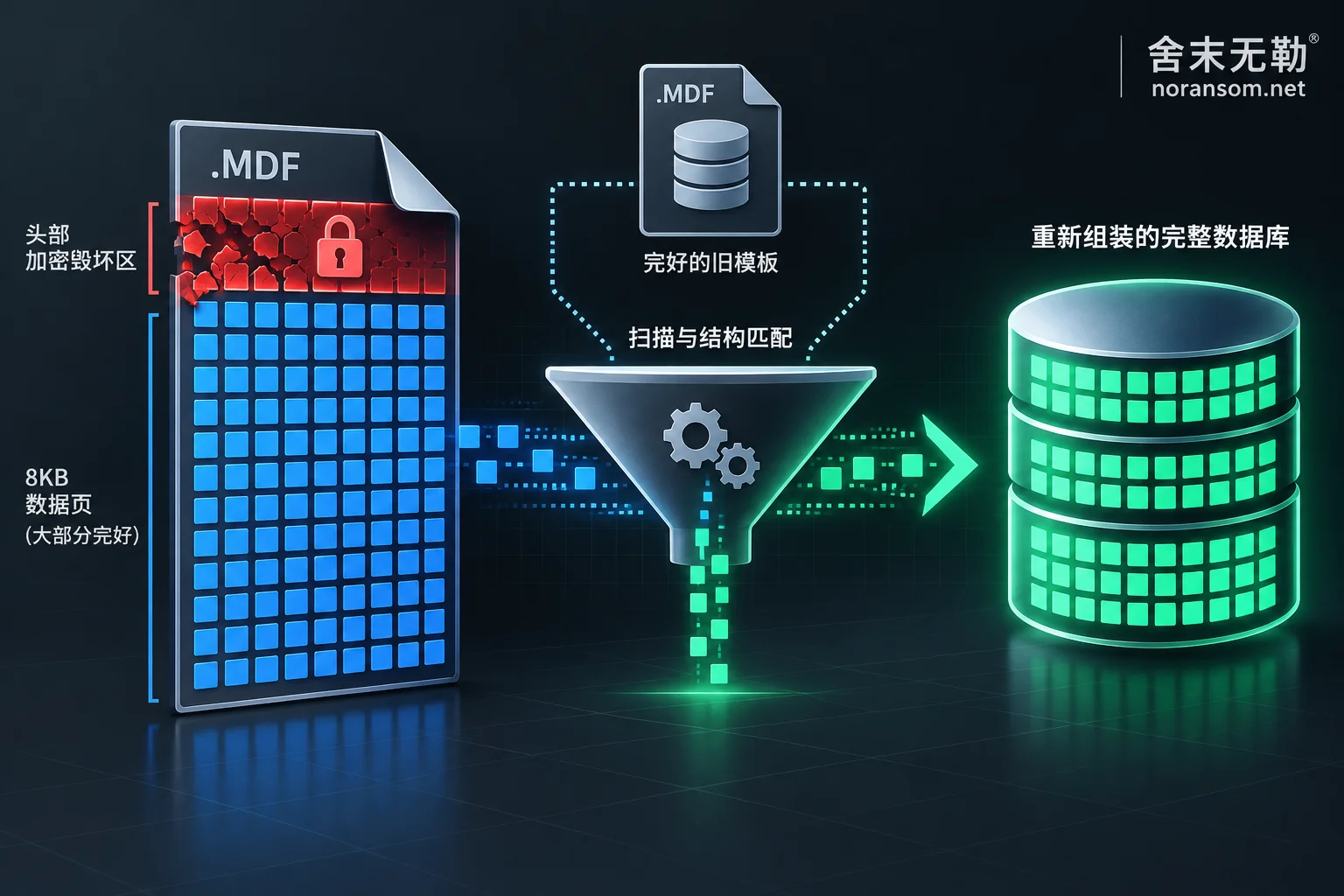
To lock down the entire server in a very short time and avoid being discovered and disconnected due to high I/O usage, most modern ransomware (such as Weaxor, Mallox, Makop, Phobos, LockBit, etc.) adopts partial encryption or intermittent encryption strategies for large files:
- Header encryption characteristic: The virus may encrypt only the first few hundred KB to tens of MB of the file (e.g., first 1MB or first 10%), or encrypt a segment at the beginning and end, leaving the vast middle data area untouched.
- Intermittent sampling encryption: It overwrites data in jumps at fixed intervals (e.g., encrypting 64KB every 1MB).
SQL Server's underlying files (MDF/NDF) are stored continuously in units of 8KB data pages. Each 8KB page has its own 96-byte page header (recording Page ID, Object ID, row offset, and other metadata).
This means: even if the boot page, file header page, and some system tables (such as sysobjects, syscolumns) at the beginning of the file are completely encrypted into gibberish, making it impossible for SQL Server to recognize it as a database file, as long as the 8KB data pages in the middle and later parts of the file are not 100% overwritten, security engineers can still extract business records from undamaged pages one by one through low-level page scanning, reverse table structure matching, and fragment reassembly.
3. What Three Things Determine How Much SQL Server Data Can Be Recovered?
In Shemowule's service process, we never promise customers "100% recovery for all databases." Instead, we insist on first identifying the family and encryption ratio, completing a recoverability assessment, and then providing a clear plan and quote. The core factors determining how much of a SQL Server database can be saved are the following three dimensions:
1. Ransomware Family and Encryption Overwrite Depth
Different families, and even different variants of the same family, have vastly different damage radii for large files. You can first enter the file's encryption extension or ransom note name into a free ransomware identification tool (or refer to the encryption extension lookup table) to preliminarily identify the family (e.g., Weaxor, Mallox, Sorry, etc.).
Then, engineers perform hexadecimal low-level analysis and entropy distribution measurement on the copy files to determine whether the variant only erased the file header or interspersed damage to data pages at high density.
2. Whether There Is a Reference "Dictionary" or Historical Old Backup
When the system tables at the beginning of the MDF file are encrypted, the recovered 8KB data pages may retain specific values (such as amounts, quantities, customer names, document numbers) but may lose table names, column names, and primary/foreign key relationship definitions.
- If you have an old
.bakbackup from a few months or even a year ago, or a test database with the same structure; - Or if you run standard commercial software such as UFIDA U8 / NC / Chanjet T+, Kingdee K/3 / KIS / Cloud Cosmic, Guanjiapo, Suda, etc. (for details, see ERP System Ransomware Recovery Solutions and "Which Files to Keep After UFIDA Database Encryption: These Are Gone Forever If Deleted");
Engineers can directly extract the table structure dictionary (Schema) from the standard version or old database and precisely map it to the surviving data pages. This not only exports the data but also writes it back into the standard database, allowing the front-end ERP software to connect and run directly.
3. Complementary State of .bak Backups and Transaction Logs .ldf
Often, although both the production database .mdf and local backup .bak are encrypted, because .bak is often a single huge continuous archive, the proportion of header damage by the virus may be smaller than that of scattered database files. By simultaneously comparing and repairing the .mdf primary file and disassembling/extracting the .bak backup stream, combined with residual log records, it is often possible to piece together the most complete and up-to-date business account set. This is also why we repeatedly emphasize in "Decryption Tool Says 'File Not Supported': Stop First, Then Troubleshoot These Causes" and "Files Won't Open After Ransomware Decryption: First Determine If It's Not Decrypted or Decrypted Incorrectly" not to focus on a single path.
4. After Data Is Recovered, How to Verify the Business Really Works?
Database repair is different from ordinary Word or PDF documents—a missing field or a broken master-detail relationship will cause errors in closing accounts and inventory documents.
After completing ransomware decryption or database file-level repair, proper delivery is never just throwing a bunch of .csv tables at the customer. Instead, completeness is annotated by system and time point, and the enterprise is assisted through three levels of verification:
- Engine-level validation: Mount the repaired and reconstructed database in a clean SQL Server environment, ensuring the database state is normal and no consistency errors exist (verified via
DBCC CHECKDB). - Core table and timeline verification: Focus on checking the last record timestamp of the general ledger, voucher tables, inventory ledger, and latest order tables to confirm exactly when the data was frozen before encryption.
- Business-side integration testing: Connect UFIDA, Kingdee, or custom business middleware, and have finance and business personnel actually log in to check accounts, create orders, and run reports to verify the business logic loop (for details on account set reconstruction, see also "How to Restore Business After Kingdee Account Set Encrypted by Ransomware: Handling Sequence from Containment to Account Set Reconstruction").
Important reminder: If involving dongle authorization reset, version upgrades, or official patch installation for software such as UFIDA, Kingdee, or Guanjiapo, please contact the corresponding software vendor or authorized agent (this site has no partnership with these software vendors and focuses on underlying database and system emergency recovery).
5. Don't Let the Hard-Recovered Database Be Locked Again Three Days After Going Live
Repairing the MDF and getting the ERP running again only solves the "urgent problem." In emergency response, we have seen too many regrettable secondary incidents: IT admins work two all-nighters to mount the database back, but because the weak RDP password, weak SQL Server sa password, Webshell backdoor, or Silver Fox/remote control Trojan on other jump servers in the internal network that the attacker used to enter were not cleaned up, the new database is encrypted again by the same group with a different extension within 48 hours of going live (for details, see "Why Ransomware Encrypts Again After Data Recovery: Restoring Data Is Only the First Step, Don't Rush to Go Live Without Cleaning These Four Types of Backdoors").
Therefore, while recovering data, it is essential to simultaneously advance security emergency response and attack tracing and forensics:
- Find out whether the attacker gained server access through port brute force, historical OA/ERP vulnerabilities, or phishing emails delivering Trojans;
- Thoroughly clean scheduled tasks, hidden accounts, registry startup items, WMI persistence, and suspicious remote control software;
- Implement security hardening: close externally exposed 3389 and 1433 ports, reconstruct host and database permissions, and establish a truly isolated, tamper-proof, offsite/offline backup system that cannot be easily deleted by server local administrator privileges.
Facing SQL Server or Core Business Encryption?
If your server, database, or virtualization platform has just been attacked by ransomware, please preserve the scene, disconnect the network, and do not rush to format or blindly try unknown repair software. You can first submit the encrypted samples and damage details to a professional team for free preliminary assessment and recoverability evaluation, and then decide whether to proceed after obtaining a clear recovery scope and plan:
- Online self-service diagnosis: Ransomware Identification Tool
- Specialized handling solutions: SQL Server Ransomware Recovery Solution | Data Recovery Services
- 7×24 emergency contact: Contact Emergency Engineer (24-hour emergency hotline:
15639272850/ Email:help@noransom.net)



Comments(0)