When you arrive at the office in the morning and open UFIDA or Kingdee, you get a database connection error. You remotely log in to the server and find a text file in English on the desktop, and all documents, account sets, and database files have been appended with a strange extension. Whether you are a business owner, IT operations staff, or finance personnel, your first reaction is often panic, followed by a search: "What should I do if I'm hit by ransomware?"
Even if your systems are deployed in the cloud or you have regular storage redundancy, without isolated offline backups and a standardized emergency mechanism, a ransomware attack can still cause business downtime and make data difficult to extract directly. In real emergency situations, the wrong actions taken in the first two hours after infection are often more destructive than the virus itself: some people rush to restart the server to see if it recovers, some immediately run a full antivirus scan, and others contact the attacker using the email in the ransom note to ask for a price. These actions not only fail to help but may directly destroy the remaining data recovery opportunities.
To minimize losses, post-infection handling cannot rely on improvisation but must follow a strict sequence. Below is a four-step emergency decision checklist organized by timeline.
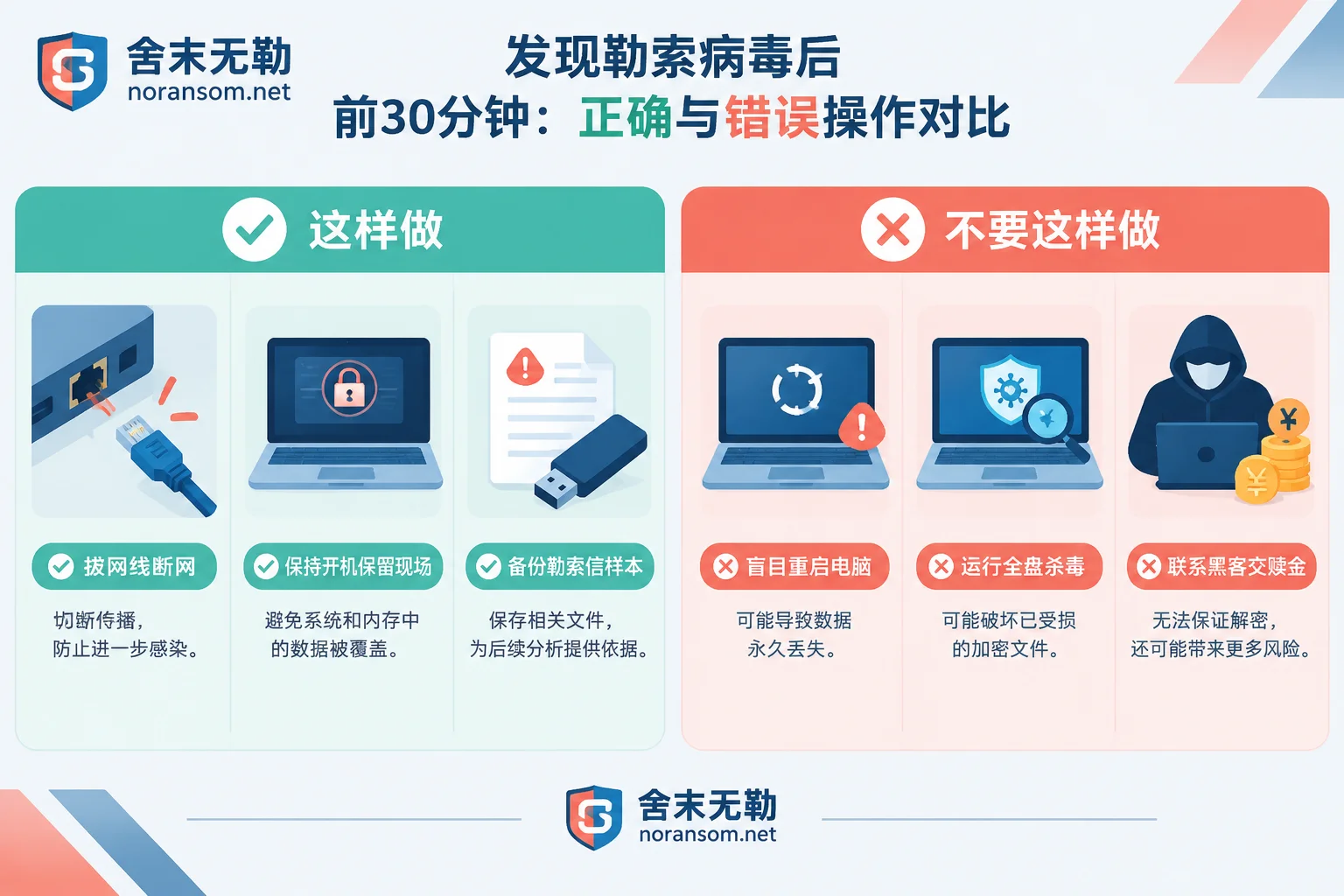
Phase 1 (First 30 Minutes): Immediately Disconnect from the Network to Stop the Bleeding, but Don't Rush to Shut Down or Reinstall
The first priority upon discovering encrypted files is to block the spread and freeze the scene.
- Physical network disconnection and storage isolation
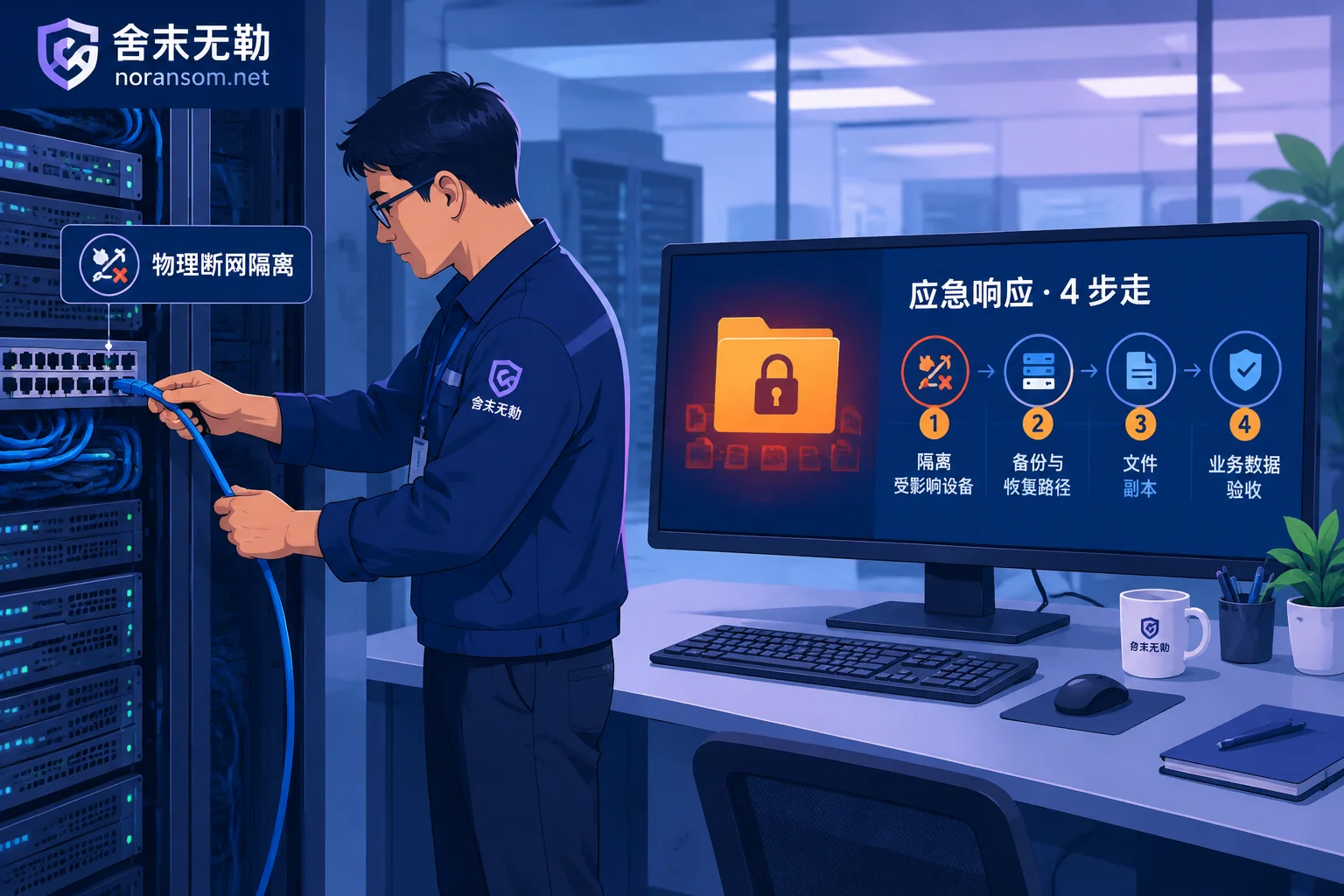
If a single office computer is infected, immediately unplug the network cable, turn off Wi-Fi, and remove any USB drives and external hard drives connected to the computer. If it's a corporate intranet environment, once you find encrypted extensions in shared directories, NAS, or servers, immediately disconnect the infected host from the intranet switch, temporarily cut off network access to Synology NAS, file servers, virtualization platforms, and backup servers, and disable port mapping and external entry points such as Remote Desktop (RDP). If you encounter a situation where multiple computers are encrypted simultaneously, prioritize isolating high-risk nodes such as domain controllers, file sharing servers, and database servers. - Preserve the scene, be cautious with restarting and antivirus scanning
After network isolation, as long as the encryption process is no longer spreading, try to keep the machine in its original state. Do not format, do not rush to reinstall the system, and do not easily restart. On one hand, some ransomware triggers secondary destructive logic or clears residual caches after a restart; on the other hand, many unencrypted data fragments, database cache pages, and intrusion traces remain in unallocated disk space and logs. If you have already accidentally restarted the machine, you can first refer to What to Do After a Ransomware Infection Has Already Restarted to gather the remaining recovery conditions. Why shouldn't you immediately run antivirus software and delete the ransom note?
Many people in panic run a full antivirus scan and casually delete the ransom note on the desktop. This leads to two serious consequences:- The filename, body format, and contact characteristics of the ransom note are core evidence for determining the specific ransomware family and variant version;
- When antivirus software automatically cleans the Trojan dropper or quarantines associated files, it may change the disk write state and even damage the underlying database files that are in use.
Note the distinction: Is it ransomware or a remote access Trojan?
If you don't see file extensions being massively altered, but instead find the mouse moving on its own, unfamiliar remote control software appearing, or finance personnel opening suspicious "disciplinary notices" or "tax audit" compressed packages in a group chat, this is usually a remote access Trojan such as Silver Fox targeting financial fraud. The core response for such cases is to first disconnect from the network, remove the online banking USB key, and freeze account sessions on another clean device. For specific procedures, see Silver Fox Trojan Special Handling.
Phase 2 (30 Minutes to 2 Hours): Identify the Adversary Before Discussing Rescue
Different ransomware families, and even different variants within the same family, vary greatly in their encryption algorithm implementation and degree of damage. Some only encrypt the first few MB of a file, while others overwrite the entire disk and delete volume shadow copies. Therefore, without knowing the specific family, any judgment about "whether it can be decrypted" or "how much it will cost" is blind.
1. Preserve Key Samples and Scene Materials
Before seeking external technical support, copy the following from the infected machine (use a clean storage medium for one-way copying, and be careful not to double-click and run suspicious programs on a normal computer):
- The original ransom note on the desktop or in a folder (preserve the complete filename and content);
- 2 to 3 small encrypted ordinary files (e.g., images or documents of a few hundred KB, preferably also find the original unencrypted versions for comparison);
- Take a photo of the complete modified filenames and extension format.
For the environmental information to inventory before handover, you can refer to Before Contacting a Ransomware Recovery Company, Prepare These Five Types of Materials and go through them item by item.
2. Online Ransomware Family Identification
After obtaining the extension and ransom note, do not randomly download "universal decryptors" of unknown origin from search engines—many download packages under the guise of decryption are themselves bundled with secondary Trojans.
You can directly use the free Ransomware Identification Tool provided by SheMoWuLe, enter the altered encryption extension or ransom note filename to quickly compare the family and current recoverability; you can also check the Ransomware Extension Query Table and the Ransomware Database for characteristics of common families. For example, Weaxor (often with extensions such as .rox, .weax, .wxx), which has frequently appeared in enterprise environments recently, Mallox, which is highly prevalent against database servers, as well as Sorry, Makop, Phobos, LockBit, etc., all have corresponding propagation route descriptions and handling recommendations in the virus database.
Phase 3 (Core Decision): Without Paying a Ransom, Through What Paths Can Data Be Recovered?
When business is at a standstill and the boss is pressuring to get back online, many people waver: "Should we just contact the hackers and pay the ransom for the key?"
From both a security compliance and practical effect perspective, paying a ransom is not recommended, and do not look for so-called "payment agents". First, there is no guarantee of performance when paying attackers; cases where the decryptor is not received after payment, the provided decryptor corrupts files, or a different ransomware gang continues extortion a few days later are common. Second, many organizations claiming to "100% decrypt all new variants" are essentially just contacting hackers on your behalf to negotiate a price and earn a markup. Not only is the cost high, but it also exposes the enterprise to huge compliance risks and hidden dangers of being hacked again.
SheMoWuLe adheres to the principle of not paying ransoms and not negotiating on behalf of clients. Without relying on attackers, professional teams typically follow the two technical paths below based on family assessment results to recover data:
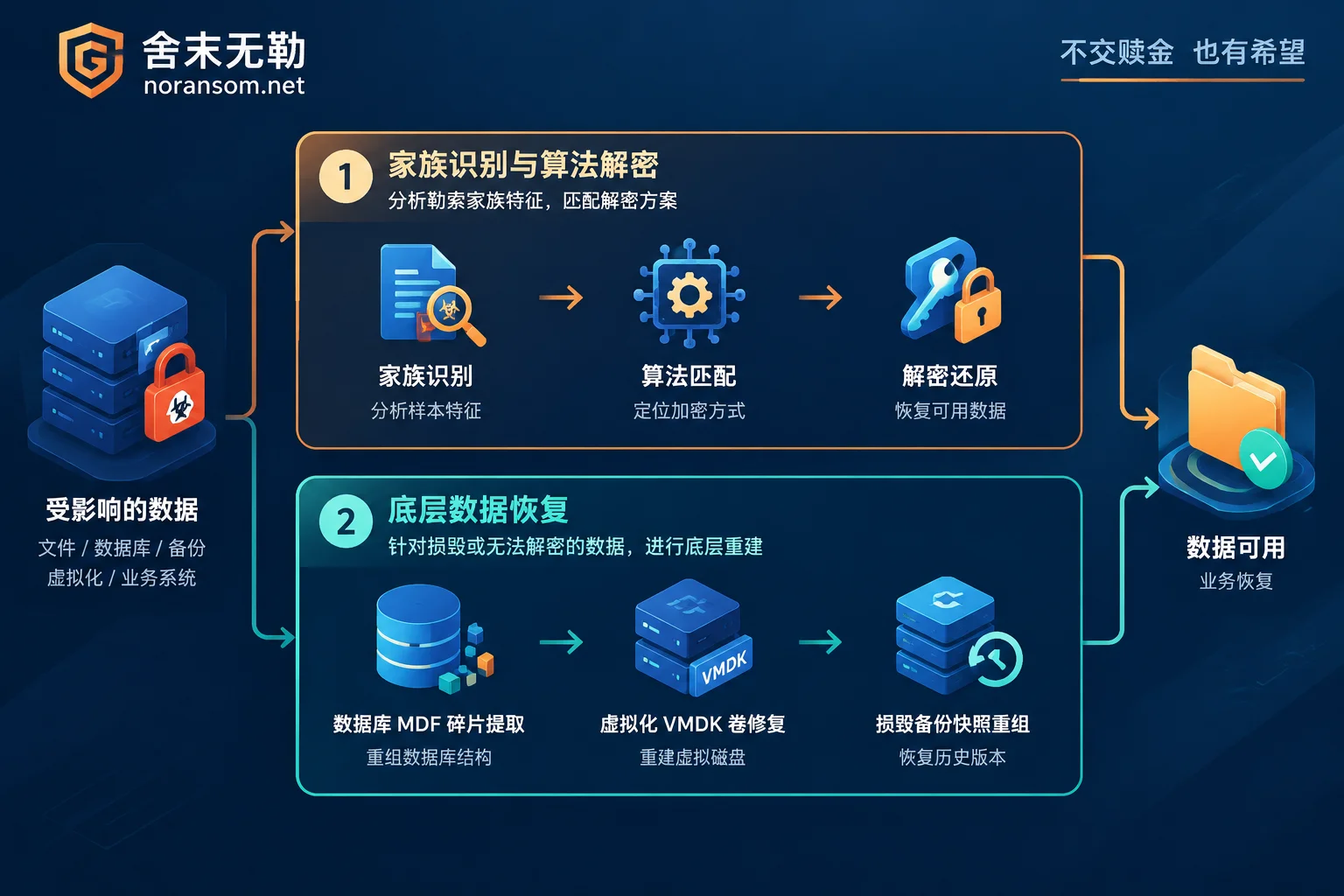
Path 1: Algorithm-level decryption for specific families and versions
Some historical families (or families whose master keys have been released by law enforcement) have free tools available in public projects such as No More Ransom; in addition, some specific variants of certain families have flaws in their encryption logic implementation, key generation, or stream cipher invocation. For such cases, through professional ransomware decryption services, engineers first perform reverse analysis and version verification on samples, issue a clear recoverable scope and risk assessment, and then perform targeted decryption on servers, databases, or virtualization volumes.
Path 2: Underlying data recovery and structured extraction
When facing new variants that use mature asymmetric encryption and have no algorithmic vulnerabilities, brute-force cracking is mathematically infeasible. But this does not mean the data is completely unrecoverable. In core business scenarios, what is truly valuable is often not the operating system itself but the databases and business account sets within.
At this point, you can use data recovery services to follow the underlying reconstruction route:
- Database file-level repair and extraction: To pursue encryption speed, many ransomware use "intermittent encryption" or "encrypt only the file header" strategies for large files of tens of GB. For scenarios such as SQL Server encrypted, or ERP systems encrypted including UFIDA U8/NC/Chanjet T+, Kingdee K/3/KIS/Cloud Cosmic, Guanjiapo, Suda, SAP, etc., engineers can bypass the damaged file headers and directly extract and reconstruct table structures and core financial business data from underlying
.mdfdata pages, log fragments, and uncovered blocks. - Virtualization platform and large storage volume rescue: When encountering ESXi / Hyper-V virtual machines encrypted or Synology NAS encrypted, although the host shell reports errors, the underlying flat volume (such as
-flat.vmdk) or storage pool often still retains a large amount of guest file systems that have not been overwritten. Through underlying block-level analysis, there is still a chance to extract critical business databases. - Damaged backup and snapshot repair: Even if the attacker executed commands to delete volume shadow copies or destroy local backups, as long as no large-scale new data writes have overwritten them, for scenes where backups are deleted or corrupted, it is still possible to recover usable copies from historical points in time through unallocated space scanning and snapshot fragment stitching.
Phase 4 (Before Restoration and Going Live): If Backdoors Are Not Removed, Do Not Connect Data Back to the Original Network
Many enterprises, after going through hardships to recover their account sets and databases, directly import them back to the original server and continue working, only to be encrypted by the same virus a second time within three days.
The reason is simple: ransomware encryption is only the last step in the attack chain. Before that, attackers may have lurked in the intranet for days or even weeks through weak password brute force, unpatched high-risk vulnerabilities, or phishing Trojans, and left hidden administrator accounts, scheduled tasks, Webshells, remote access Trojans, or domain controller delegation backdoors on multiple machines. For common lurking techniques, you can read in detail Why Ransomware Data Recovery Is Followed by Re-encryption: Rescuing Data Is Only the First Step; Don't Go Live Until These Four Types of Backdoors Are Cleaned.
To bring business online safely, the following closed-loop must be completed simultaneously with data recovery:
- Security emergency response and backdoor removal
Through standardized security incident response, thoroughly investigate the intranet environment. Especially for enterprises that have experienced domain controller compromise and network-wide encryption, it is essential to comprehensively clean resident backdoors and reset all high-privilege credentials and tickets to prevent re-encryption during recovery. - Attack tracing and compliance forensics
From which machine and which port did the attacker enter? Did they exfiltrate core business secrets before encryption (double extortion)? With attack tracing and forensics, reconstructing the complete intrusion timeline based on system logs, traffic, and disk images not only helps enterprises report to public security authorities or meet regulatory reporting requirements but also identifies defense blind spots. - Exposure surface reduction and defense line reconstruction
After confirming the environment is clean, implement security hardening and protection: shut down unnecessary public network mapping ports (especially RDP and database ports directly exposed to the internet), comprehensively address weak passwords, patch system and application vulnerabilities, and establish truly physically isolated or tamper-proof offline backup mechanisms. (Note: For version upgrades and official patches of ERP software such as UFIDA and Kingdee, please contact the corresponding software vendor or authorized agent directly.)
Conclusion: Act According to Standard Procedures and Keep the Initiative in Your Own Hands
In the face of ransomware, time is data integrity. The earlier you stop blind tinkering and the earlier you identify the virus family and underlying damage, the higher the proportion of business data you can recover.
In SheMoWuLe's standardized service process, we always adhere to "identify the family first, assess the recoverable scope, then provide a plan and quote": from initial guidance on isolation upon alert reception, sample analysis, to issuing a clear recoverability assessment report (clearly stating what can be recovered, which path to take, and the expected completeness), the assessment conclusion is first delivered to the client, who then decides whether to proceed with recovery after weighing the options.
If your server, database, or office computer has just been encrypted by ransomware, or you suspect the intranet has been infected with the Silver Fox Trojan, please first follow the first step in this article to disconnect the network and preserve the scene, then contact us through Contact Us for support, or directly call the 7×24 emergency response hotline 15639272850 (you can also send the encryption extension and ransom note screenshot to help@noransom.net), and let emergency engineers assist you with preliminary assessment and loss control.


Comments(0)