When a dozen people report issues simultaneously and ransomware notes fill the screens, the most common mistake is to start fixing the machine with the loudest complainer. The correct order has nothing to do with "who is worst off"—it only depends on how much can still be saved:
- Contain first: Block internal communication and external connections to stop encryption within the current scope;
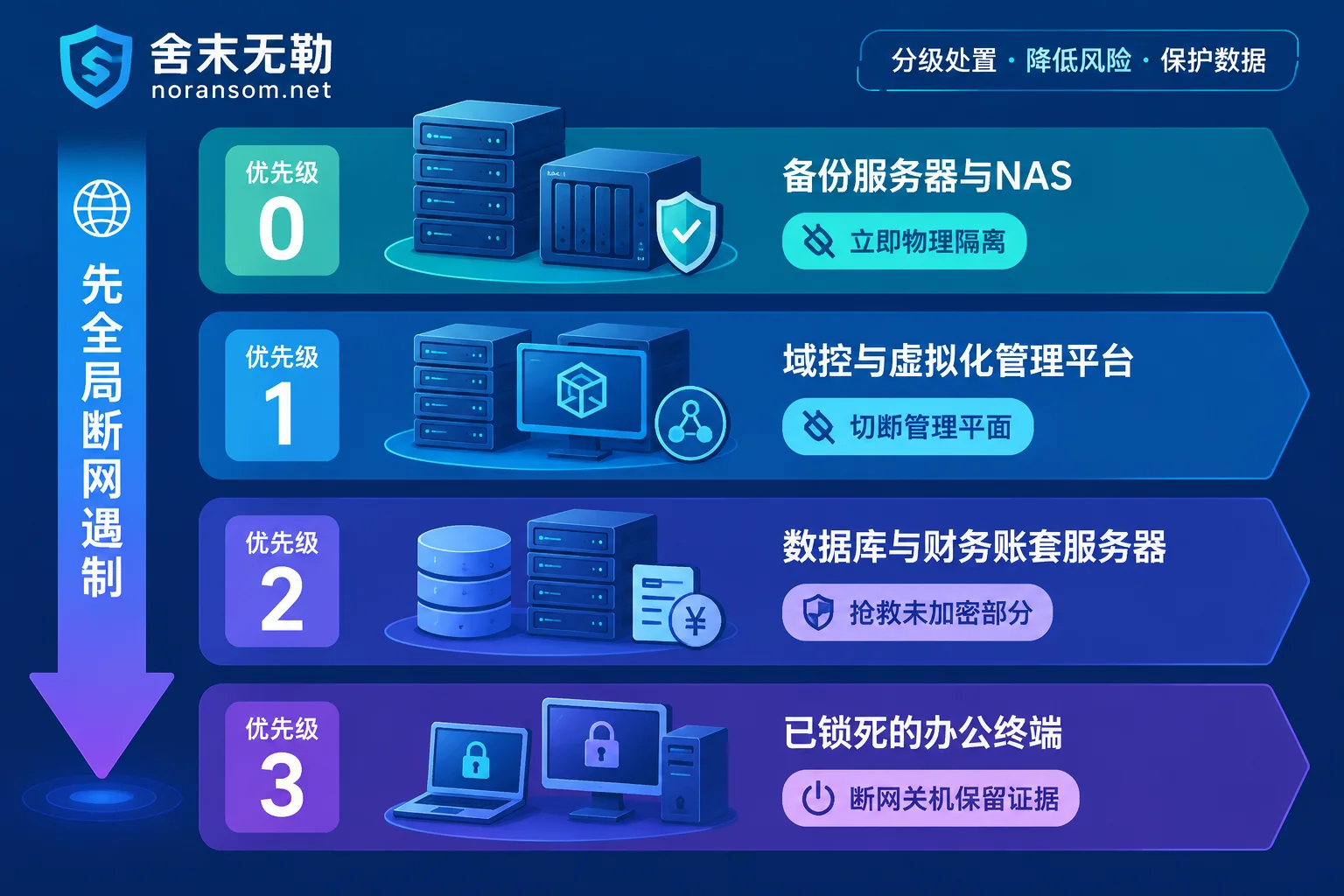
- Priority 0: Protect backups that haven't been touched yet (backup servers, NAS, external drives, tapes);
- Priority 1: Cut off control hubs—domain controllers, jump servers, virtualization management platforms, core network devices;
- Priority 2: Rescue core business machines (databases, ERP/financial accounting servers) that are still being encrypted or only partially encrypted;
- Priority 3: Ordinary office computers that are completely locked—disconnect and shut down, preserve the scene, handle last.
When multiple machines are compromised simultaneously, it's highly likely the attacker has completed lateral movement or obtained a high-privilege channel. In this case, the speed of checking individual machines will never catch up with the spread, so the first action must be global.
Step 1: Choose Different Disconnection Methods Based on Network Scale
The only goal: prevent machines from accessing each other and from connecting to the external network. How to do this depends on your environment.
- Workgroup network with a dozen machines: Unplug network cables and turn off wireless per machine, starting with servers and machines hosting shared drives, then office terminals.
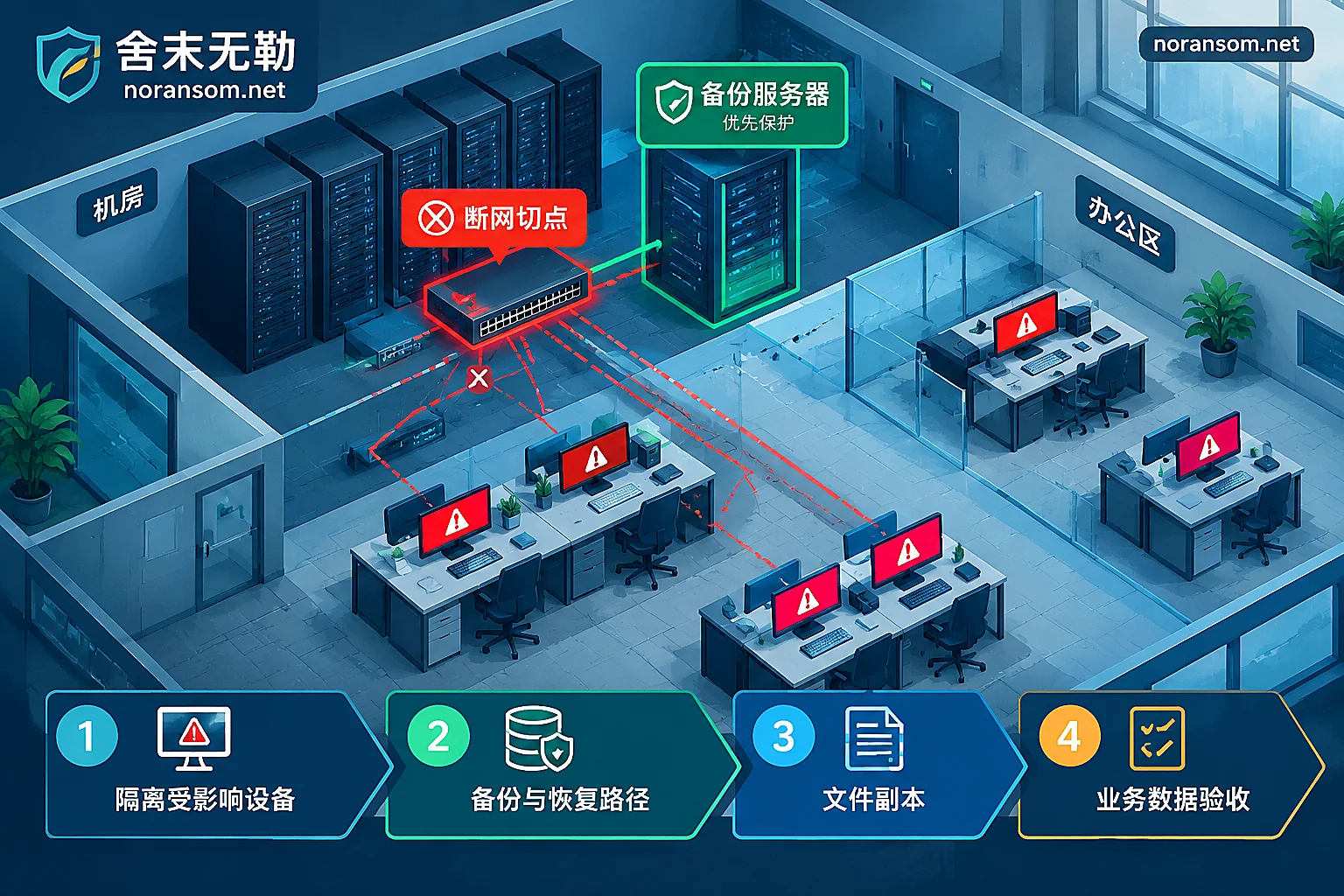
- Dozens of machines with switch segmentation: Don't unplug one by one. Directly disconnect relevant ports or downstream links on access switches, or remove affected network segments from the core. At the same time, block external connections for that segment on the egress firewall.
- Virtualization clusters: First disconnect business and management network ports on physical servers. Do not log into the management platform to perform bulk operations without confirming safety—the management account itself may already be the key the attacker is using.
- VPN, remote desktop mapping, third-party maintenance channels: Shut them down as well. Many secondary encryptions come back through these channels.
If only one person is on site and the environment is complex, pulling the main network switch for the affected area is safer than checking machine by machine. The cost of business interruption is usually far less than letting encryption run for another half hour.
Priority 0: Backups Are the Only Thing You Can't Gamble With
After disconnecting the network, the first thing is not to check which machine is worse, but to go to the server room and physically isolate backups.
Modern ransomware attacks often first map out the backup architecture, prioritize deleting or encrypting backup copies, and then touch production data. Therefore:
- Immediately unplug network cables from backup servers and backup appliances;
- Disconnect NAS shared mounts and stop all sync and replication tasks (sync will overwrite good copies with encrypted files);
- If external drives or tapes are already plugged into a machine, confirm that machine is disconnected before removing them and store them separately;
- Absolutely do not plug clean spare drives into any suspected infected machine, nor mount backup volumes "just to see if backups are still there."
Confirming backups exist and confirming backups are usable are two different things. After physically isolating the media, verification should be done on a clean, independent machine—not in the production environment. If you open a backup and find it encrypted, don't delete or overwrite it yet; those files often still contain extractable parts. For handling ideas, see How to determine what can still be saved after backup files are also encrypted.
Priority 1: If Control Hubs Are Not Handled, Fixed Machines Will Be Encrypted Again
This level includes: domain controllers, maintenance jump servers/bastion hosts, virtualization management platforms (vCenter, ESXi hosts, Hyper-V management machines), and management ports of core switches and firewalls.
The reason is straightforward: if the domain controller is compromised or domain admin credentials are leaked, the few machines you painstakingly restored may be re-encrypted by a script that same night. So at this step, the goal is to isolate the management plane, not to immediately reinstall the domain controller.
Specific actions:
- Disconnect domain controllers from terminal network segments; keep their state intact, do not reinstall;
- Disable and reset suspicious domain admin and local admin credentials—note: change passwords on a confirmed clean, independent device, not on a just-compromised machine;
- Check and disable recently added startup items and script distributions in scheduled tasks and Group Policy;
- If VM files on ESXi/Hyper-V hosts are already encrypted, do not rebuild datastores or delete seemingly damaged volumes. For diagnosis methods, see Handling order when ESXi VMs are encrypted and there are no snapshots.
Priority 2: Rescue the Part That Is "Not Yet Fully Encrypted"
This level has the highest value and is most easily overlooked—because these machines appear to "still work."
How to tell a machine is still being encrypted: file extensions keep changing, disk I/O remains high, an unfamiliar process occupies CPU, files in shared directories are renamed in batches. SQL Server, Oracle, and Kingdee/UFIDA accounting servers are typical targets, and database files are often half-encrypted—headers are modified, but the underlying data tables and transaction logs behind may still be intact, and a significant portion can often be saved.
Handling trade-offs:
- If you can reliably disconnect the network and the encryption process has stopped → keep the machine powered on, disconnect the network, preserve the scene, and hand it to experienced personnel for analysis;
- If encryption continues after disconnection, or you cannot disconnect quickly → decisively power off. Letting it run will only destroy the still-intact parts;
- Do not run full antivirus scans, disk repair tools, or various one-click decryptors "just to be safe." Repeatedly tampering with the only original copy is the most common way to turn recoverable into unrecoverable.
If encryption spread through shared directories, the source may not be this server. For how to disconnect shares first and trace back to the initiator, see How to find the machine actually encrypting after shared folders are encrypted.
Priority 3: Locked Office Machines—Value Is in Evidence, Not Repair
For machines with ransomware notes all over the desktop and documents all having new extensions, the damage is done. They no longer pose a spread risk and should be handled last. Only two things to do: disconnect and shut down, preserve the scene.
Before and after shutdown, be sure to preserve these items—they determine whether the family and solvability can be identified later:
- Original ransomware note (txt/html/hta, don't just take a screenshot);
- Two or three small encrypted file samples, along with the same-named unencrypted originals (if a copy exists in email or on a phone)—very useful for version comparison;
- System logs, security logs, and paths of suspicious executable files;
- The time of the attack, who discovered it first, and what was being operated at the time.
Do not reinstall on the spot, do not format the entire disk, do not redo the system "to get back to work quickly"—after reinstallation, clues for family identification and tracing are basically gone. When submitting materials, do not upload databases, customer lists, or production passwords to public forums or any online analysis site.
One Thing to Do Along the Way: Find the First Infected Machine
When multiple machines are encrypted simultaneously, the starting point is usually a terminal that someone operated—opened a file disguised as "disciplinary notice" or "new fiscal policy," installed a fake financial tool, or was taken over by remote control software. This machine often retains the remote access trojan and stolen credentials, serving as a springboard for subsequent lateral movement.
When financial and cashier computers are involved, handle host response, account sessions, and financial risk on three separate lines:
- Host: Disconnect and preserve the scene; don't rush to scan and remove—antivirus not detecting doesn't mean it's clean;
- Accounts: On a confirmed clean device, reset passwords for online banking, email, OA, WeChat/QQ, and kick out all logged-in sessions; unplug USB shields and key media;
- Funds: If abnormal transfers are found, immediately contact the bank through official channels and report to the police, keeping transfer records and chat screenshots. No one should promise you that the money can be recovered.
For investigation details on this line, see Investigation order when unfamiliar remote control software appears automatically and Special notes on Silver Fox trojan, remote control, and account risks.
When to Call for Help and What to Prepare Before Calling
In the following situations, the risk of continuing to explore on your own outweighs the benefits: encryption is still spreading and you cannot determine the boundary; domain controllers or virtualization platforms are compromised; database or accounting servers are encrypted and backups are unavailable; or abnormal account logins or transfers have occurred.
If you really need external support, first organize these: list of affected hosts (role, system, whether disconnected), original ransomware notes, a few encrypted samples, backup status, and earliest discovery time. With complete information, others can give a reliable recoverability assessment rather than just quoting a price. For a related preparation checklist, see Five types of materials to prepare before contacting a recovery company.
It should be noted that removing the virus and recovering files are two different things: even if cleaned, files still won't open; and whether decryption is possible depends on the family, version, and key implementation—not all variants have a feasible path. First perform family identification and recoverability assessment, then decide whether to go with decryption, backups, or residual data extraction—this is more reliable than directly trying tools. If encryption is still ongoing and multiple people and machines are affected, this kind of emergency response during active spread is a scenario requiring prompt intervention. You can explain the situation through the contact page; do not upload databases and passwords on public channels.
Finally, to recap the order: disconnect network → protect backups → cut off management plane → rescue business machines being encrypted → seal locked terminals → find source machine and account/fund risks. Who is most urgent doesn't matter; which machine can still save something is what matters.



Comments(0)