When you arrive at the office in the morning and open the server, you find that Kingdee or Yonyou ERP reports an error and cannot connect to the database. Looking at the disk, all .mdf database files, Excel reports, and backup archives have a string of strange characters appended, with the end uniformly changed to .AIR or .air.
In this situation, many IT administrators and business owners first search online for "AIR ransomware decryption tools." But search results often vary: some say it's the Makop family, some say it's the Dharma (CrySiS) family, and others directly send a bunch of software of unknown origin.
Before attempting any recovery operation, the most critical step is to understand: "AIR" is just an appended file extension, not the name of a single virus family. Different attack groups can use the same letters as an extension. If you blindly run tools without distinguishing the underlying encryption logic, you may completely destroy database files that still had a chance of being rescued.
1. Same .AIR Extension: Which Two Families Could Be Behind It?
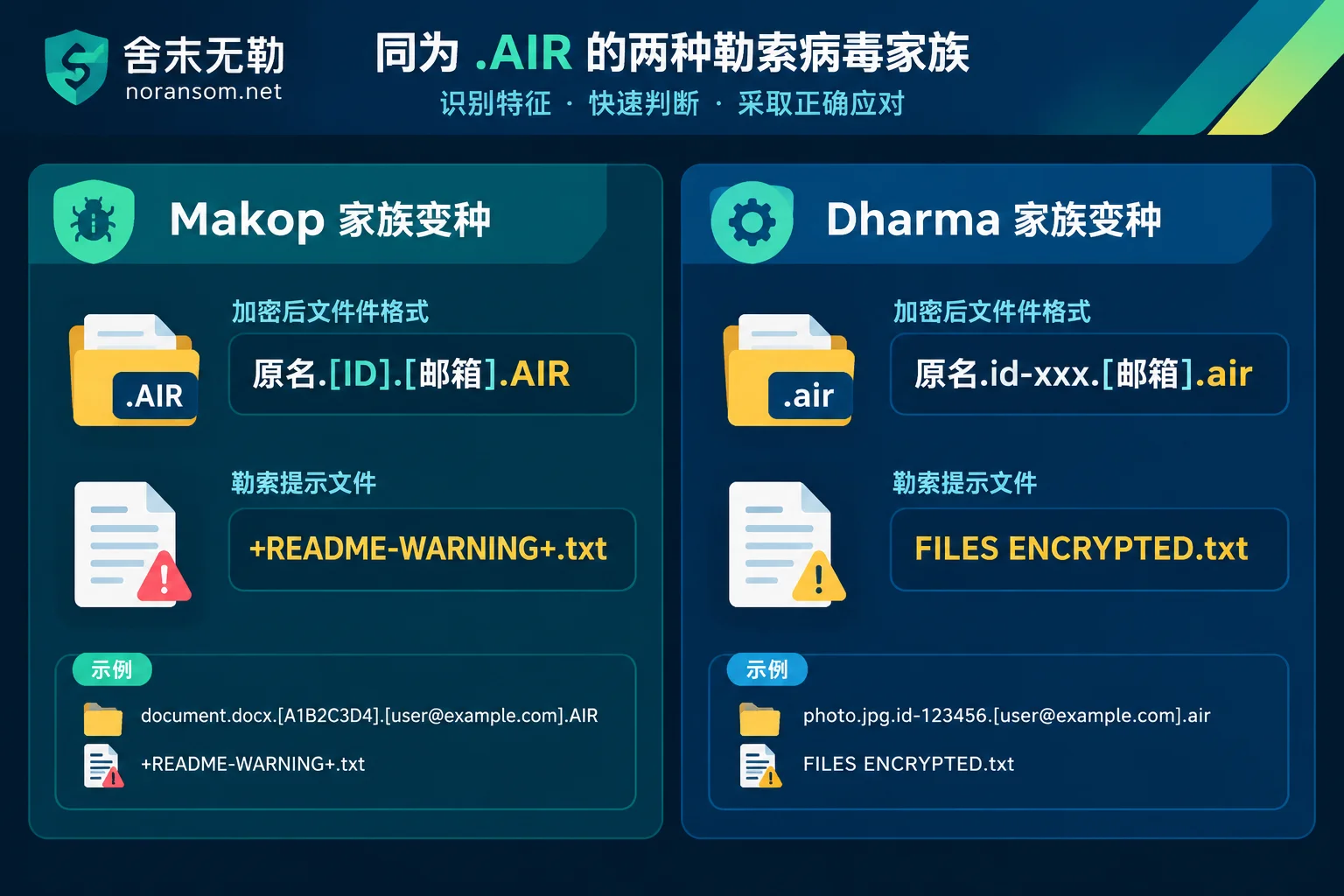
Based on publicly captured samples and emergency response cases, attacks that rename files to .AIR or .air are mainly concentrated in the following two high-frequency ransomware family variants. You can make a preliminary assessment by examining the complete naming format of encrypted files and the ransom note names:
1. The .AIR Variant of the Makop Ransomware Family
This is a variant that has been active in recent years against domestic enterprise servers, hyper-converged platforms, and financial systems.
- File naming characteristics: Usually follows the structure
原文件名.[8位随机ID].[攻击者邮箱].AIR(extension often uppercase). For example, the originalufdata.mdfbecomesufdata.mdf.[2AF20FA3].[xxx@onionmail.org].AIR. - Ransom note characteristics: The ransom note file name generated in each folder is usually
+README-WARNING+.txt, and the desktop wallpaper is also modified. - Encryption characteristics: The Makop family mainly locks files using a combination of high-strength asymmetric and symmetric encryption algorithms, and updates frequently. The private key is usually not left in local memory, making direct key extraction extremely difficult with conventional methods.
2. The .air Variant of the Dharma (CrySiS) Family
Dharma is a veteran server brute-force ransomware family and has also appeared in variants ending with lowercase .air.
- File naming characteristics: Usually includes the
id-prefix, with a format mostly like原文件名.id-8位字符.[攻击者邮箱].air, for examplesample.jpg.id-1E857D00.[xxx@tutanota.com].air. - Ransom note characteristics: Often generates
FILES ENCRYPTED.txton the desktop and pops up a dialog window with ransom information at system login.
If you are unsure which category your files belong to, do not casually rename extensions to test. You can directly put the complete encrypted file name or ransom note into the ransomware identification tool for comparison, or check the ransomware extension lookup table to see the family and current handling recommendations.
2. The First 30 Minutes After Discovering .AIR Encryption: Contain First, Don't Destroy the Scene
Whether Makop or Dharma, their most common intrusion vector is exposed Remote Desktop (RDP port 3389) with weak passwords, unpatched OA/ERP web services, or SMB sharing channels within the LAN.
Before seeking ransomware decryption and recovery, on-site preservation directly determines how much data can be saved later (for the complete decision sequence, refer to "What to Do When Hit by Ransomware: A Complete Emergency Decision Checklist from the First 30 Minutes of Containment to Business Resumption"):
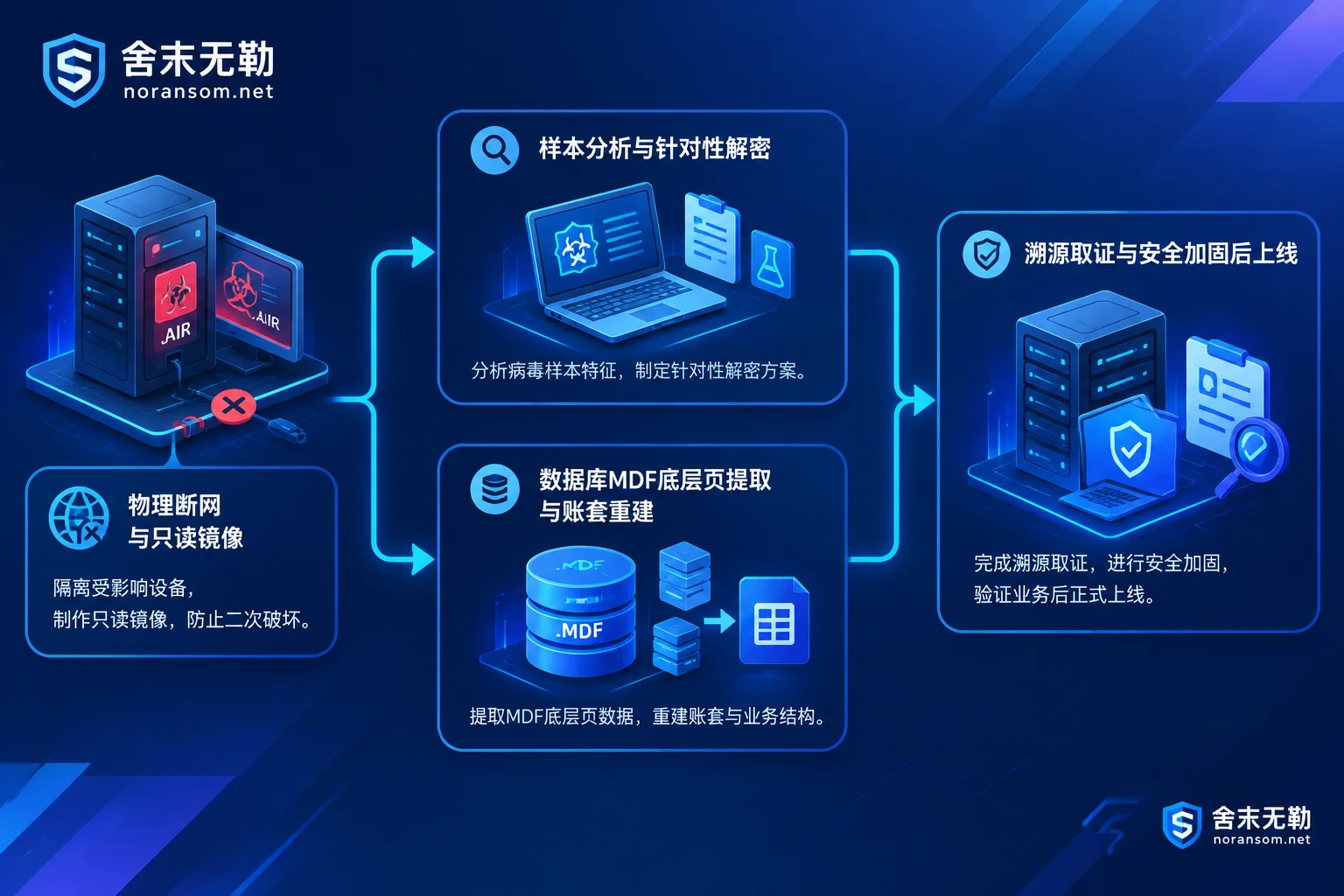
- Immediately physically disconnect from the network, but be cautious about shutting down: Unplug the network cable of the infected server, or block its internal and external communication on the switch or firewall to prevent the virus from continuing to encrypt other machines or NAS storage via LAN sharing. If the server is writing heavily, a professional should determine how to interrupt the process.
- Do not forcibly run a full antivirus "cleanup": Many attackers leave resident backdoors, brute-force logs, or the encryptor itself on the scene after encrypting files. Rashly running antivirus software may delete key sample characteristics, or even cause secondary damage when handling partially encrypted files.
- Strictly prohibit direct recovery testing on the original disk: Especially for databases or virtualized storage, any creation, copying, or overwriting on the original disk will consume residual unallocated space and underlying data fragments. A read-only image backup must be made first.
- Do not trust "universal decryptors" sold online: If a decryption program for the wrong version or family is used, files that were only encrypted in the header may be overwritten again and become completely unreadable garbage (see "Files Won't Open After Ransomware Decryption: First Determine Whether They Weren't Decrypted or Were Decrypted Incorrectly").
3. How to Assess Decryption and Recovery for .AIR Ransomware?
Many victimized enterprises ask during consultation: "Without paying the ransom, can .AIR files actually be decrypted?"
In Shemowule's handling standards, "whether files can be directly restored via keys" and "whether core business data can be rescued" are two paths that need separate assessment. For these two types of .AIR variants, if there is no existing public free decryption tool (e.g., the corresponding private key is not included in the No More Ransom project), we will assess recoverability at the following two levels:
Path 1: Sample Analysis and Targeted Ransomware Decryption
First extract encrypted samples, ransom notes, and a small number of non-sensitive encrypted files to verify the specific variant version, encryption algorithm structure, and the proportion of file encryption (whether the entire file is encrypted or only the header/interval blocks). For variants with specific conditions or algorithmic flaws, the ransomware decryption service will provide the recoverable scope, expected results, and risk description.
Path 2: Underlying Data Recovery and Database Reconstruction (The Most Common Lifesaving Path for Enterprises)
To pursue encryption speed, many ransomware including Makop often do not encrypt every byte of large files (such as SQL Server .mdf files, Oracle data files, VMDK/VHDX virtual machine images) from beginning to end when dealing with tens or hundreds of GB. Instead, they only encrypt the file header or sample-encrypt at certain intervals.
This leaves room for underlying data recovery:
- SQL Server and ERP account set repair: For databases of systems such as Yonyou (U8 / NC / Chanjet T+), Kingdee (K/3 / KIS / Cloud Star), and Guanjiapo, even if the
.AIRextension prevents the entire file from being mounted, engineers can bypass the damaged file header and directly extract residual data pages from the underlying layer. Through fragment reorganization, table structure alignment, and account set reconstruction, core vouchers, inventory, and transaction records can be extracted and imported into a new database for operation. For details, see SQL Server encrypted recovery solution and ERP system encrypted recovery solution. (For the recovery principles of.mdf, you can also read "Can an Encrypted SQL Server mdf Be Recovered: First See How Much Encryption Covered, Then Decide Which Path to Take".) - Virtualization and backup file rescue: If the files with
.AIRappended are ESXi / Hyper-V virtual machine files, or already damaged local backup packages or volume shadow copy remnants, you can use the virtualization encrypted recovery solution and backup destruction recovery solution to scan underlying sectors and strip usable data blocks, delivering with completeness marked by system and time point.
4. Why Must Emergency Investigation and Hardening Be Done While Recovering Data?
When handling enterprise requests, we found that many servers infected with .AIR ransomware had actually been breached by hackers days or even weeks before encryption. Attackers often first enter through weak passwords or vulnerabilities, disable protection software, map the internal network structure, delete volume shadow copies, and finally execute the encryption program in the early morning or on weekends.
If you only spend effort repairing the database, reinstalling software, and hastily reconnecting to the public network without finding the initial entry point, without clearing scheduled tasks and backdoor accounts hidden on other machines, you may very likely suffer a second round of encryption just one or two days after business resumes (refer to "Why Ransomware Data Recovery Is Followed by Re-Encryption: Rescuing Data Is Only the First Step, Don't Rush to Go Online Before Cleaning These Four Types of Backdoors").
Therefore, a closed-loop handling process that allows business to resume safely should include, in addition to data rescue:
- Security emergency response and attack tracing and forensics: Through system logs, registry, network connections, and residual images, restore exactly which port and which account the attacker used to enter, thoroughly remove resident Trojans, and check for traces of core data being exfiltrated.
- Security hardening and protection: Before business goes back online, reduce the public exposure surface (e.g., close high-risk public 3389 and 1433 ports and switch to secure access methods), fully rotate high-privilege passwords for domain controllers, servers, and databases, and establish an offline backup system isolated from the production network that attackers cannot easily delete.
Need Assistance Assessing .AIR Encrypted Files?
Facing ransomware, Shemowule adheres to the principle of not paying ransom and not negotiating with attackers on your behalf. We follow the standard service process and pricing system and insist on identifying the family first, conducting a recoverability assessment first, and letting the customer decide whether to proceed after confirming the recoverable scope and plan.
If your or your enterprise's server or ERP database is suffering from .AIR or other unknown extension ransomware attacks, please first protect the original disk scene. You can get support via Contact Us, or directly call the 7×24 emergency response hotline 15639272850 (email: help@noransom.net) for preliminary sample assessment and emergency containment guidance.



Comments(0)