A server is infected with ransomware. IT and finance staff pull an all-nighter, finally export data from historical backups, or bring in professionals to repair the encrypted database. Everyone breathes a sigh of relief and quickly reconnects the business systems to the network to resume work. Less than half a day later, the familiar ransom note pops up again, and the account sets and documents just recovered are once more given an encrypted extension.
This "re-encrypted right after recovery" situation is common in recent emergency responses. Especially when facing currently active families such as Weaxor (common extensions .weax, .rox, .wxx), Mallox, and Sorry targeting Linux servers, attackers often do not "hit and run" but leave multiple layers of backdoors in the target network.
Recovering the data only solves the "availability" problem. If you do not figure out how the attacker got in, what permissions they still hold, and whether the backup files contain Trojans, blindly pushing the recovered system into production is no different from handing the repaired data back to the attacker.
Why does freshly recovered data get locked again? There are four common reasons
Ransomware's encryption action is only the last step in the entire attack chain. Before actually pressing the "encrypt" button, attackers may have lurked inside the intranet for days or even weeks. Recovering only the data without cleaning the environment usually falls into the following four traps:
1. The backup recovery point itself is already "infected"
Many enterprises have scheduled full-machine backups or virtual machine snapshots. But after intruding into a server, attackers often do not immediately start encryption; instead, they first implant remote-control Trojans, Webshells, or create hidden accounts, lie low to map the intranet structure, and wait for the right moment.
If an attacker implants a backdoor on the 1st and triggers encryption on the 10th, then the full-machine backups or system images generated between the 2nd and the 9th actually already contain the lurking backdoor programs. When you directly roll back the entire server using the backup from the 8th and connect it to the network, the backdoor left inside revives and soon triggers a new round of encryption.
2. The original intrusion entry point is still open
Recently, the National Computer Virus Emergency Response Center has monitored multiple Weaxor attacks against domestic users, with attackers mainly entering the intranet through weak-password brute force (such as Remote Desktop port 3389 or database port 1433) or unpatched software vulnerabilities; meanwhile, automated scanning against Web servers exposed to the public internet (such as using recent high-risk PHP remote code execution vulnerabilities or panel authorization vulnerabilities to deliver Sorry ransomware) is also ongoing.
If, when restoring business, the server still uses the original weak password, or the high-risk ports exposed to the public internet and unpatched applications remain online unchanged, automated scanners across the internet can enter again the same old way without even needing the original backdoor.
3. Resident mechanisms on the host have not been thoroughly removed
Many administrators believe that "deleting the encryption program on the desktop and running a full antivirus scan" counts as complete disinfection. In reality, to maintain control, attackers use many legitimate system features for persistent residence:
- Create a high-privilege hidden account or shadow account with a highly misleading name in the system;
- Write scheduled launch scripts into Windows scheduled tasks, system services, registry startup items, or WMI event subscriptions;
- Leave passwordless login public keys in Linux server
crontabscheduled tasks and SSHauthorized_keys; - Even bury command-execution backdoors in databases (such as SQL Server stored procedures or triggers).
These configurations are not "virus files" themselves, and traditional antivirus software can hardly flag them directly. Once the server restarts or the preset time arrives, the malicious program will be re-downloaded and executed.
4. Other "jump hosts" in the intranet are still attacking
Sometimes the encrypted machine is the core finance server or a Synology NAS. The administrator reinstalls this server and restores the data, but overlooks that the attack source is actually an ordinary office computer or an already compromised domain controller.
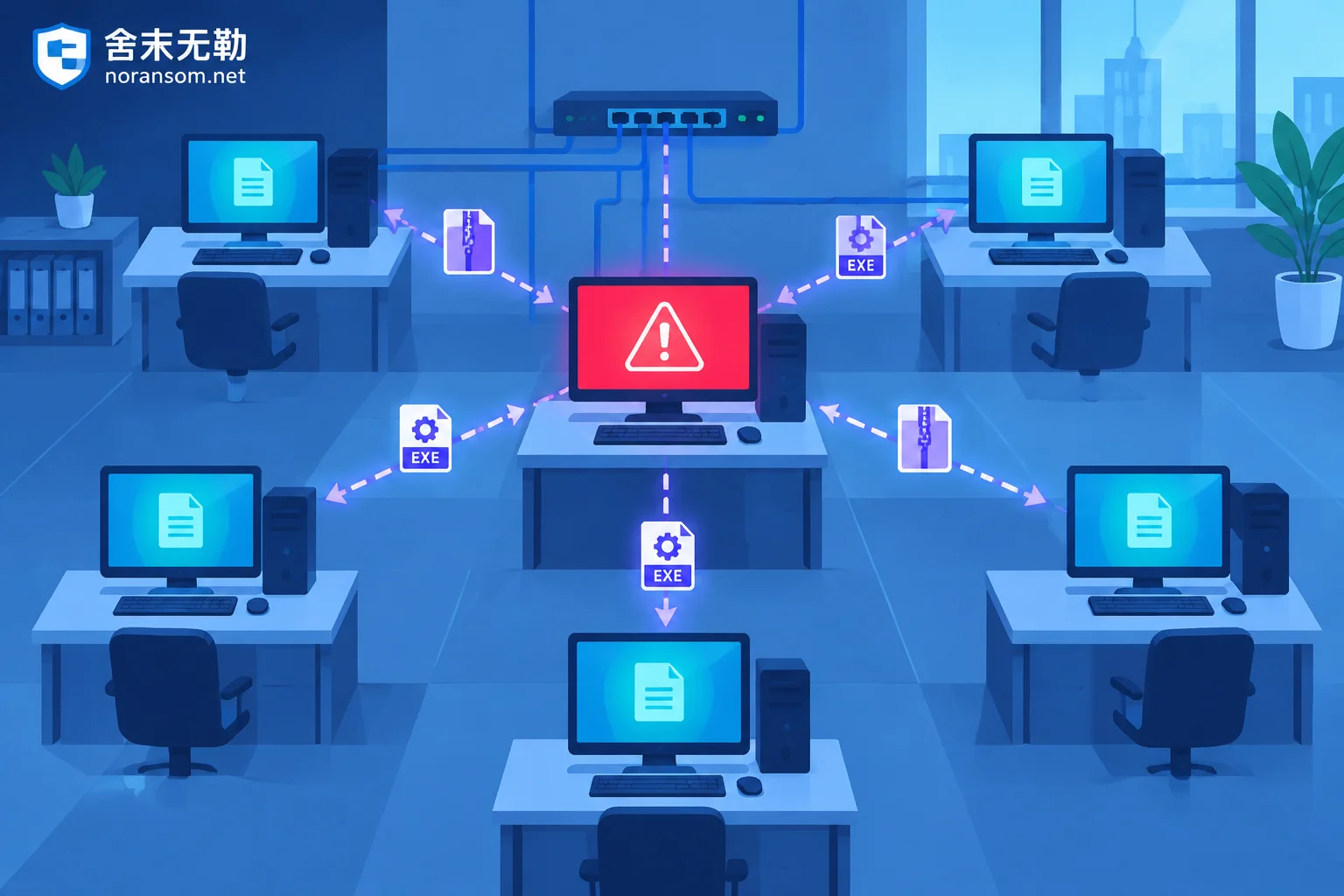
If the enterprise suffers multiple computers being encrypted simultaneously or shared folders encrypted by ransomware, it means the intranet likely contains a "source machine" that is sending lateral packets outward or mounting SMB shares to execute encryption. As long as this jump host is not identified and isolated, a clean server will be laterally affected again once it is reconnected to the same LAN.
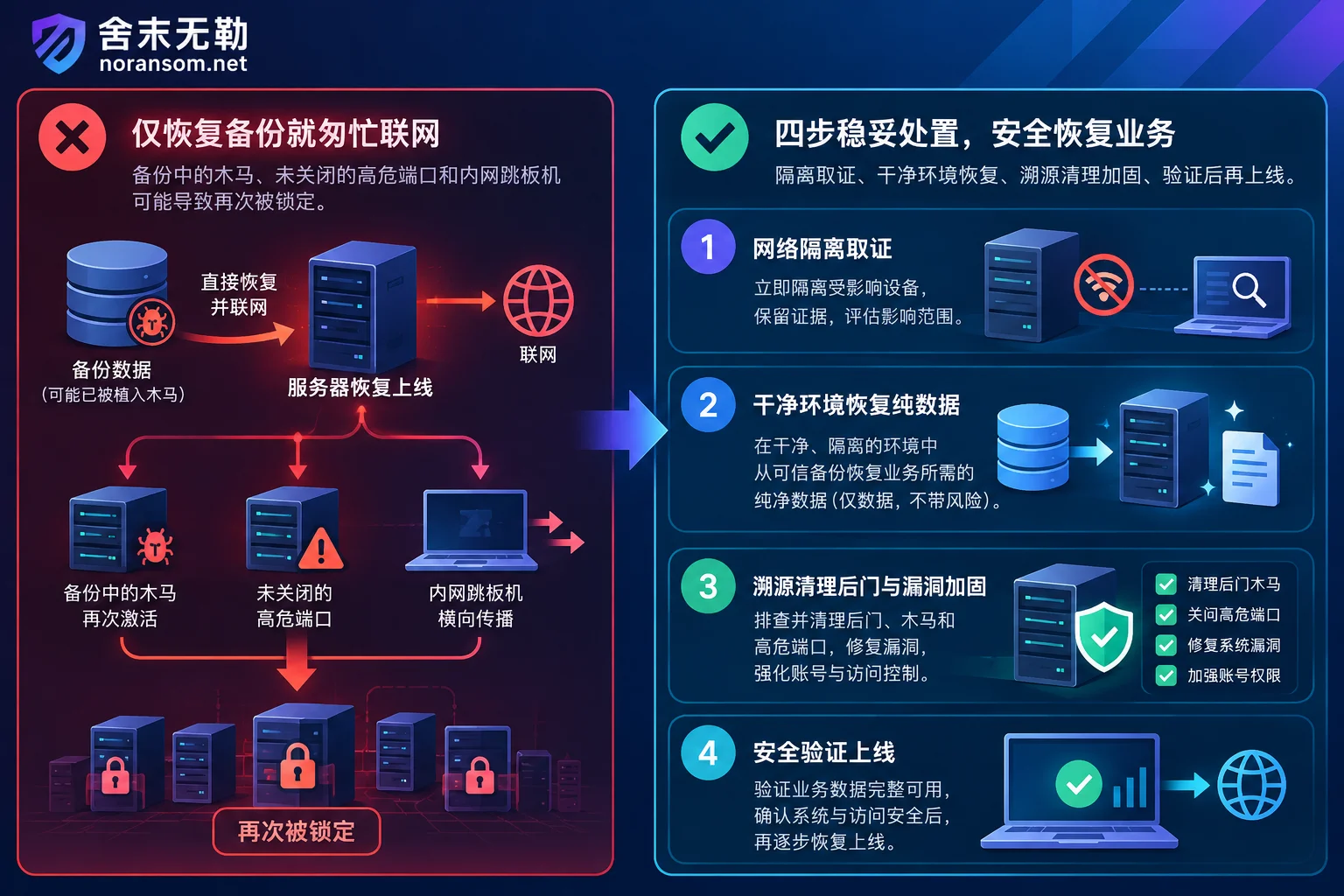
How to break the "recover—re-encrypt" death loop? Handle it in this order
To land the recovered data safely, emergency response must not be a matter of "pure data rescue" but must follow a closed loop: contain the damage first, then preserve evidence, then recover, and finally harden strictly.
Step 1: Isolate the environment—preserve evidence before acting
After discovering the infection, immediately cut off the network connection of the infected host (unplug the network cable or isolate the port on the switch/firewall) to block lateral spread.
Before reinstalling the system or rolling back backups, be sure to preserve on-site evidence: including the original ransom note, two to three encrypted sample files, system event logs (Windows Event Log / Linux /var/log), database logs, and firewall access records. You can first use a free ransomware identification tool or check the ransomware extension master list to confirm the family type and learn the family's common propagation methods and destructive characteristics. If facing complex intranet spread, it is advisable to directly engage professional security emergency response so engineers can help control the scope of impact and preserve key evidence.
Step 2: Recover data in a clean environment and strip executable files
Whether going through ransomware decryption evaluation, or using data recovery when direct decryption is impossible (such as database file-level low-level repair, fragment extraction, backup snapshot repair), there is one iron rule: do not put repaired core data directly back onto the originally infected system before backdoors are fully identified.
- If using backup rollback: prefer "fresh installation of a clean operating system + apply all latest patches + import only pure business data (such as restoring only
.mdf/.ndfdatabase files, ERP account set data, or office documents)", and try to avoid directly restoring full-machine system disk images that may be contaminated. - If performing low-level data repair: for example, for SQL Server encrypted or Yonyou, Kingdee and other ERP encrypted scenarios, complete account set repair, structure verification, and business validation in a fully physically isolated clean test environment, confirm the data is intact and usable, and then migrate it in after the production environment has been cleaned.
Step 3: Use traceback and forensics to pinpoint the "disease"
Why do many enterprises still get hacked after changing passwords? Because they changed the password for door A, while the attacker came through a vulnerability in door B.
While data recovery proceeds in parallel, attack traceback and forensics should be carried out based on the previously preserved logs, disk images, and memory evidence. By reconstructing the attacker's initial access time point, privilege escalation path, and intranet lateral movement trajectory, precisely answer three questions:
- Through which port, which vulnerability, or which leaked account did the attacker enter?
- On which machines did the attacker leave resident backdoors or remote-control Trojans?
- Are there signs that sensitive data was packaged and exfiltrated?
Only with an accurate intrusion chain will subsequent cleanup and closure not become "blind men feeling an elephant".
Step 4: Complete the "five security checks" before going live
Before reconnecting the repaired database or business system to the production network, complete security hardening and protection against the following checklist—none can be omitted:
- Public internet exposure has been reduced: Close all unnecessary public internet port mappings (especially RDP 3389, SMB 445, database 1433/3306/1521, and default NAS management ports). If remote work or operations are truly needed, uniformly bring them behind a VPN or zero-trust gateway with multi-factor authentication (MFA).
- High-risk vulnerabilities have been patched: Check whether the operating system, Web containers, various development frameworks (such as recently reported high-risk PHP vulnerabilities), and third-party management panels have been upgraded to official secure versions.
- All-network credentials have been rotated: On confirmed clean devices, force reset all server administrator passwords, database
sapasswords, domain controller krbtgt and domain admin passwords, and VPN account passwords, eliminating shared passwords across multiple devices. - Resident items and suspicious endpoints have been cleared to zero: Check the local account list, scheduled tasks, startup items, service items, and Web directories of online servers one by one; for office endpoints that have had abnormal outbound connections or installed unfamiliar remote-control software on the intranet, thoroughly investigate and clean them before allowing access to the business network segment (if accompanied by remote-control software and financial risks, refer to the investigation logic in Silver Fox Trojan special handling).
- Undeletable backups have been rebuilt: Review the backup architecture to ensure at least one backup copy is physically isolated (offline) from the production network or has immutable (WORM) attributes, cutting off the path for ransomware to wipe out backups over the network.
Dealing with ransomware encryption or worried about a secondary infection after recovery?
If your server, database, or ERP system has been hit by ransomware, or you encounter secondary encryption during self-recovery, it is advisable to stop, preserve the scene, and avoid repeatedly overwriting disks or losing key logs.
舍末无勒 (noransom.net) provides a standard and transparent emergency response and data recovery process: we insist on not paying ransoms and not negotiating with attackers on your behalf; we first identify the ransomware family for free, assess the recoverable scope of data, and provide a clear plan and quote, leaving it to you to decide whether to proceed. While recovering core data, our security team can simultaneously carry out backdoor removal, attack traceback, and security hardening to help you safely bring business back into the production environment.
For emergency technical support, get assistance via Contact Us, or call the 24-hour emergency hotline 15639272850 (email: help@noransom.net).


Comments(0)