In daily emergency assistance, we often hear financial staff or enterprise IT operations ask: "I clearly downloaded antivirus and specialized removal tools for a full scan, and the Trojans found were deleted. Why does the mouse start moving by itself again two days later, or WeChat automatically sends phishing links to work groups in the middle of the night?"
Moreover, recent security monitoring has found that attackers are even spreading malware under the guise of "Silver Fox Trojan specialized removal tools" or "Silver Fox Trojan self-check lists" in social groups and search engines. Victims intending to find Silver Fox Trojan removal methods end up clicking on fake "scanning tools" and personally installing the latest variant of a remote access backdoor on their computers.
Why is the Silver Fox Trojan so persistent? Why is the conventional "scan-delete-reboot" process often ineffective against it? To thoroughly eradicate this pest, we must first understand what resurrection mechanisms it has buried deep in the system.
I. Why is it difficult for conventional antivirus to thoroughly complete "Silver Fox Trojan removal"?
Traditional Trojan detection logic is to find known malicious executable files (.exe) and quarantine or delete them. However, recent Silver Fox Trojan variants have evolved into a complex architecture of "multi-stage loading + modular persistence." Simply deleting the surface dropped files does not touch its root.
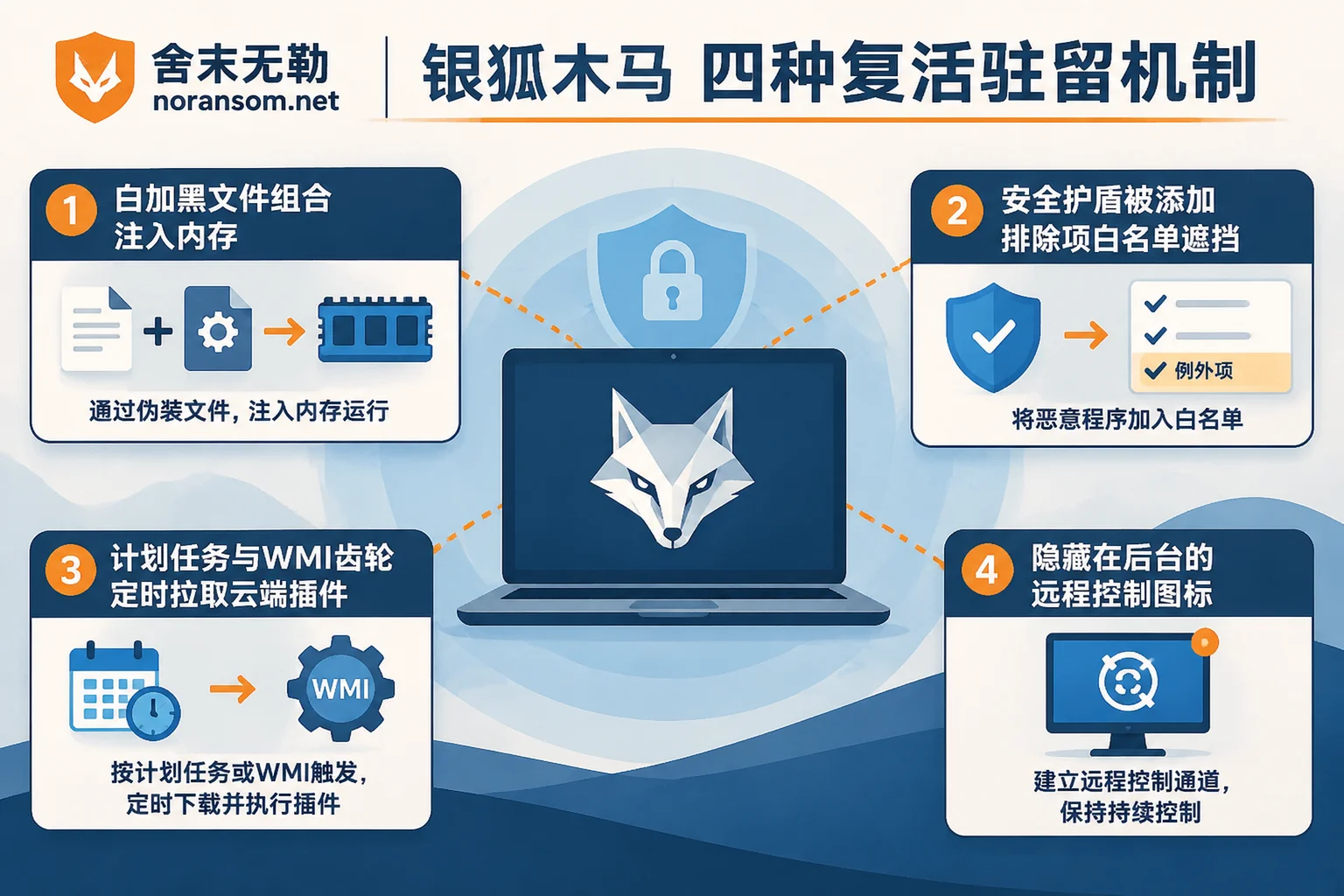
1. "White+Black" and fileless memory persistence
The Silver Fox Trojan rarely runs as a naked malicious program. In the initial intrusion, it releases a legitimate software main program with a valid digital signature (the "white file," such as old browser components, input method modules, or well-known office software programs), and simultaneously releases a tampered malicious dynamic link library (such as libcef.dll and other "black files") and encrypted data files (such as .dat or .png, .jpg files using image steganography to hide malicious code) in the same directory.
When the system starts this legally signed "white file," it also loads the malicious DLL into the memory of system processes (such as svchost.exe). Antivirus software sees a legally signed legitimate software in the startup item and often allows it directly; the real remote control module only exists in memory and does not land on disk before reboot, so ordinary file scanning naturally cannot detect anomalies.
2. Tampering with security software "exclusions" and system policies
Many users think: "My Windows Defender or antivirus is still on, and it didn't alert, so it's clean." In fact, as soon as the Silver Fox Trojan obtains administrator privileges, it uses scripts or registry operations to add its own directory (for example, specific random folders under C:\ProgramData, AppData\Local\Temp) or even the entire C drive to Windows Defender's exclusions (whitelist).
At the same time, it secretly disables UAC (User Account Control), turns off the system firewall, modifies system service configurations, and even uses vulnerable legitimate drivers (BYOVD technique) to blind security software monitoring hooks at the kernel level. The antivirus's eyes have been blindfolded; no matter how green the scan result is, it proves nothing.
3. Plugin-based updates and multi-point "resurrection armor"
The Silver Fox Trojan completely decouples "stealth guard" and "remote control data theft" functions. Even if you forcibly kill the remote control process that is communicating externally via Task Manager and delete the corresponding folder, as long as any of its persistence triggers remains in the system—such as a scheduled task disguised as a system update, a hidden registry startup item, COM component hijacking, or a fileless WMI event subscription—as soon as the computer connects to the network or the preset time arrives, the remaining guard module will request the configuration list from the attacker's C2 server again and pull down the latest remote control plugin, achieving resurrection on the spot.
4. Trojan horse: silent installation of legitimate remote management software
Besides writing their own remote control code, the Silver Fox gang is also very good at "borrowing a knife to kill." After controlling the victim's computer, the attacker directly silently installs legitimate third-party remote control software or enterprise endpoint management software clients in the background and binds them to a console controlled by the hacker. If you encounter unfamiliar remote control software automatically appearing on your computer, even if the original Silver Fox Trojan sample is removed, as long as this "legitimate remote control software" taken over by the hacker is still running in the background, the attacker still has the highest privileges to view the screen and transfer files at any time.
II. Moving beyond the misconception of "only killing files": Three isolation lines for Silver Fox Trojan removal
Facing Silver Fox variants with the above characteristics, the core principle of Silver Fox Trojan specialized handling is very clear: Antivirus not alerting does not mean it is clean; host cleanup, account sessions, and financial risk must be handled independently as three lines.
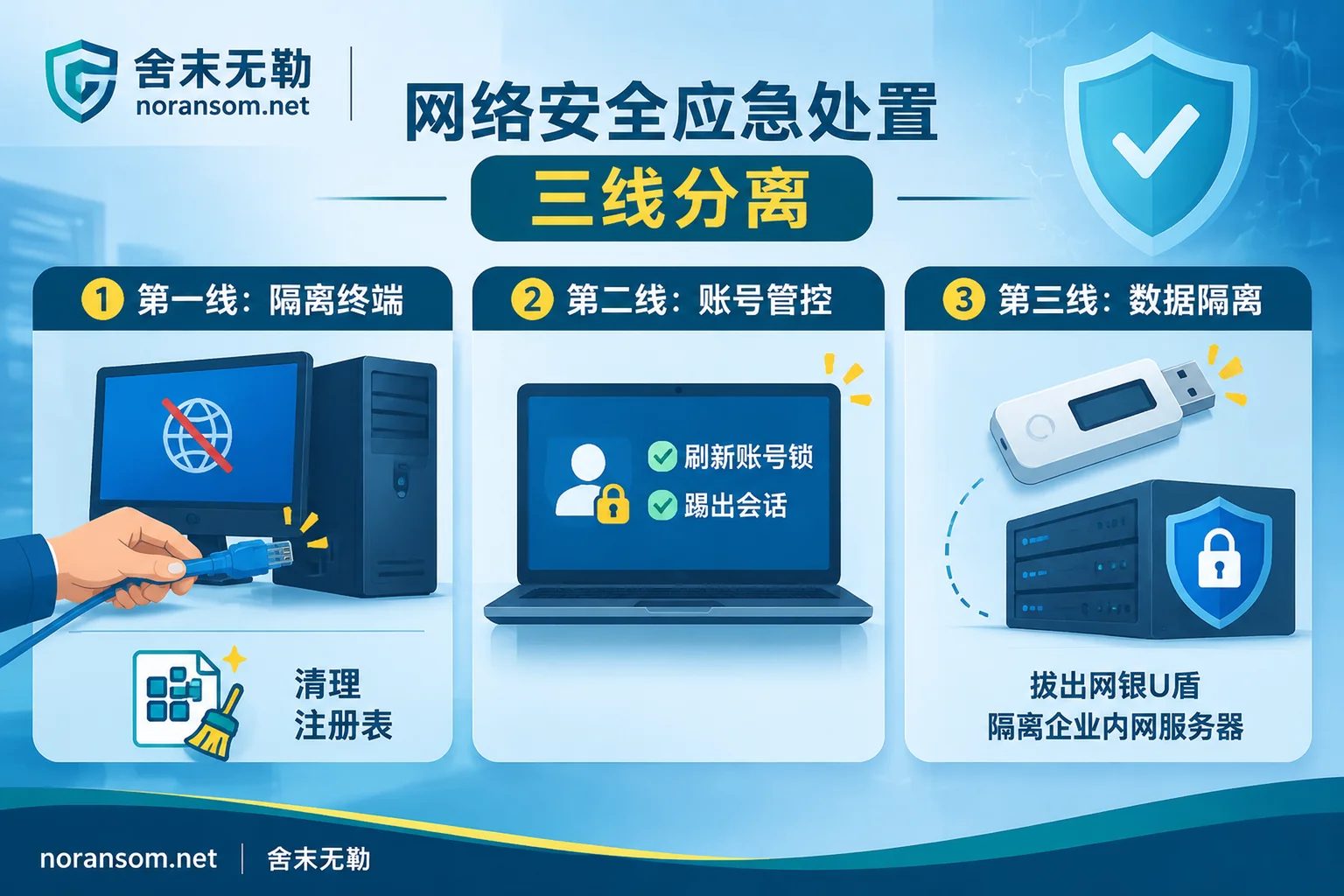
First line: Deep cleanup of the host underlying layer and system restoration
- Physical network disconnection and scene protection: Once an anomaly is discovered or cleanup is about to begin, the first step is always to unplug the network cable or disconnect Wi-Fi, cutting off the C2 remote command channel and automatic update link.
- Investigate security policy tampering: Do not directly click scan. First open Windows Security Center and check the exclusions list in "Virus & threat protection settings" to see if any folder paths or file types (such as
.exe,.dll) have been inexplicably added. Remove them all. Also check whether system services, group policies, and the hosts file have been tampered with. - Eradicate persistence points across the entire chain: In safe mode, use behavior analysis tools to check one by one the seven inspection surfaces included in Silver Fox Trojan handling services—including but not limited to: hidden "white+black" kits in temporary directories and public documents, disguised tasks in the task scheduler library, registry Run/RunOnce and Image File Execution Options (IFEO), suspicious system services and drivers, and remote control or endpoint management software not installed by the user in the uninstall list.
- Prerequisites for reinstalling the system: For endpoints with extremely deep infection and replaced core system components, reinstalling the system is the most reliable method. But before formatting, be sure to refer to the four types of key evidence to preserve before reinstalling the system to avoid erasing logs needed for reporting and intranet tracing; at the same time, backed-up personal documents must be strictly screened, and it is strictly forbidden to copy original executable programs, compressed packages, or scripts directly back to the new system.
Second line: Thorough takeover of account sessions and communication tools
Many people reinstall their computers and just log back into WeChat or office systems, and the scammers start sending messages again. This is because during its persistence, the Silver Fox Trojan not only enables keylogging and screen capture (often generating chat screenshot caches in hidden local directories) but also directly steals browser cookie tokens and local login states of instant messaging software.
- Strictly forbidden to change passwords on infected devices: As long as the infected computer has not been thoroughly cleaned, any new password you enter on it will be synchronized to the hacker in real time through keyboard monitoring.
- Use clean devices to kick out login states: You must use a mobile phone or another confirmed safe computer to change passwords for WeChat, QQ, DingTalk, enterprise email, and OA systems, and in security settings kick out all logged-in PC devices and clear the trusted device list. For specific operational details, you can follow the verification checklist to confirm accounts are no longer controlled after Silver Fox Trojan cleanup item by item.
Third line: Financial security and blocking lateral spread within the intranet
- Emergency avoidance for financial terminals: If the infected computer is a finance or cashier computer, while disconnecting the network, you must immediately unplug hardware media such as online banking U shields and dongles. Before confirming the system is absolutely safe, do not plug the U shield back in for any account reconciliation or transfer operations, and immediately verify with supervisors by phone or in person whether there have been recent abnormal payment instructions.
- Cut off the evolution chain toward intranet ransomware: Today's Silver Fox black industry is no longer just "stealing accounts and money." When attackers find that the controlled computer is in an enterprise intranet and contains remote desktop (RDP) credentials, VPN accounts, or server passwords, they often use this office machine as a springboard to launch lateral penetration into intranet UFIDA, Kingdee and other ERP servers, SQL Server databases, and Synology NAS, ultimately deploying ransomware such as Weaxor, Mallox, or LockBit to lock down the entire network. Therefore, after a single machine is infected, enterprise IT should immediately refer to the method for investigating lateral spread of Silver Fox Trojan from office computers, block the springboard machine's intranet access permissions, and prevent a single point of compromise from turning into a disaster of the entire network being encrypted.
III. When is professional security emergency response needed?
If it is just a personal home computer that mistakenly clicked a phishing file, with no important financial operations, then disconnecting the network, changing passwords and kicking sessions on a clean device, and full formatting and reinstalling the system can usually block the risk.
But if your enterprise is facing the following scenarios, it means the attack has entered a deep confrontation stage, and it is often difficult to cover the bottom line simply by having operations staff manually delete files or run free specialized removal tools:
- Repeated scanning and killing still keeps recurring: Antivirus or EDR frequently alerts to Trojan generation under the same path, and after deletion and reboot or overnight it automatically reappears, and the triggering process cannot be found.
- Key position terminals compromised: Computers of financial managers, cashiers, company executives, or system administrators are infected, and the computers store a large number of business system accounts, online banking certificates, or server connection credentials.
- Signs of lateral movement within the intranet: Multiple office computers simultaneously show abnormal mouse behavior, security software is inexplicably turned off, or the intranet firewall detects a large number of abnormal port scans and external C2 requests.
- Already accompanied by file locking or account set anomalies: The attacker has completed the transition from remote control data theft to intranet ransomware, and files in servers or shared directories have been tampered with extensions.
For such complex situations, Shemowule (noransom.net) provides 7×24 security emergency response services and Silver Fox Trojan specialized handling. We adhere to the standardized emergency response process of "stop loss first, then forensics, then recovery":
- Deep removal of persistent backdoors: Not relying on a single static signature scan, but thoroughly eradicating hidden persistence points from multiple dimensions such as memory injection chains, white+black loaders, WMI and registry persistence, driver-level confrontation, and abuse of legitimate remote control.
- Attack tracing and exfiltration determination: Through attack tracing and forensics services, based on system logs, memory images, and residual traces, restore the initial intrusion entry point and complete timeline, clarify which sensitive data or credentials have been packaged and exfiltrated, and issue forensic reports usable for police reporting and enterprise compliance audits.
- Anti-recurrence hardening and ransomware rescue: If the attacker has already delivered ransomware to the intranet causing database or ERP paralysis, we can simultaneously carry out ransomware decryption and enterprise data recovery while removing the remote control backdoor, and assist enterprises in completing security hardening protection, avoiding the vicious cycle of "being controlled or encrypted again while recovering."
If you are facing a stubborn Silver Fox Trojan that cannot be cleaned clinically, or suspect that your enterprise intranet has been penetrated and controlled by attackers, please first disconnect the suspicious device from the network, and do not blindly reboot or format to destroy the scene. You can get technical support through the Contact Us page, call the 24-hour emergency hotline 15639272850, or send an email to help@noransom.net. We will provide professional assessment for your host environment and business data security as soon as possible.


Comments(0)