When you see messages like 'Unsupported file', 'file type is not supported', or similar, the first thing to do is not to try another tool, but to stop the tool and confirm whether you're working on a copy or the original.
In most cases, this error doesn't mean you clicked the wrong button; it means the tool is telling you that the file doesn't meet its prerequisites. Continuing to run different decryptors and repair tools on the same set of original files is actually the most common and most regrettable source of secondary damage in such incidents.
Three things to do first
- Exit the decryption tool and do not check options like 'overwrite original files'. Some decryptors write back in place by default, and a mid-way failure can leave half-finished output.
- Copy the encrypted files to another drive or external disk, and perform all subsequent attempts on the copies. If space is tight, pick a few typical samples (an Office document, an archive, a database file) and copy each.
- Save the full ransom note, your victim ID, and the complete filename of one encrypted sample. Later, when determining the family and variant, you'll rely on these, not the extension itself.
After these three steps, look back at the error cause.
Why the tool says 'unsupported'
1. It can only decrypt offline keys, but you were encrypted while online
This is one of the most common limitations in public decryptors. Many ransomware families first connect to the attacker's server to request a unique key ('online key') during encryption; only when the host is offline and cannot reach the server does it fall back to the hardcoded 'offline key' in the program. Free decryptors reverse-engineered by security vendors often only cover the latter case.
As a result: within the same family and same extension, some people can decrypt, while others get 'unsupported' or skipped throughout. This isn't a broken tool; it's because your machine was connected to the C2 at the time.
How to tell: If none of the files in the same batch can be decrypted, and the tool log shows messages like 'no key' or 'offline key not available', it likely falls into this category. Reinstalling the tool from another source is pointless in this case.
2. The extension matches, but the family or version doesn't
The extension is the least reliable clue. The same extension may be reused by different groups, and the same family may change its encryption implementation upon upgrade, causing tools found by extension to fail on actual files. The tool first verifies the file header signature, and if it doesn't match, it refuses to process.
How to tell: Compare the contact email, ID format, and ransom page address in the ransom note with the samples listed on the tool's documentation page; also use a hex viewer to open an encrypted sample and check if the beginning and end contain any signature strings mentioned in the tool's documentation. The sample comparison feature on No More Ransom can be used for cross-confirmation, but its results are also just candidates, not definitive.
For how to proceed when you only have a ransom note, see How to determine if files can be decrypted when only a ransom note remains.
3. Metadata at the end of the file has been corrupted
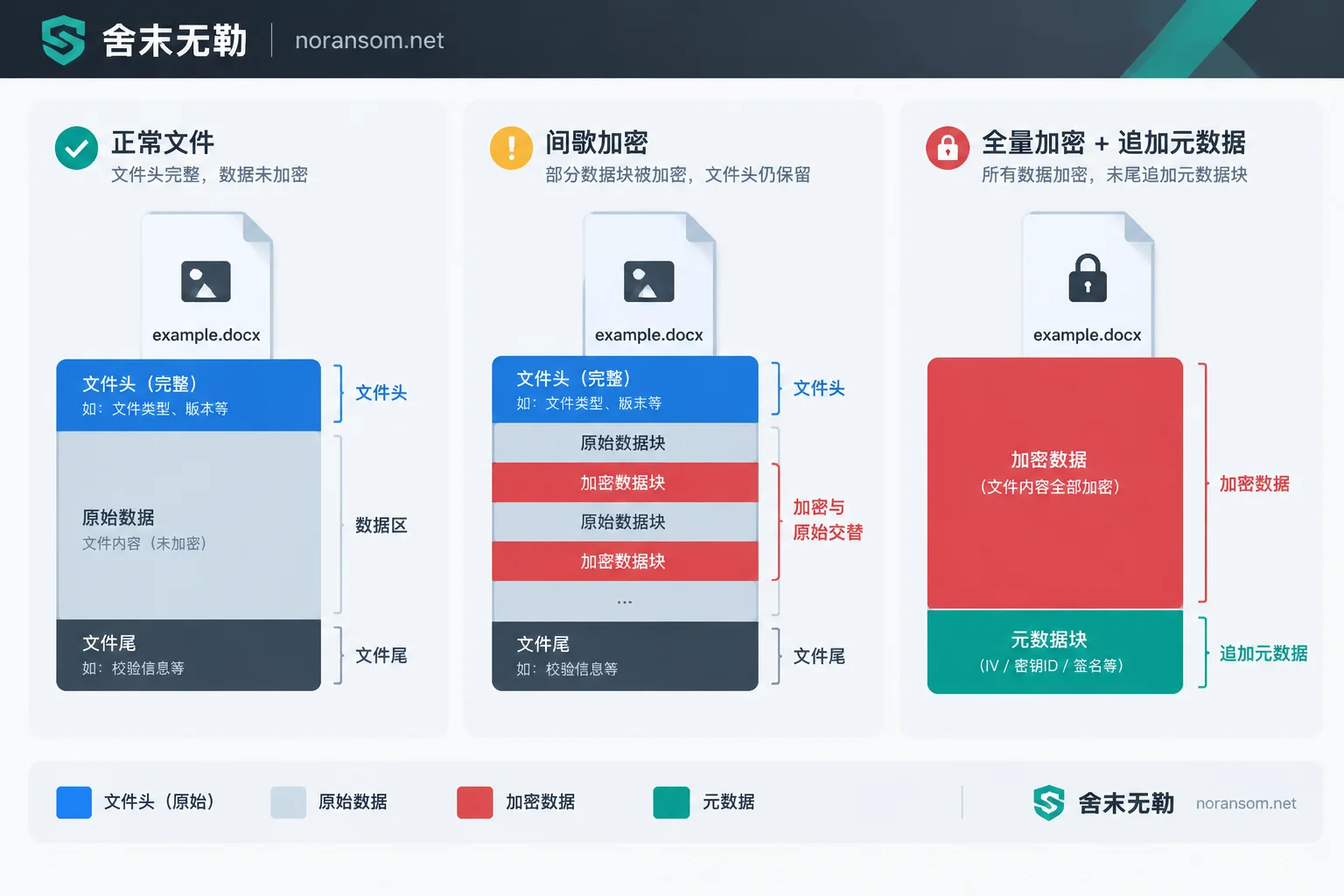
Many ransomware programs append a block of data to the end of the file after encryption: initialization vector, key ID, encrypted session key block, verification signature. Decryptors rely on reading this data to determine which key to use and where to start decrypting. If this data is missing or altered, the tool cannot recognize it and reports 'unsupported'.
What usually damages it is not the virus but subsequent operations: some 'file repair master' software forcibly rewrites the file, antivirus software truncates or quarantines the file as a threat, a sync drive performs an incomplete upload, or a previous decryptor failure leaves a half-output that overwrites the original.
There's also the opposite case: some tools are specifically designed for intermittent encryption (only encrypting part of the file) and rely on structural markers left in the original file, such as PK headers in Office/Zip or obj/endobj in PDF. If your files were fully encrypted, the original structure is gone, and such tools will also report 'unsupported'—this means the tool is the wrong choice, not that the file is beyond saving.
4. The extension has been manually changed
Someone may have manually changed 报表.xlsx.locked back to 报表.xlsx to 'see if it opens', or batch-removed the extension. The decryptor needs the complete filename to identify the original type and locate the encrypted segment; after modification, it can't recognize it.
How to tell: Recall whether anyone performed a batch rename, or find an unmodified sample from the Recycle Bin or sync drive history for comparison. If the rename record is still available, change it back to the original format and try again (still on a copy).
Troubleshooting order: work on copies, change only one variable at a time
- Start by testing 2–3 small files of different types; don't run on the entire disk.
- Confirm the filename is complete, unmodified, and not repaired by other software.
- Check the tool's documentation for supported variant range and key type, and look at the specific log messages, not just the pop-up.
- If the tool offers a 'sample + original file' pairing mode, find a pair of files with the same name (e.g., an unencrypted version of the same document in an email attachment, USB drive, or colleague's computer) and feed it—this is the most direct way to determine if the key is usable.
- If all the above still reports unsupported, stop and don't run a fourth or fifth tool in turn.
If it truly doesn't support, what's left
A decryptor isn't the only way out. When it's clearly unavailable, focus should shift to the following options, which are often more promising than continuing to search for tools:
Uncontaminated copies. Offline backups, offsite backups, external drives not plugged in for a long time, historical versions and Recycle Bin in cloud sync, email attachments, and the same files held by colleagues or external parties. Some ransomware cleans shadow copies, but not always thoroughly; system restore points on servers, snapshots, and virtualization platform-level snapshots are worth checking one by one—even if only a week-old version.
Low-level residual extraction. Databases and large files are especially worth evaluating: some variants only process the file header or write at intervals for encryption speed, leaving the middle and later parts intact; old data blocks overwritten after deletion may also remain in unallocated space. For scenarios like SQL Server, see How to assess encryption coverage after mdf is encrypted. Note that such extraction must be done on a read-only image, not directly on the original disk.
Archive and wait. If no usable key is currently available, seal the encrypted files together with the ransom note, samples, and victim ID onto offline media; do not delete. Some families' keys are released after subsequent law enforcement actions or internal leaks, making decryption possible then—but there's no timetable, and it can't be relied upon as a recovery plan.
For a more complete list of alternative paths, see What recovery options remain when there's no free decryption tool; if backups were also encrypted, first follow Stop-loss order when servers are encrypted and there's no backup.
Actions that turn 'can decrypt' into 'cannot decrypt'
- Running different decryptors and repair software repeatedly on the only original copy.
- Using disk tools to check and repair the affected drive, rebuild partition tables, format, then recover.
- Directly reinstalling the system or rebuilding the array to 'clean up'—system drive and data drive handling are completely different; for consequences of not confirming before reinstall, see Can data be recovered after reinstalling the system?.
- Uploading complete databases, accounting files, and files containing customer information to strangers or public platforms for 'a look'. To determine the family, providing the ransom note text, sample filenames, and a small non-sensitive sample is sufficient.
When to get human assessment
In the following situations, continuing to try on your own has low marginal benefit:
- Encryption is still ongoing, or new encrypted files keep appearing on multiple machines or shared drives—this is an ongoing incident; prioritize isolation and entry point investigation, not decryption.
- Affected systems are production databases, ERP/financial accounting files, or virtual machine disk files; recovery actions themselves carry risk of damage.
- Someone has already run repair software on the originals, and now even file sizes and structures have changed.
- The ransom note, extension, and the tool documentation you found don't match, and you can't determine which family or version it is.
Confirmation of family and variant, and the judgment of 'whether these files still have recovery conditions', can be handled through the process of family identification and recoverability assessment; after assessment, decide whether to go for decryption, backups, or low-level extraction. When you need someone to take over a specific incident, submit the ransom note text and sample information via the contact entry; do not upload production data on public channels.
It should be noted: not all families and variants have available decryption solutions, and no single path guarantees all data back. What you can do is clarify the basis for judgment—key type, variant version, degree of file damage, and how many unaffected copies remain—then decide where to spend time. Before that, preserving the originals already preserves most of the possibilities.


Comments(0)