Reinstalling the operating system does not decrypt a single file. It removes the malware's executable, backdoor scripts, and startup entries, but encryption is a mathematical transformation applied to file contents—that transformation stays in the file, regardless of whether the system is present.
But that doesn't mean all is lost. After reinstallation, how much recovery potential remains depends mainly on three things: whether the encrypted data still lies on disks that haven't been overwritten, whether there's a backup untouched by the malware, and whether this family has a usable decryption method. Let's assess in that order.
Before You Continue, Stop Three Things
Stop writing anything to the affected disk. Don't install software, download tools, defragment, or repeatedly run various "repair masters" or "decryption miracles" on that disk. If you've already formatted the entire disk, the only protection for residual data is "no one writes to it anymore"—every write reduces recoverable sectors.
Disconnect the machine from the network, or at least isolate it from shared drives and the domain environment. Reconnecting a cleanly reinstalled system to an unchecked network segment is the most common way to get re-encrypted.
Don't rush to "restore the environment as it was." Many people, after reinstalling, immediately remap shared drives, reinstall business clients, and plug backup drives back in—these steps can re-trigger a still-active attack chain.
If you just rebooted or reinstalled and haven't done anything else, the situation is often better than you think. You can first refer to similar scenarios in What to Do After Infection and Reboot.
Compare: How Did You Reinstall?
This step determines the feasibility of all subsequent paths, so think carefully before proceeding.
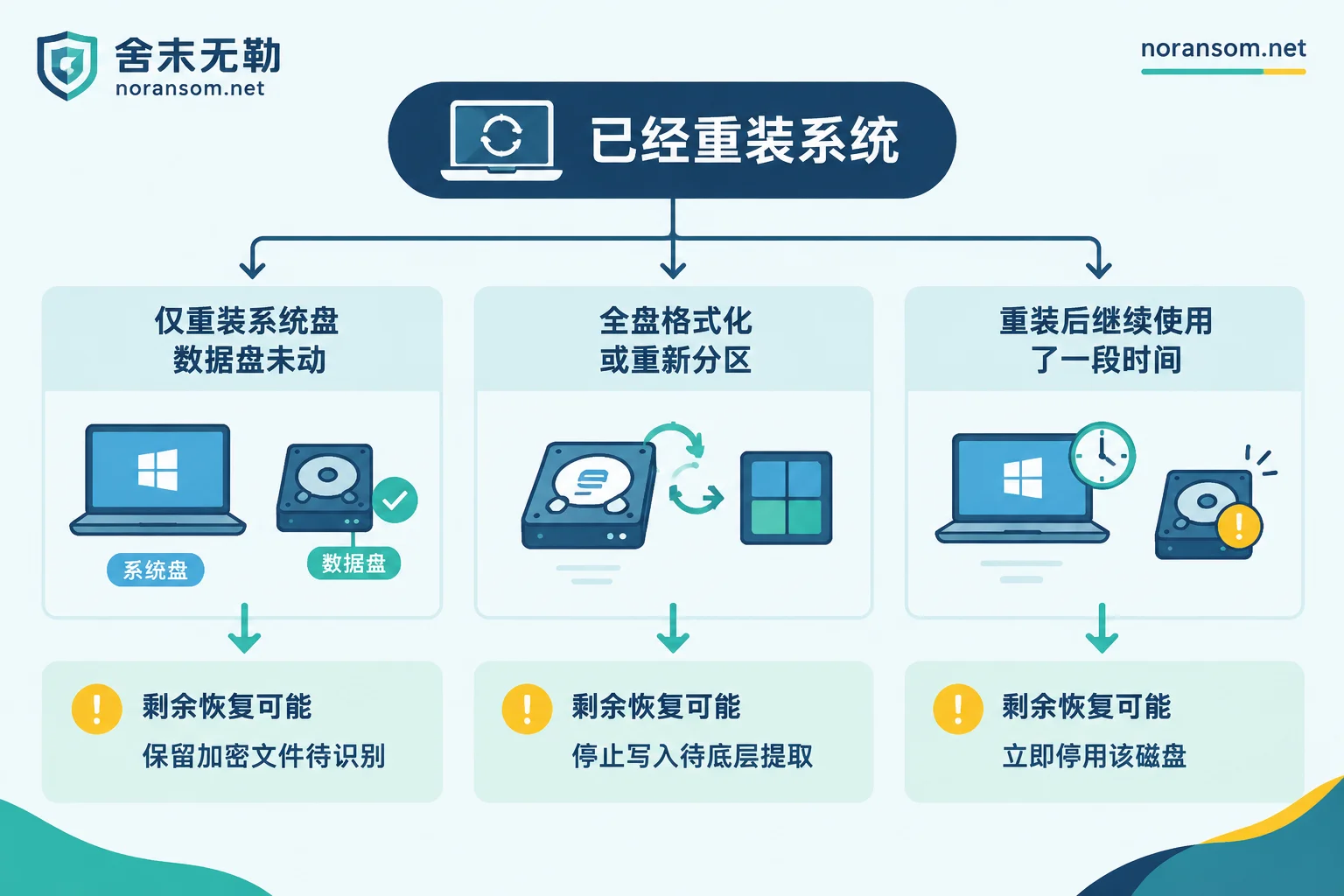
Scenario 1: Only the system drive (C:) was reinstalled, data drives untouched. This is the best outcome. Encrypted files on data drives are fully preserved, and the theoretical possibility of decryption and recovery is essentially the same as before reinstallation. What you lost is identification material, not the data itself.
Scenario 2: Full disk format or repartitioning. The data faces a triple layer of destruction: first encrypted, then formatted and the file system rebuilt, then overwritten by several GB to tens of GB of data written by the new system. Sectors that were actually overwritten are physically irreversible; for the parts not overwritten, files scanned out with conventional recovery software will most likely still be encrypted gibberish—meaning even if recovered, they won't open. In this case, what's truly valuable is not "recovering files" but extracting database fragments, as explained below.
Scenario 3: The system has been used normally for some time after reinstallation. The longer it's used and the more data written, the more thoroughly the remaining space is overwritten. If the data still has value, stop using this disk now; if necessary, power down the entire machine and remove the drive to attach to another machine for read-only analysis.
What Did the Reinstall Take Away, and Can It Be Restored?
Reinstalling the system drive also wipes the ransom note on the desktop, system event logs, registry entries, malware samples, and in-memory resident data. These things don't store your files, but they are the primary basis for determining "which family, which version, and whether a public decryptor exists." Without them, identification must rely on other channels.
You can look in these places:
- Other encrypted machines on the LAN: When multiple machines are affected, other machines often still have the same ransom note and the same encryption extension;
- Network shares, NAS, mapped drives: Shared directories often have a ransom note dropped in every folder;
- Email and chat records: Screenshots sent to colleagues, bosses, or vendors at the time can also be used;
- Any original encrypted file: The full extension plus file header characteristics are important clues in themselves;
- Backup and antivirus logs: Sometimes record the detection name and first trigger time.
Note that a single extension or detection name often corresponds to multiple families and variants, so you can't directly conclude "can decrypt" or "cannot decrypt." If you only have a ransom note left, you can refer to How to Judge Decryptability from the Ransom Note Alone. If you're really unsure about the family and version, you can go through Family Identification and Recoverability Assessment to first determine the conclusion before deciding on investment.
What Recovery Paths Remain After Reinstallation
First, inventory all possible copies. This step yields more than most people expect. It's not just about "official backups": offline external drives, offsite backups, read-only snapshots, VM snapshots, historical versions from cloud sync, old backup images that haven't been touched but never overwritten, monthly reports exported by business systems, copies of financial reports sent to accountants or tax authorities. The key condition is that the copy was offline or read-only at the time of encryption—backup drives that are online are usually encrypted too. If the inventory turns up nothing, What Paths Remain When a Server Is Encrypted and There's No Backup covers scenarios in more detail.
Second, confirm whether a matching public decryptor exists. Some families have free decryption tools released by official sources or security vendors due to key leaks, law enforcement actions, or algorithm flaws. But decryptors are bound to specific versions of specific families; if the version mismatches, not only is it ineffective, it may corrupt files. Regardless of which tool you use, always test on a copied sample first, never directly on the only original. For other options when no ready tool exists, see Can Data Be Recovered Without a Free Decryption Tool.
Third, perform low-level extraction for databases and large files. This path is actually the most realistic in the "already formatted" scenario. Data files for SQL Server, MySQL, and business accounting systems like Yonyou or Kingdee are large; many ransomware families use sampling encryption or encrypt only the file header and tail, with large chunks of data pages in between actually plaintext. Even if the file system has been rebuilt, as long as the corresponding storage area hasn't been overwritten by new data, it's still possible to extract some historical records through fragment carving and data page parsing. This is "extracting valid records," not "restoring the database to its pre-incident state"; how much can be retrieved depends on actual overwriting. For related assessment, see How to Evaluate After MDF Is Encrypted.
These paths are independent, not sequential. Which is worthwhile depends on the business value of the data and the current disk state. This step deserves assessment before action—don't just go with your gut. When needed, go through Assessment of Backups, Databases, and Other Recovery Paths.
The Machine May Be Clean, but the Network May Not Be
This is the most common pitfall after reinstallation: the host is a fresh system, but the attack entry point is still there.
Most ransomware incidents are not a single-point outbreak. After entering, attackers usually move laterally and may have stolen browser-saved credentials, remote desktop passwords, or domain accounts. Without clarifying the entry point (internet-exposed remote desktop, weak passwords, unpatched services, phishing email attachments), without changing relevant account passwords, and without confirming whether other internal devices are still compromised, reconnecting the freshly installed machine to the original network makes it easy to be hit again.
So before reconnecting to the network, at least confirm: is external remote access closed or source-restricted, have relevant account passwords been changed from another trusted device, do other machines on the same segment show the same symptoms, and is the backup drive isolated from the production network.
If Accompanied by Remote Control or Financial Anomalies
If before reinstallation you also experienced the mouse moving on its own, remote assistance windows popping up inexplicably, or online banking or office software being logged in from unusual locations, there may also be a remote access trojan (like SilverFox). These two issues must be handled separately: file encryption affects data; remote control affects accounts, sessions, and funds.
Reinstalling the system does remove the program from the host, but leaked account passwords, still-valid login sessions, and tampered payment information won't automatically become secure again because of the reinstall. For suspicious transfers, handle through official bank and police channels, and retain transfer records, chat logs, screenshots, and other materials. For the handling order of this type of risk, refer to Can the Computer Still Be Used After Removing the SilverFox Trojan.
When Is It Worth Seeking Professional Assessment
Not all situations require professional intervention. If you only reinstalled the system drive, the data drives are intact, and you have an offline backup, you can handle it yourself by restoring in order and changing passwords.
The following situations warrant assessment before action, because mistakes are irreversible: the entire disk has been formatted but the data must be recovered; involves SQL Server, Yonyou, Kingdee, and other business accounting systems; multiple machines or virtualization platforms (ESXi/Hyper-V) are affected simultaneously; backups were also encrypted; you can't tell whether you were only encrypted or also remotely controlled.
The purpose of assessment is to first clarify "what paths remain and what each can retrieve" before deciding whether to invest, rather than starting work immediately. When needed, submit a description through the specific incident help entry—just describe the reinstallation scope, remaining materials, and data types. Do not upload database files, customer data, production passwords, or malware samples on any public channel.
One final emphasis: no one can guarantee that all families and all variants can be decrypted, nor can they promise "definitely full recovery." What you can do now is protect the disk state, recover identification materials, and inventory backups clearly—after these three things, the answer will have a basis.


Comments(0)