The reboot has already happened. You can't undo it, so don't dwell on it. What really determines the outcome now is what you do and don't do in the next hour.
Do three things in order, immediately:
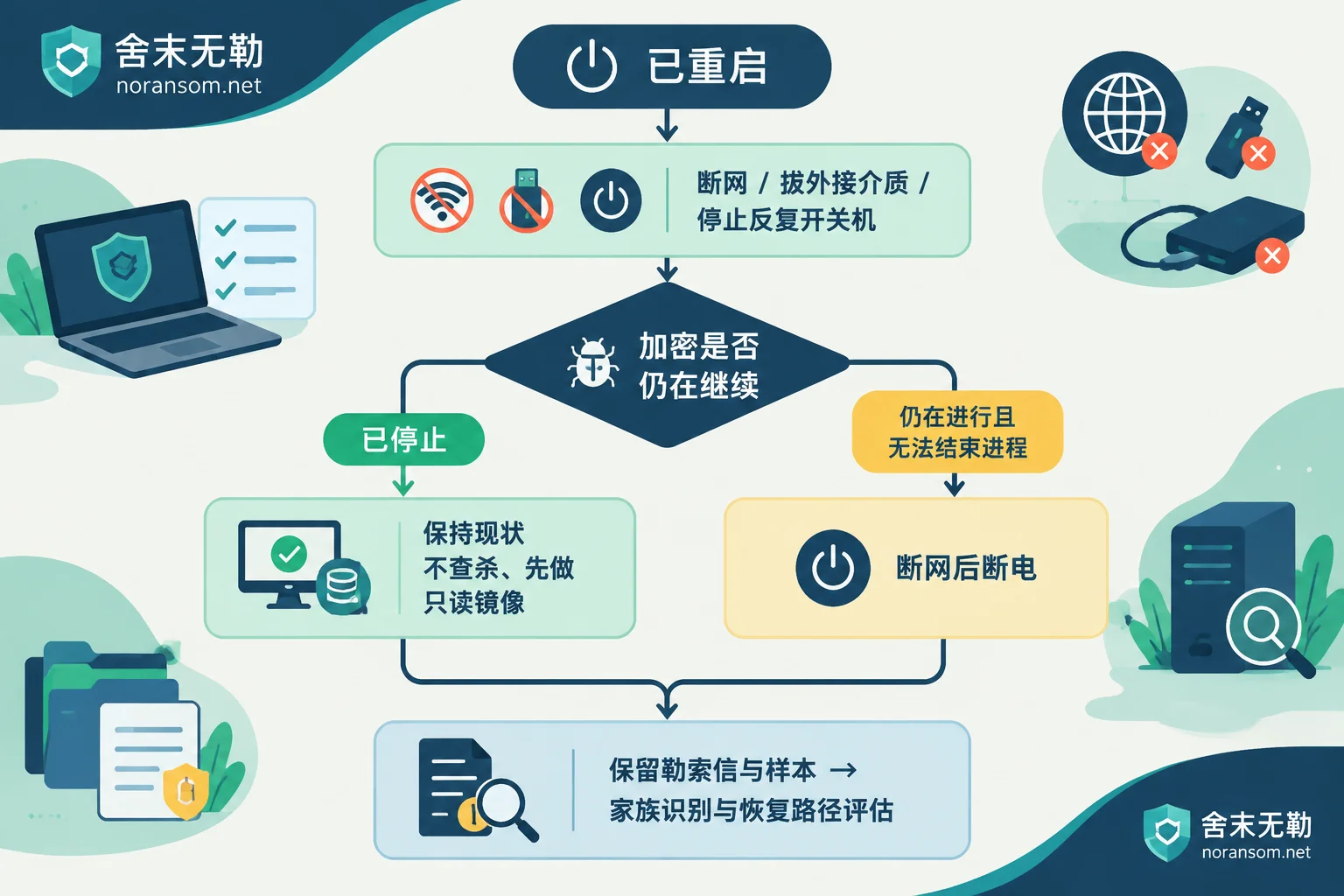
- Disconnect from the network. Unplug the Ethernet cable, turn off Wi-Fi, or disable the machine at the switch port. The goal is to cut off communication with the external controller and prevent it from scanning other hosts on the internal network.
- Stop repeatedly power cycling. Don't try a third or fourth reboot hoping it will boot up. Every power-on writes to the disk.
- Remove and do not reconnect any external media. USB drives, external hard drives, mounted NAS shares, and still-connected backup machines—disconnect them all. Any drive that was already connected should be set aside as a suspect and later checked read-only on a clean machine.
Once these three steps are done, the damage to this machine is essentially contained. Here's how to assess the road ahead.
What exactly was lost in the reboot, and what new problems might it bring
The reboot cleared memory. This means two types of things are gone: runtime forensic traces (suspicious processes, injected modules, logs not yet written to disk), and the keys that a very small number of weak encryption variants temporarily keep in memory. The latter was never likely, and only applies to specific families, so don't take it as a conclusion that "it could have been decrypted but now it can't." Most modern families using AES + RSA/ECC combinations never store keys anywhere you can reach.
The real concern is the other side: if the ransomware or its companion remote-control module wrote scheduled tasks, services, or registry startup entries, a reboot may well have awakened it again. So the first question you need to answer now is not "can I recover?" but rather—
Is encryption still ongoing?
If the system can still reach the desktop, use three signals to judge:
- Pick a directory that hasn't been encrypted yet, refresh it every few minutes, and see if files are gradually getting unfamiliar extensions;
- Check the modification times of encrypted files: do they all stop at one point in time, or are they still moving forward?
- Check the disk activity light and Task Manager for suspicious processes with sustained high disk usage.
It has stopped (ransom note generated, modification times stopped hours ago, disk quiet): keep the current state, just disconnect from the network. Do not shut down again, do not reinstall, and do not immediately run a full antivirus scan. Leaving it in this state is the most recovery-friendly condition.
It is still ongoing, and you cannot locate and stop the process: letting it continue means certain loss. After disconnecting from the network, a forced power-off is an acceptable choice, at the cost of the database possibly stopping in an inconsistent state and memory traces being completely lost. For a machine that has already been rebooted, there was little left in memory anyway. The key trade-off is "how much unencrypted data is worth saving."
Virtualization platforms need separate consideration. If a VM on an ESXi or Hyper-V host has been encrypted, don't rush to reboot the host or delete/modify the VMs. Check whether there are snapshot files, independent volumes, or unmounted backup datastores on the storage that haven't been overwritten. These are often the fastest recovery entry points, and a single misstep on the host could overwrite them.
Before doing anything to the original disk, make an image first
This is the step most easily skipped after a reboot, and the one most likely to cause irreversible loss.
The encryption program writes new files, the system writes logs on boot, antivirus scans the entire disk, disk defragmentation runs, the system is reinstalled—all these actions overwrite unallocated space. But unallocated space may still contain sector remnants of original files, fragments of database transaction logs (ldf, ibdata, etc.), and pieces of volume shadow copies that weren't completely cleared. Once overwritten, the "low-level data carving" recovery path has no raw material left.
The correct approach is to make a sector-by-sector read-only image of the affected hard drive, or keep a complete copy of the VM's underlying files. After that, all identification, testing, and recovery attempts should be done on the copy, and the original disk should be sealed. This way you still have a fallback and preserve the original materials needed for reporting and tracing.
If you can't make a full disk image due to limited conditions, at least hold the line: do not repeatedly run unknown "decryption tools" on the only original copy of your data, do not format, and do not reinstall the system.
Removing the virus ≠ recovering files
This point needs to be made clear, because many people's first reaction after a reboot is to install antivirus software and run a scan, only to find the files still won't open, and think they did something wrong.
Antivirus software removes the malicious program still running; its purpose is to stop further encryption and spread. For files that are already encrypted, the algorithm's structure won't be reversed just because the program was deleted. These are two separate tasks, and often require separate technical paths.
There's also a side effect: once the program is deleted, the sample is gone, making family identification harder. So before cleaning, preserve the evidence for analysis.
Keep three things to determine what can still be recovered
- The original ransom note. Usually README.txt, HOW_TO_DECRYPT, .hta, etc., on the desktop or in various directories. Keep it complete, including any ID numbers, email addresses, and onion addresses inside.
- Samples of several encrypted files. Pick different types, such as a document, an image, and a database file, and copy them to clean media along with their full extensions.
- A timeline. Roughly when the anomaly was discovered, who found it first, what services this machine exposed (remote desktop port, shared directories), who installed what software recently, and what time the reboot was done.
With these, you can check against public family characteristics and decryptor libraries like No More Ransom to see if a usable decryptor has ever been released for this version. Note: different versions of the same family can have completely different decryptability. Drawing conclusions based only on an extension or an antivirus-reported name can easily lead you to the wrong conclusion. For how to narrow things down when you only have a ransom note, see How to determine if decryption is possible when you only have a ransom note.
If no public decryption solution exists, the focus shifts to other paths: offline or offsite cold backups, overlooked historical backup files, and extraction of database data pages and transaction logs. Each of these paths has its own prerequisites and must be judged based on the actual disk state—they can't be generalized. For what copies can still be inventoried when there's no backup, see Server encrypted and no backup available for more details.
Treat all passwords as compromised
Before deploying ransomware, attackers typically have been inside the network for some time, and credentials have likely been taken. A reboot doesn't change that.
Treat all account passwords used on this machine as compromised: local administrator, domain administrator, database sa, remote desktop accounts, business backend passwords saved in browsers, and login accounts for online banking USB keys. The password change must be done on another machine confirmed clean; do not open any critical backend login pages on this machine.
If this machine is also used by finance or cashiers, there's another layer of risk to handle separately: remote-control Trojans care not about encrypting files but about online banking, reconciliation, chat records, and payment processes. If you discover abnormal transfers, report to the bank's customer service and police through official channels immediately, and preserve screenshots, transfer receipts, and system logs. In such cases, host cleanup, account session revocation, and financial handling are three independent tasks; doing only one does not eliminate the risk.
When to bring in help
In the following situations, continuing on your own has low marginal benefit and accumulating risk:
- Multiple machines are affected simultaneously, or encryption is still spreading to other hosts;
- Encrypted files include databases, VM disks, or financial accounting systems, and business has already stopped;
- Backup disks are also encrypted, or backups haven't been verified for a long time and may not be usable;
- Antivirus repeatedly detects and removes threats, but they reappear—suspect persistent mechanisms or an internal deployment source still active.
Before seeking help, doing the isolation and evidence preservation described above is more valuable than rushing into action. If you need to first confirm which family this version belongs to and whether any feasible recovery path remains, you can request a family identification and recoverability assessment; if the situation is still spreading and multiple people/machines are affected, emergency response is more appropriate. When you need to submit specific incident information, follow the instructions on the contact page. Do not upload database files, customer data, or suspicious executables to public forums or random online upload sites.
One final emphasis: a reboot doesn't mean it's over. What truly determines how much you can recover is whether you stop overwriting the original disk from now on and whether you preserve the evidence for analysis. Only if these two things are done do the subsequent choices have meaning.



Comments(0)