When antivirus software pops up 'threat removed', it only means the identified sample on disk is gone. It does not revoke what the attacker has already taken from this machine—credentials and cookies saved in browsers, local login states of chat apps, credentials read from memory. Once these are synced to the attacker's device, deleting the Trojan or not doesn't affect their continued use.
So 'confirming accounts are no longer controlled' is not about checking a scan report, but about invalidating each credential the attacker might still hold, then verifying over an observation period that no new anomalies appear. The following four steps should be done in order.
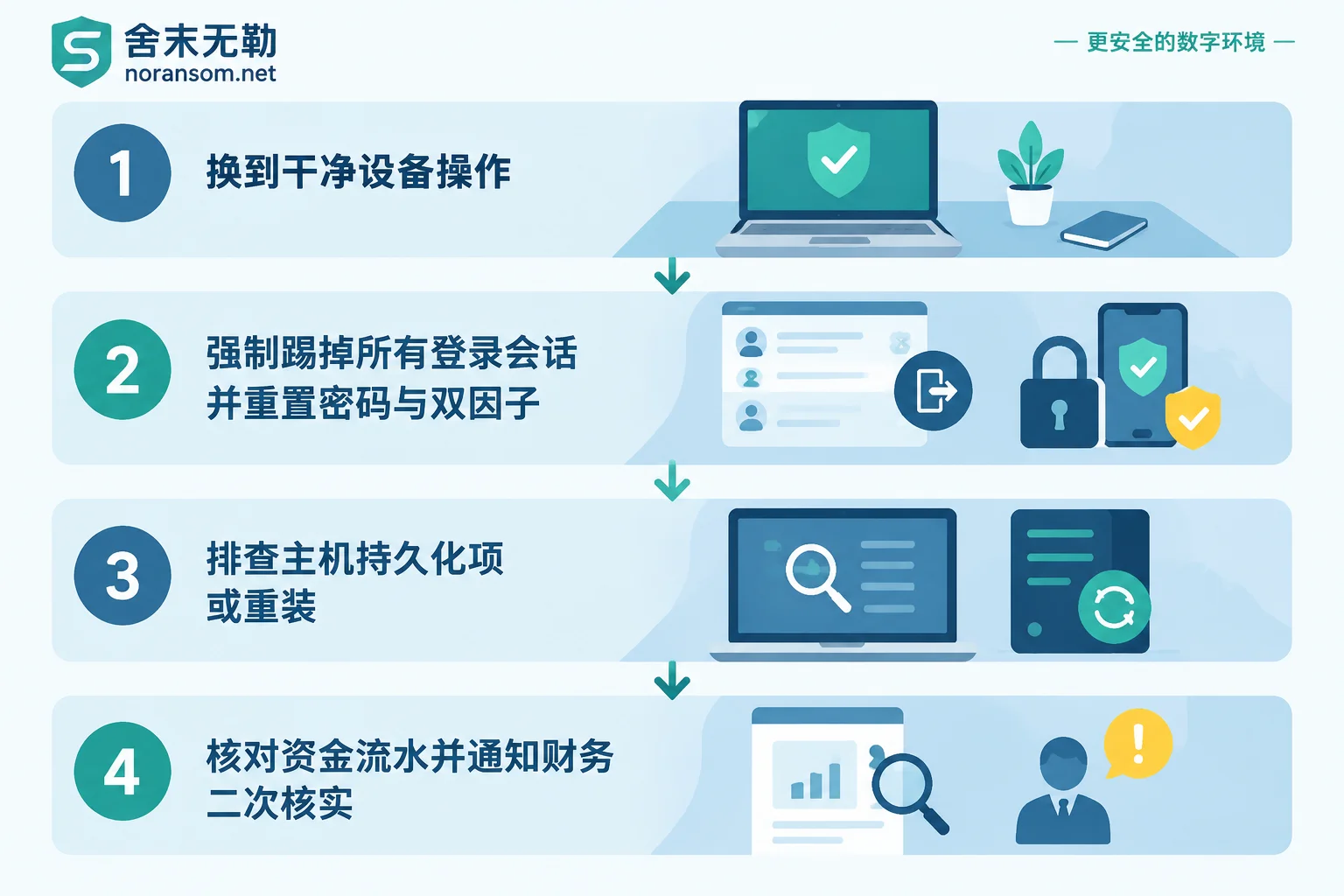
Step 1: Switch to another device; don't operate on the just-cleaned computer
All actions—changing passwords, scanning QR codes, receiving verification codes—must be done on another clean device, typically a phone or a computer unrelated to the incident and that has never shared accounts.
The reason is straightforward: you cannot be sure the machine is clean based solely on antivirus conclusions. If keyloggers or residual loaders remain, any new password you type there will be recorded again on the spot, rendering your effort useless. A common mistake is 'change password on the original machine first, then consider reinstalling'—the order is reversed.
Keep the incident machine offline and do not use it to log into any account until remediation is confirmed. If a USB security key or bank certificate key is plugged in, remove it first.
Step 2: Force logout all active login sessions
This is the most critical and most easily skipped step. If you change the password but don't kick out old sessions, the attacker's login state remains valid.
For instant messaging apps like WeChat, WeCom, DingTalk, and QQ, go to Account & Security on your phone (menu names vary slightly by version, usually under 'Settings—Account & Security—Login Device Management'), and delete every listed desktop, tablet, and web login entry one by one, including those that look like your own. Keep only the current phone. Then immediately change the password and enable device lock or new device login verification.
After kicking out logins, also check three things:
- Whether you've been recently added to or have created unfamiliar group chats, especially small groups with only finance, the boss, and a few people;
- Whether any contacts have been quietly blocked, deleted, or set to mute (attackers often use this to prevent you from seeing verification messages from others);
- Whether there are messages in chat history you didn't send, and whether there are abnormal settings like message forwarding or auto-replies.
If the account has already experienced remote takeover, repeated forced logouts, or password changes being reverted, don't continue a tug-of-war with the attacker. Go directly to the official security center for emergency freeze, then follow the appeal process to recover. For detailed handling of WeChat and QQ, see another article: How to Handle WeChat and QQ Accounts After a Silver Fox Trojan Infection.
For office email and internal systems (OA, ERP, CRM, financial systems, cloud drives), consider two layers. What users can do is change passwords and rebind two-factor authentication; but when cookies are compromised, changing the password alone is often insufficient—administrators need to force logout / terminate all sessions for that account in the backend so that historical tokens are invalidated. Without this step, browser sessions may still be alive in the attacker's hands.
For email, specifically check two types of hidden settings because they persist without passwords:
- Auto-forwarding and incoming mail rules: whether forwarding to unknown addresses has been added, or emails containing keywords like 'invoice', 'contract', 'payment' are automatically moved to rarely-checked folders (this is to prevent you from seeing communications between the attacker and clients);
- POP3/IMAP authorization codes, app-specific passwords, third-party app authorizations: these are independent credentials that do not automatically expire when you change the login password. They must be deleted one by one and recreated as needed.
Step 3: Determine whether the host is truly clean
After handling accounts, return to verify the machine. Several criteria are more reliable than antivirus conclusions:
Check persistence locations for suspicious items. This type of remote access trojan often uses scheduled tasks and 'white plus black' DLL hijacking for backdoors—a legitimately signed program loads a malicious DLL from the same directory, and antivirus passes it because the main program looks fine. Focus on scheduled tasks with names resembling system items but triggers like 'at logon' or recurring timers, and startup items pointing to user or temp directories.
Check prompts from office software themselves. If WeCom or DingTalk still frequently pop up 'remote control detected' or 'abnormal runtime environment', even if antivirus is clean, treat it as 'something is still running' rather than ignoring it as a false positive.
'Antivirus doesn't detect it' is not evidence of completed cleanup. Variants update quickly; what's detected is often just one dropped file; loaders, scheduled tasks, registry entries, and residual remote control clients may all remain. If you discovered the problem through 'mouse moving by itself but antivirus not detecting', refer to this troubleshooting sequence.
For computers used by finance, cashiers, or involving online banking and accounting systems, directly reinstall the system. Spending time on 'fine-grained cleanup' on such machines has an disproportionate risk-reward ratio. Before reinstalling, preserve what should be kept—business accounting data, evidence materials, configuration information; see the order and checklist in After a Silver Fox Trojan Infection: Four Types of Things to Preserve Before Reinstalling. Log into accounts after reinstalling, not before.
Step 4: Verify funds and business operations; this cannot wait
The endgame of Silver Fox and similar Trojans is usually not encrypting files but impersonating a leader or finance person to initiate an urgent transfer. So while handling hosts and accounts, someone must verify business operations:
- Recent transaction records of online banking and payment accounts, pending approval documents, batch payments;
- Whether the phone number bound to bank accounts, pre-set information, Ukey authorization, and certificate status have been altered;
- Whether recent payment account change notifications or contract payment information have been tampered with;
- Whether any outgoing emails show changes to payment accounts in your name.
At the same time, send a clear warning to finance and management: all messages involving funds or payment account changes—whether from WeChat, WeCom, or email—must be verified via phone call or in person; do not rely on chat screenshots or voice messages. The value of this notification often exceeds technical cleanup, because even if the attacker loses account access, they may have already gathered enough conversational material to scam others.
If abnormal transfers or payments have occurred, contact the bank through official channels immediately and report to police, preserving chat logs, transfer receipts, original emails, and device status as evidence. Whether funds can be intercepted depends on the channel, timing, and specific case; do not believe any 'guaranteed recovery' claims.
What counts as 'confirmed'
There is no single green-light test result. A practical judgment is: credentials the attacker might hold have been individually invalidated (sessions kicked out, passwords and 2FA reset, authorization codes deleted, forwarding rules cleared), affected hosts have been reinstalled or persistence checks completed, business side verified with no anomalies, and then over the next one to two weeks none of the following signals appear:
- Login alerts for unknown devices or remote locations on accounts;
- Colleagues receive messages you didn't send, or payment account change requests in your name;
- New rules or authorizations appear in email;
- After reinstallation, remote control prompts, abnormal outbound connections, or unknown processes still appear;
- Other colleagues in the internal network gradually show similar symptoms.
The last point deserves special attention. After one machine is compromised, attackers often use existing chat identities to continue delivering to colleagues and clients; even if the original machine is cleaned, spread continues.
When not to handle it alone
In the following situations, after some self-checking, it's time to let experienced professionals take over rather than continue trying:
- Affected accounts are domain accounts, or the machine has domain administrator or server management privileges—meaning credentials may be used for lateral movement, and the scope exceeds one computer;
- Two or more machines show similar symptoms, or colleagues report receiving suspicious messages;
- After reinstallation or cleanup, remote control prompts or abnormal outbound connections recur;
- Actual financial loss has occurred, requiring simultaneous evidence preservation and entry point analysis.
In these cases, the focus is not 'run another antivirus scan' but to clarify hosts, accounts, lateral scope, and evidence together. For the scope and inspection surface of Silver Fox and remote control incidents, see Silver Fox, Remote Control, and Financial Computer Risks. To understand what a full investigation typically covers, refer to What Checks Are Included in Silver Fox Trojan Handling Services. If it's spreading with multiple people and machines affected, requiring simultaneous isolation and forensics, the Emergency Response path is more appropriate; for specific incidents, describe the situation via the Contact Page, and be careful not to upload passwords, client data, or executable samples on public channels.


Comments(0)