To start with the conclusion: a proper Silver Fox trojan cleanup does not stop at “run a full antivirus scan, and if nothing is flagged, it’s fine.” It typically needs to cover seven dimensions—startup and persistence, process and memory injection, network outbound connections, what has been changed in security software, messaging app sessions, financial credentials and accounts, and internal spread. Moreover, the host track and the account/fund track must be separated and advanced in parallel. Doing only host cleanup without touching accounts is the most common and costly mistake in Silver Fox incident response.
If you are still deciding whether to act urgently, the order is: first disconnect the machine from the network (unplug the Ethernet cable, turn off Wi‑Fi), remove any plugged‑in online banking USB key, then use a different, unaffected device to handle your accounts. These steps do not depend on any investigation results and can be done immediately.
Why “scanned and nothing found” means nothing
Silver Fox and similar remote‑access families rely heavily on “white‑plus‑black” techniques: a legitimate, digitally signed program loads a malicious DLL from the same directory, and the antivirus sees only the signed main executable. Many payloads also run injected in memory, with no corresponding executable file on disk. Even more directly, on landing it often silently adds paths to the antivirus exclusion list—giving itself a whitelist—so subsequent scans naturally come up “clean.”
Therefore, “AV didn’t flag it” only means this AV didn’t match signatures in this scan; it cannot be used as proof that the system is clean. For related symptom assessment, see What to do when someone else controls your mouse but antivirus reports nothing.
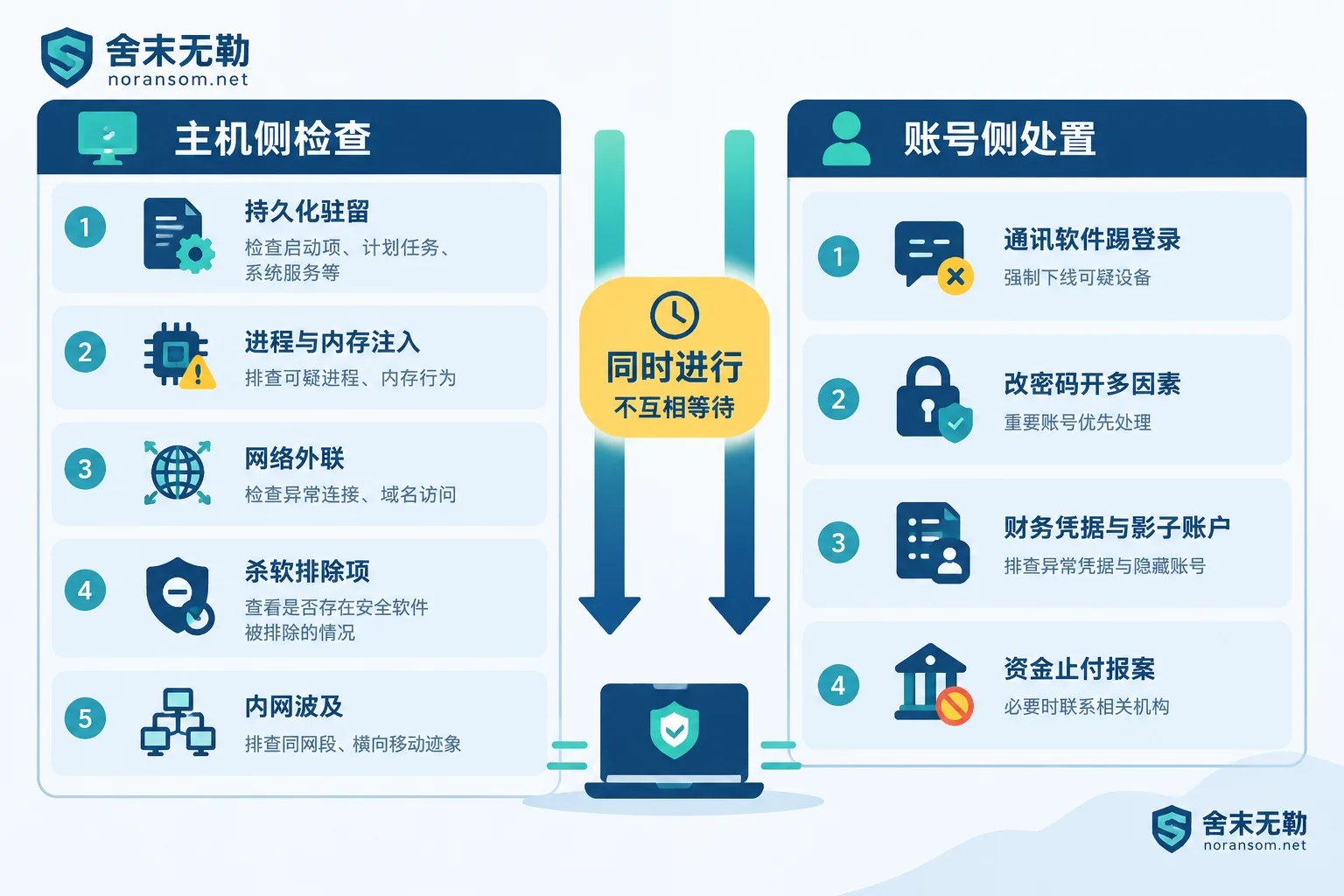
Host‑side check dimensions
1. Persistence and startup. This determines whether the threat will reappear after removal. Check: scheduled tasks disguised as system component names or random strings; registry Run/RunOnce autostart keys; new system services and suspicious drivers; startup folders; and WMI event subscriptions. The last is stealthy and easy to miss manually, but it is a common means of repeated revival.
2. Processes and memory. Analyze the parent‑child process chain to find “normal programs launched from unexpected places”; check for executable memory segments not backed by any disk file (RWX regions), and whether system processes like explorer.exe or svchost.exe have been injected. The white‑plus‑black paired directory (a signed main program with an unknown DLL beside it) is also verified here.
3. Network outbound connections. Look for persistent connections to fixed ports or unfamiliar external addresses; also check local traffic tampering: system proxy settings, hosts file modifications, DNS cache contents, and firewall allow rules. Some samples do not connect while the remote control is disconnected, so an empty outbound log alone cannot be taken as “all clear.”
4. What has been changed in security software. Specifically: which paths and processes have been added to Defender or third‑party AV exclusions; whether security‑related services have been stopped or set to manual; and whether local group policy has been modified. This matters because it is both evidence of compromise and determines whether your later re‑scan results can be trusted—if the whitelist isn’t cleared, every scan will give the same result.
5. Internal spread scope. Check whether the victim host has performed port scans against internal network segments, whether there are abnormal SMB share access records, and whether password‑protected archives have been sent to colleagues via internal work groups or email contacts during the compromise. This step determines whether it’s “just this one machine” or must be handled as an incident. When multiple people or machines show similar symptoms, the response differs from a single machine; see Emergency response when multiple machines are affected.
Accounts and funds: a separate track that cannot wait until the host is cleaned
Silver Fox is not primarily after your files—it is after your identity and payment capability. Its typical goals are session hijacking, impersonating you to defraud colleagues and clients, stealing credentials, and long‑term persistence. This means: deleting the trojan from the host does not invalidate already‑stolen sessions.
Messaging app sessions. For WeChat, DingTalk, QQ, and similar tools, check locally for generated automatic chat screenshot cache directories (often hidden folders under ProgramData or temp directories), unrecognized devices in the login device list, and records of mass sending archives or fake statements. Response actions: on a trusted device (a phone on mobile data is safest), force logout of all authorized computers, change passwords, and enable multi‑factor authentication. For the specific order, see How to handle WeChat and QQ accounts after a Silver Fox trojan infection.
Financial credentials and accounts. Check whether passwords and cookies for tax systems, online banking front‑ends, and corporate email saved in browsers have been leaked; whether hidden or re‑enabled shadow accounts have been created; and whether online banking USB keys or invoicing software show traces of use outside working hours. There is one prerequisite for changing passwords: do not do it on the suspicious computer, or the new password will be captured immediately. For which accounts to change and in what order, refer to Which account passwords to change after discovering a Silver Fox trojan.
For abnormal transfers that have already occurred, use official channels. Immediately contact your bank to request a payment stop and explain the situation, and report to the police, preserving transfer records, chat logs, abnormal login alerts, suspicious files, and the timeline. The outcome depends on fund flow and timing; no one can promise recovery, but complete materials and prompt reporting directly affect what can be done next.
How to judge whether the check scope offered is sufficient
Some practical benchmarks:
- If they only say “full scan + reinstall OS” and stop there, the scope is insufficient. Reinstalling solves host persistence but does nothing for already‑stolen sessions and credentials.
- If they never ask what messaging apps you use, whether a USB key was plugged in, or whether any payments were made, the account and fund track is not in the process.
- If they don’t ask “what other machines are on the same subnet, and has anyone in the group also clicked that file,” the spread scope is blank.
- Conversely, if they conclude “this is Silver Fox variant X” based on a single AV detection name or symptom, be skeptical. Remote‑access families overlap heavily in techniques; what it is and which persistence chain it uses must be pieced together from the above checks, not determined at a glance.
A reminder: Silver Fox is a remote‑access and account compromise problem, distinct from file encryption. If your machine also shows changed file extensions or files that won’t open, that is a different issue and should be evaluated separately, not mixed together.
When it’s worth bringing in professionals
For a single machine, no financial or online banking involvement, and symptoms limited to receiving a suspicious file without opening it, checking against the above list and changing passwords is usually enough. Professional investigation is strongly recommended in these cases: abnormal transfers or impersonation messages have occurred; symptoms recur after cleanup; multiple machines or people are affected simultaneously; the machine holds USB keys, accounting systems, or business systems; or you need an investigation and forensic record for management or police.
In these situations, forensics and cleanup conflict—rushing to delete files or reinstall will erase the scope of judgment and timeline. When professional assessment is needed, refer to Scope of Silver Fox and remote‑access trojan response, or explain your situation via the contact page. When describing the problem, just state the symptoms, time of occurrence, and which accounts and devices are involved; do not upload databases, customer data, production passwords, or suspicious executables on public channels.


Comments(0)