The decryption tool finishes, file extensions are back to normal, but double-clicking gives a format error, garbled content, or a database that just won't attach. At this point, the most important thing to do is one thing: stop running any decryption tool, repair utility, or antivirus "repair" function on these files.
The reason is straightforward. Decryption and repair are both write operations. Each run overwrites already damaged data with another layer. What really determines how much you can recover is often not finding a magic tool, but how many untouched original copies you still have.
First, preserve what you can
Before making any judgments, preserve data in this order:
- If you still have the encrypted original files or the original disk, immediately make a separate copy, set it to read-only, and place it on another drive or machine. This is your fallback for all subsequent recovery. Without it, many paths are cut off.
- Also make a separate copy of the currently decrypted but unopenable files. They are different evidence from the encrypted originals. Don't delete one to save space.
- Record the decryption tool's logs, screenshots of the output window, ransom notes, tool filenames, and versions. Many decryptors list Failed / Skipped / Error files in their logs. This list is key to judging the nature of the problem. Once the window is closed, it's gone.
- Perform all subsequent attempts on the copied files.
If the machine is still in a domain or connected to shared drives, first confirm that encryption activity has indeed stopped before discussing recovery. It's pointless to fiddle with files while encryption is still spreading.
Step 2: Confirm whether the files are actually decrypted
"Won't open" corresponds to at least two completely different states, and the recovery directions are opposite. You must distinguish them first.
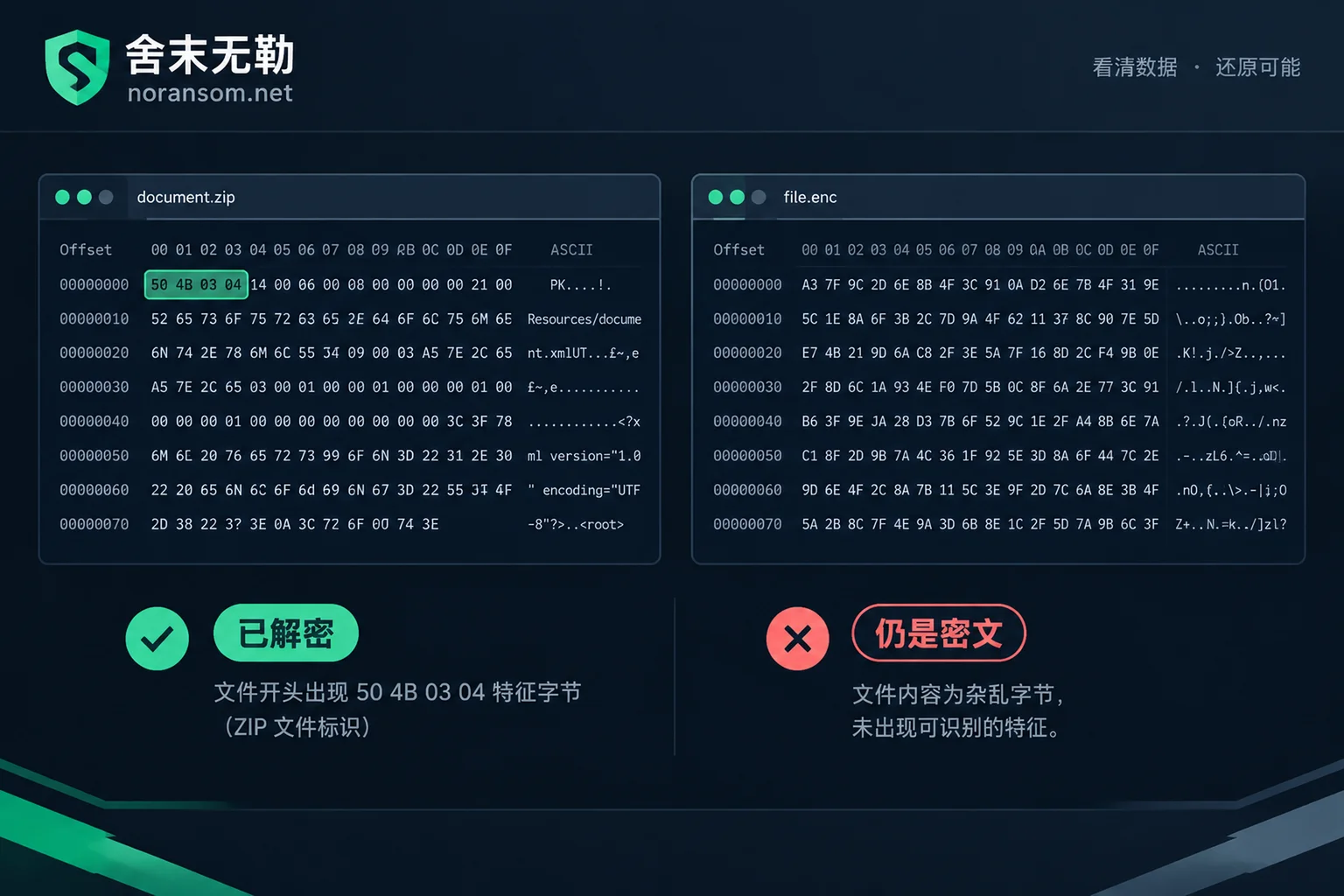
Take one unopenable file, copy it, and open the copy in read-only mode with a hex editor (like HxD or 010 Editor). Look at the first dozen bytes:
- docx / xlsx / pptx / zip should start with
50 4B 03 04(visible characters PK) - Old doc / xls / ppt files start with
D0 CF 11 E0 A1 B1 1A E1 - PDF starts with
25 50 44 46(%PDF) - JPG starts with
FF D8 FF - PNG starts with
89 50 4E 47
If the beginning shows the correct signature bytes, the file was indeed decrypted. The problem is internal structural damage, i.e., "decrypted but corrupted."
If the beginning still shows irregular random bytes, or you can still see the ransomware family's marker string or contact email, then the file was never decrypted—only the extension was changed back. This is common in two scenarios: someone ran a batch rename script to remove extensions like .locked, or the decryptor actually skipped these files and only renamed them. In such cases, don't try any format repair software; the direction is completely wrong. You need to go back to the question of "can it be decrypted?"
If decryption succeeded but files won't open, common causes
Using an incompatible decryption tool or wrong key
Different compile batches of the same family may use different key derivation methods. Forcing a "looks right" generic tool to decrypt can re-encrypt the ciphertext with the wrong algorithm, outputting irreversible garbage and overwriting the original file. This is why we emphasized keeping the encrypted originals—if the originals are still there, this failure is just a waste of time; if they're gone, this data is basically lost.
If you're stuck at the tool's prompt stage, you can refer to Several reasons why decryption tools say "file not supported".
Decryptor itself is flawed
Decryptors written by attackers are generally not rigorously tested, and public tools may only cover some variants. Actual problems include: incorrect decryption offset for large files, so only the first few megabytes are normal; incomplete handling of intermittent encryption (only some segments encrypted), resulting in files that are partly good and partly bad; corrupted metadata at the end of the file, causing the tool to skip it as "no decryption needed"; padding bytes not removed correctly, leaving extra garbage at the end.
These problems are characterized by appearing in batches and with patterns—for example, all files above a certain size are bad, while small files are fine. In this case, checking the skip list in the decryption log is more useful than running the tool again.
Encryption was interrupted
If you pulled the power or forced a shutdown when you first discovered the infection, or antivirus killed the process mid-encryption, files that were being processed are stuck in a "half-written" state. Even if the decryption process fully succeeds, such files will be incomplete. The recovery direction is structural repair by file format, not finding another decryption tool—repeated decryption won't help.
Encrypted more than once
Systems with a long compromise window may have been encrypted by two different families, or the same family may have processed the same files multiple times. In this case, the decryptor only removes the outermost layer; inside is still ciphertext. The diagnostic basis is again the file header: after decryption, if the header shows another regular anomaly rather than normal format signature, consider compound encryption. You need to re-identify the family and process layer by layer.
Databases and virtual machines are a different issue
For SQL Server mdf/ldf, MySQL data directories, Oracle data files, and vmdk/vhdx virtual disks, if they were actively being read/written during encryption, underlying damage such as torn pages, broken indexes, and inconsistency between transaction logs and data files can occur. This damage is separate from encryption; even after a decryption tool restores the correct byte stream, it remains.
So database attach failures after decryption and VMs that won't boot after decryption are common outcomes, not necessarily decryption failures. But there are red lines:
- Do not run forced database repair commands on your only copy (e.g., the SQL Server repair option that loses data), and do not repeatedly attach/detach. Make a full copy first.
- Do not directly merge, repair, or snapshot virtual disks on the original datastore; make a full disk image first.
- For financial accounting systems, note that missing any of the data files, log files, or backup files can affect the rebuild path. You can check against the list in Which files must be kept after UFIDA account set encryption.
The real recovery method for such files is to extract still-intact data regions at the page level, re-validate and rebuild the structure, and import recoverable business data into a new instance. This requires knowledge of the underlying database structure and is beyond general repair software. If necessary, have someone first perform a database and business data recovery assessment to determine which tables and point-in-time data are still valuable, then decide on the investment.
What other options remain beyond decryption
If you confirm that these files are damaged beyond recovery, don't jump to the conclusion that "all is lost." First check these places: volume shadow copies on the original machine, scheduled backup directories from business systems, offline or offsite backups, old versions kept locally by colleagues, copies in email attachments and cloud drives, and the database's own bak files. In practice, it's not uncommon to piece together most usable data from these. For more ideas, see What recovery paths remain when there's no free decryption tool.
Also a reminder: decrypted files do not mean the system is clean. Especially after using a decryptor provided by the attacker, backdoors, residual accounts, and scheduled tasks remain on the machine. Restored data put back could be encrypted again. Treat recovery and cleanup as two separate tasks to be verified.
When to bring in a professional
In the following situations, the risk of continuing to try on your own outweighs the benefit:
- The encrypted originals have been overwritten or deleted, and only decrypted corrupted files remain;
- Core data is a production database, ERP account set, or virtual machine, and no usable backup exists;
- After decryption, the file header still shows ciphertext, and family attribution is unclear;
- Multiple tools of unknown origin have been run on the same files, and you're unsure what state they're in.
These all require a recoverability assessment first, rather than trying another tool. First confirm the family and variant, confirm the current true state of the files, confirm what usable copies remain, then decide whether to pursue decryption, low-level recovery, or backup rebuild. We do this in the ransomware family identification and recoverability assessment phase: first see what's left, then discuss options.
When seeking external help, judging reliability is simple: can they clearly explain what state your files are in, why they won't open, and which path they plan to take—rather than quoting a number first. For more detailed criteria, refer to How to judge if a decryption solution is reliable.
Finally, back to the opening point: before you understand which state your files are in, touch them as little as possible. How many overwritten original copies you have left determines the upper limit of all subsequent options.



Comments(0)