No backup does not mean the data is necessarily gone; but how you operate in the next few hours will directly determine how many possibilities remain.
The three things you should do now, in order: isolate the affected system → confirm whether encryption is still ongoing → preserve the original encrypted files before touching any recovery tool. Finding a decryption tool comes after these three. Many data that still had a chance were completely destroyed during the "anxious trial" phase.
First Few Hours: Three Stop-Loss Steps
Step 1: Physical isolation. Unplug network cables, disable switch ports, or disconnect wireless, and cut off its connections to shared storage, NAS, backup servers, and other machines in the domain. If it is a virtualization platform, isolate the host management network first; do not just stop services inside one VM. Ransomware usually compromises one machine first and then moves laterally. The goal of isolation is to protect assets that have not been touched yet.
Step 2: Determine whether encryption has stopped, then decide whether to shut down or keep running. There is no universal answer; do not blindly follow "never shut down" or "always reboot immediately":
- If network isolation is confirmed, the number of encrypted files is no longer growing, and no abnormal processes are continuously consuming CPU and disk, keeping it powered on is more beneficial—memory may contain encryption-related data, and a running system is easier to forensically examine.
- If encryption is clearly still ongoing (files keep increasing, extensions keep spreading), prioritize terminating that process; if you cannot terminate it, power off. Powering off loses memory clues, but the cost of letting encryption finish is usually greater.
- It is not uncommon for files to still be encrypted after disconnecting the network, because the malware itself is running locally. For this situation, refer to how to urgently stop files from being encrypted after disconnecting the network.
Step 3: Preserve the originals. Before running any decryptor, repair tool, or data recovery software, make a full disk image of the affected disk or virtual disk; if conditions do not allow, at least copy the ransom note, a few typical encrypted files, and the corresponding original file name list to read-only media. All subsequent attempts should be done on copies.
Things you must not do at this stage: reinstall the OS, repartition, or format the original disk; let antivirus directly "clean" the encrypted files themselves (some samples rewrite original files as encrypted files, and deleting them means they are gone); repeatedly run unknown "universal decryption tools"; reconnect a NAS with snapshots to a network that has not been cleaned.
"No Backup" Is Often Not Really Zero Copies
The backup server being encrypted together does not mean the whole company only has this one copy. After isolation is complete, go through this checklist, roughly in order of probability of finding complete data:
- Virtualization and storage layer snapshots: ESXi/Hyper-V VM snapshots, snapshots built into storage or NAS. Some NAS snapshot mechanisms are read-only for SMB access, so ransomware processes that encrypt through shared drives cannot delete them.
- Volume Shadow Copies (VSS): Many families actively delete them, but whether deletion is complete must be actually checked; do not skip based on assumption.
- Offline media: Mobile hard drives that have not been plugged in for a long time, backup drives rotated into cabinets, old servers that are powered off. Devices not powered at the time of the incident are usually intact.
- Historical exports of business systems: Manual backup files of accounting sets such as Kingdee or Yonyou are often stored on another disk, on the computer of finance or cashier staff; also monthly tax export, bank statements, data packages sent to accounting firms.
- Copies on other endpoints: Copies on colleagues' computers, email attachments, file transfer records in WeCom or DingTalk, cloud drive historical versions.
- The database itself: .bak backups may be encrypted, but transaction log files, previously exported intermediate files, and dumps in temporary directories may not be affected at the same time.
During inventory, also note: these media should be checked in a clean environment after isolation; do not reconnect them to the original network just to "take a look."
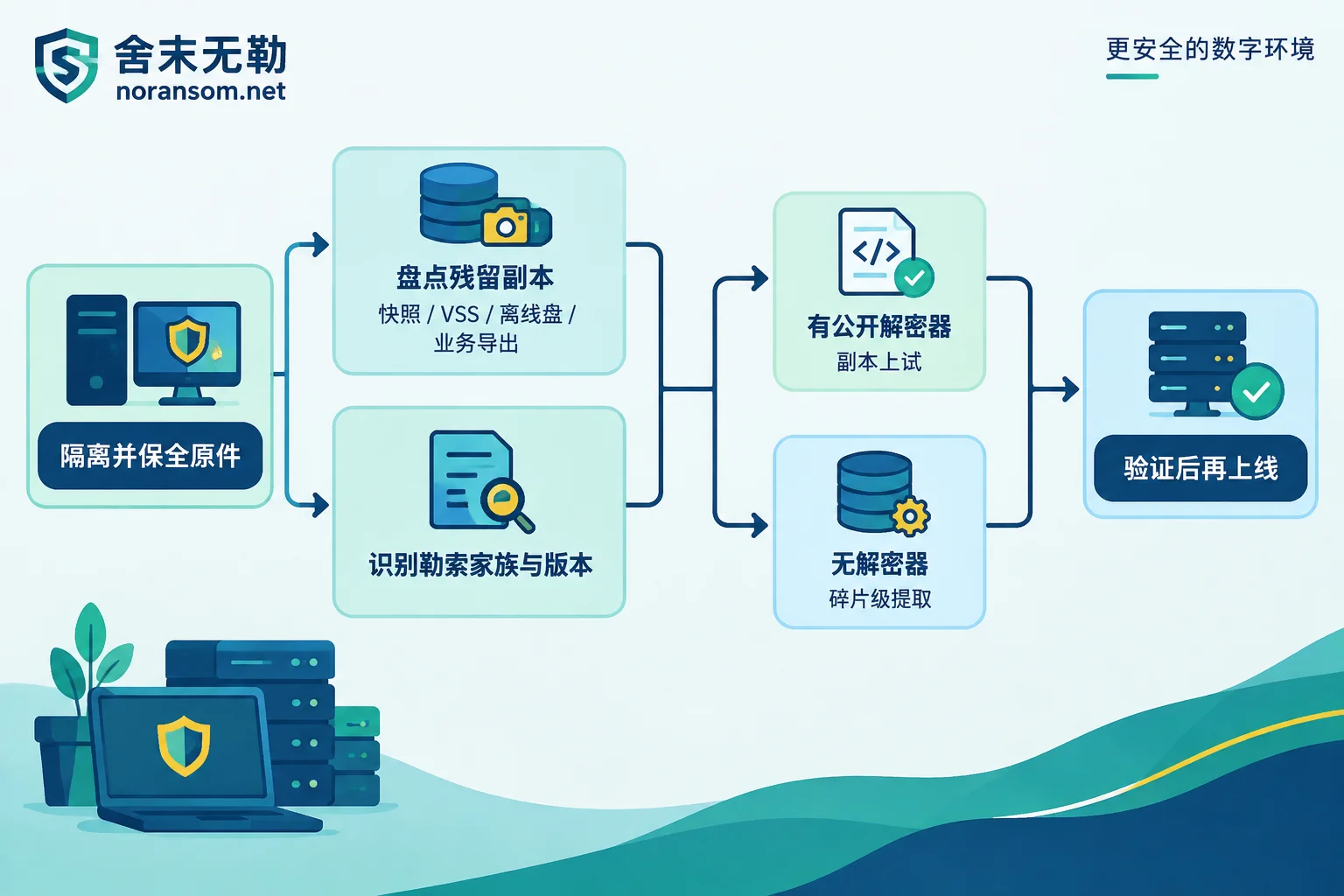
Without Backup, the Conditions for Three Non-Ransom Recovery Paths
Path 1: Public decryption tools. The prerequisite is to first determine the ransomware family and version. The basis is the file name and content of the ransom note, encryption extension, and structural characteristics of encrypted files. Looking at the extension alone is not enough—the same extension may correspond to multiple families, and there are samples impersonating well-known family names. If you are still not sure whether the files are truly ransomware-encrypted, first see several judgment points when files become unknown extensions.
Public projects such as No More Ransom include a number of families that can be decrypted for free, usually because the encryption implementation of that version has flaws or the private key was seized in law enforcement operations. However, the applicable scope is often narrow: often only effective for specific versions and specific time period variants; using the wrong tool may be ineffective or even cause secondary damage to files. Therefore, always test on copies with a small number of files first.
Path 2: Encryption implementation flaws or residual keys. Some families have key reuse, weak random number generation, or residual keys in memory or on disk. This depends entirely on the specific version of the specific family; it is not a general rule and requires sample-specific analysis to conclude. For families with many circulating versions like LockBit, conclusions vary greatly between versions. You can refer to the approach in LockBit confirmation and recovery path judgment.
Path 3: Structural-level, fragment-level extraction. For encryption speed, some samples only encrypt the first few MB of a file or jump-encrypt at intervals. For large database files and virtual disks, this means the latter part may retain a large number of intact data pages, and records can be reassembled through low-level scanning. This path usually yields partial data, and the recovered data must be verified by the business side, not directly assumed to be "recovered."
To be clear: if the family correctly implements asymmetric encryption with independent keys per machine, without the private key held by the attacker, there is no possibility of direct decryption. In this case, the only hope is residual copies and fragment-level extraction. Therefore, the order of judgment should be: first identify family and version → check if a public decryptor exists for that version → if not, turn to copy inventory and fragment extraction, not the other way around. If you cannot determine the family yourself, you can submit the ransom note and sample characteristics to family identification and recoverability assessment to determine the nature, then decide whether to invest in subsequent costs.
About Paying the Ransom
The consistent advice from agencies such as CISA is not to pay. The reasons are practical: payment does not guarantee the attacker will provide a usable private key, nor does it guarantee their decryption program will run correctly on your data volume; it also makes you a target for secondary extortion. Whether to pay is ultimately the company's own decision, but at least do not contact the attacker before identifying the family, inventorying residual copies, and evaluating other paths. [Company name] does not pay ransoms or negotiate on behalf, and the handling direction is to follow backup, database, and other recovery paths after identification and assessment.
In addition, keep the ransom note, samples, relevant logs, and timeline, and report to the cybersecurity department of the public security bureau. These materials are also input for subsequent technical analysis.
After Data Is Recovered, Do Not Rush to Go Live
- First verify in an isolated environment: perform database consistency checks, and the business side reconciles by vouchers, balances, and document quantities. Data "can be opened" and "can be used" are two different things. For the verification order, refer to layered verification method after SQL Server recovery.
- Do not put recovered data directly back onto the original server that has not been cleaned. If the intrusion entry point is not addressed—exposed remote desktop on the public internet, weak passwords, unpatched services, office endpoints still under remote control—the same group can come again, and the second time they often delete what you just recovered first.
- Reset all related credentials (domain accounts, databases, VPN, remote management, backup systems), and operate on devices confirmed clean; do not change passwords on machines that are not yet confirmed to be controlled.
When External Help Is Worthwhile
If it is just a single office computer and data has copies elsewhere, handling it yourself in the above order is feasible. But in the following situations, the risk of repeated self-attempts clearly outweighs the benefit: multiple servers or the entire virtualization platform encrypted; core business database or financial accounting set is the only original; you cannot confirm whether encryption has stopped; evidence needs to be preserved for reporting; or someone has already run a round of repair tools on the original disk and now it is unclear what remains.
In such cases, the first thing is still assessment, not action—confirm the family and version, confirm which media are still available, confirm which data must be prioritized, then decide whether to invest. Recovery assessment and delivery order is to assess recovery scope first and then provide a plan; no step should require you to make a decision before you know what can be recovered. If remote access is truly needed, preparing materials in advance will save much back-and-forth; refer to things to prepare before remote emergency handling.
One final reminder: do not upload production databases, customer data, and password files to public forums, comment sections, or arbitrary online sandboxes. When submitting samples and logs, also use channels that clearly state data submission requirements.


Comments(0)