If your files were just given a random extension, your desktop wallpaper was changed, and a README.txt appeared in every folder, the most important thing now is not to find a decryption tool, but to stop the spread and preserve evidence of identity. LockBit's encryption itself cannot be mathematically reversed, but your actions in the next few hours will directly determine how much remains recoverable.
First, handle these four things
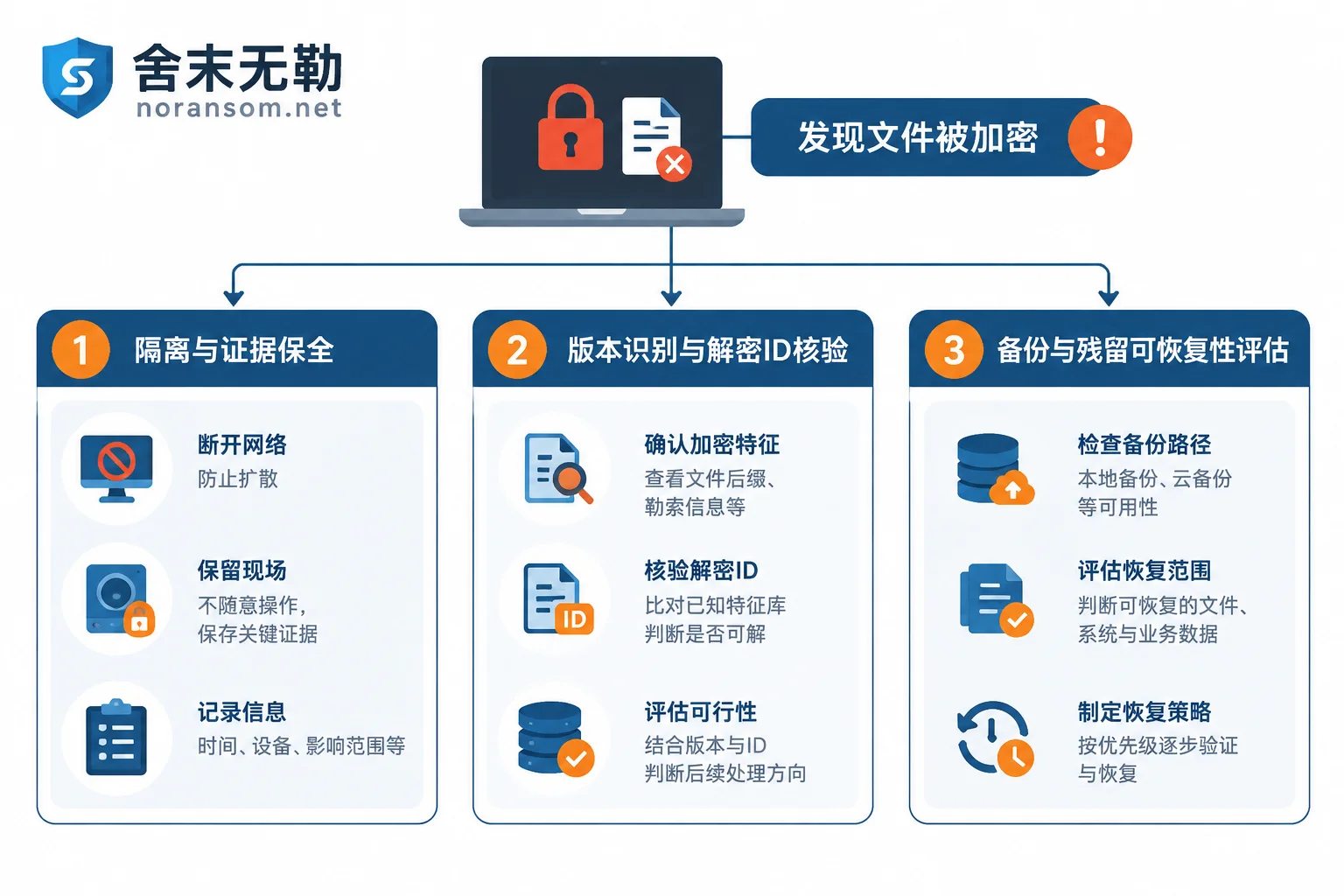
1. Isolate, don't rush to reinstall. Unplug the network cable, disable the corresponding switch port, or turn off Wi-Fi to remove the affected host from the network. Domain controllers, file servers, virtualization hosts (ESXi/Hyper-V), NAS, and backup servers should be disconnected first—LockBit's typical playbook is to obtain high privileges in the domain and then distribute via Group Policy or SMB in bulk, and backups and shared drives are often hit in the same wave.
2. Decide whether to shut down or keep it running based on the situation. If the encryption process is still running and you are not confident you can completely remove this machine from the network, powering off to stop the damage is reasonable; if isolation is confirmed and encryption has finished, keeping the machine as-is is better for later forensics and extracting residual information from memory. Don't hesitate while still connected to the network.
3. Keep the original ransom note. The Decryption ID string in the ransom note is a key credential for later verifying whether decryption is possible. Don't delete or overwrite it. Also keep a copy of encrypted sample files (a few small files are enough), screenshots of the desktop wallpaper and pop-up windows, and the approximate time of discovery.
4. Don't tamper with the only original copy. Do not format and reinstall, do not use system disk tools to "repair" directly, and do not repeatedly run unknown decryption programs on the original disk. Some fake decryptors will re-encrypt or corrupt file headers, and overwritten sectors will not come back.
If files are still increasing and encryption continues after disconnecting from the network, the order of handling is slightly different; you can refer to 断网了文件还在被加密该怎么紧急停下来.
How to confirm it's LockBit, and which generation
Different versions have distinct external characteristics:
- Early versions: file extensions are
.abcdor.lockbit. - LockBit 2.0: mostly appends
.lock/.lockbitextensions, and the ransom note is usually calledRestore-My-Files.txt. - LockBit 3.0 (also known as LockBit Black): the extension becomes a random string of numbers and letters (commonly 9 characters), the ransom note is named
[随机后缀].README.txtorREADME.txt, and it also replaces the desktop wallpaper and pops up warning windows. - Newer versions have also expanded support for Linux and VMware ESXi, allowing bulk encryption of
.vmdkvirtual disks after the host is compromised.
A reminder: A single file extension or antivirus detection name is not enough to determine the family. After the LockBit 3.0 builder leaked in 2022, the underground community recompiled numerous unofficial variants that behave almost identically to the genuine version but use a completely different key system—this directly affects the later judgment of "whether decryption is possible." Reliable identification requires combining the ransom note format, encrypted file header structure, ID format, and dropped samples. For general methods of judging by extension, see 文件变成陌生后缀怎么判断是不是勒索病毒.
Several things it does determine your recovery method
Beyond encryption, LockBit also performs a series of destructive actions, which is why many people "find nothing left after removing the virus":
- Deletes volume shadow copies (VSS) and clears system event logs, so Windows "Previous Versions" and restore points are usually gone, and logs are hard to use to trace the intrusion path;
- Force-closes security software, databases, and related system services, so files locked by SQL Server, Kingdee/Yonyou accounting systems, etc. can also be encrypted;
- Uses tools like Mimikatz to harvest credentials, then spreads laterally within the network via domain controller Group Policy, SMB, or PowerShell—meaning handling just one machine is almost certainly insufficient;
- Multithreaded fast encryption, combining ChaCha20/AES with RSA-2048 for extremely fast encryption, often finishing before discovery;
- Double extortion: exfiltrates data before encryption, then pressures by threatening to publish it. So even if you have backups that can fully restore, the data leakage line still needs separate assessment and handling.
Can it be decrypted: clarifying the real possibilities
Brute-forcing the key is not feasible. There is no room for negotiation here; do not trust any claim of "cracking the algorithm."
But there is a conditional channel. The international joint law enforcement action in February 2024 (Operation Cronos) disrupted part of LockBit's infrastructure and seized a batch of decryption keys. Europol and No More Ransom subsequently released a decryption checker for LockBit 3.0 (including the check_decryption_id component), allowing victims to use the Decryption ID from the ransom note to check whether it matches a seized key.
The key point is its scope: the official description explicitly states that the tool only works for the portion of victims whose keys are in the seized key database, and does not cover all LockBit 3.0 variants. If you are infected with a fake version recompiled from the leaked builder, the key is not in this database at all. So the reasonable expectation is: it's worth verifying, but don't bet your entire recovery plan on it.
There are also two operational prerequisites for verification: do it in a clean environment isolated from the production network, test with file copies rather than the only original; first verify that the output is normally readable on a small batch of unimportant files before considering bulk processing. If you are unsure about version identification and the verification process, you can first do 家族版本识别与可恢复性判断 to avoid trial and error on the original disk.
If no key match, what paths remain
This is the real situation in most cases. At this point, you need to systematically inventory rather than continue looking for tools:
1. The actual state of the backup chain. Don't just look at backup software task records; confirm whether the backup media was online at the time, whether it was encrypted in the same wave, and when the most recent usable full point was. Offline tapes, unplugged removable drives, offsite replication, and cloud buckets with version retention are all objects that need separate confirmation.
2. Un-overwritten remnants. The encryption process does not always fully overwrite; database files, transaction logs, temporary files, exported reports, and historical archives often contain extractable parts. Such extraction must be done on a disk image, not by trial-and-error on the original disk.
3. Specifics of virtualization platforms. After an ESXi/Hyper-V host is encrypted, the actual overwrite ratio of virtual disks varies greatly; some only destroy the file header and leading data. Whether reassembly conditions exist must be determined through actual image forensics, not inferred from the extension.
4. Alternative sources for business systems. For accounting systems like Kingdee or Yonyou, besides the database itself, there may be historical backup files, reports exported from other terminals, and reconciliation documents from upstream/downstream, which can reduce the scope of loss.
5. Corner copies on office endpoints. Email attachments, historical versions in enterprise cloud drives/sync drives, copies kept by colleagues locally, and printed electronic files are scattered but often save the day.
The feasibility of these paths varies greatly, and the judgment is based on disk overwrite conditions and backup status; forensics must be done first to decide where to invest. Database, VM image, and backup extraction are different recovery methods; you can refer to 备份与数据库等恢复路径的评估方式 and match your own situation.
About paying the ransom
Paying is not a technical solution: you cannot verify whether the other party actually holds your key, whether the decryptor will run to completion, or whether the data has already been resold. 舍末无勒不代付赎金、不代为谈判, the handling order is always to first assess what can be recovered, then decide where to invest.
When external intervention is needed, prepare these
If any of the following occurs, relying solely on internal IT usually prolongs the loss: encryption is still spreading across multiple machines, domain controllers or virtualization hosts are compromised, backup servers have also failed, core databases have no usable backups, or data is suspected to have been exfiltrated.
Before contacting a response provider, organize this information to significantly shorten assessment time:
- Original ransom note (including Decryption ID) and a few encrypted sample files;
- Number of affected hosts, operating systems, and roles (domain controller, database, virtualization host, office endpoint);
- Time of discovery, last known normal access time;
- Backup type, location, and whether it was online at the time;
- Actions already taken (reinstalled, ran tools, rebooted, etc.).
Do not upload database files, customer data, production passwords, or malware samples to public forums or arbitrary file-sharing sites.
When it is spreading and multiple machines are affected, 应急处置与横向阻断 provides 7×24 remote and on-site response; if you just want to know how much can be recovered and in what order to deliver, see 恢复评估与交付流程 to assess scope first, then get a plan and quote. To submit materials for a specific incident, follow the requirements on the 联系与资料提交页面.
After recovery, close the entry points
Getting data back does not mean the incident is over. Common entry points for LockBit-style attacks are exposed RDP, VPN and virtualization management ports, weak and reused passwords, and unpatched edge devices. What to do before and after recovery: reset all domain and service account passwords (from trusted devices), close or reduce the public exposure surface, add multi-factor authentication to management ports, move backups to offline or immutable storage and verify restorability, and investigate whether any persistence or outbound connections remain. Otherwise the same path will be used again in a few weeks.


Comments(0)