First, the two most important things:
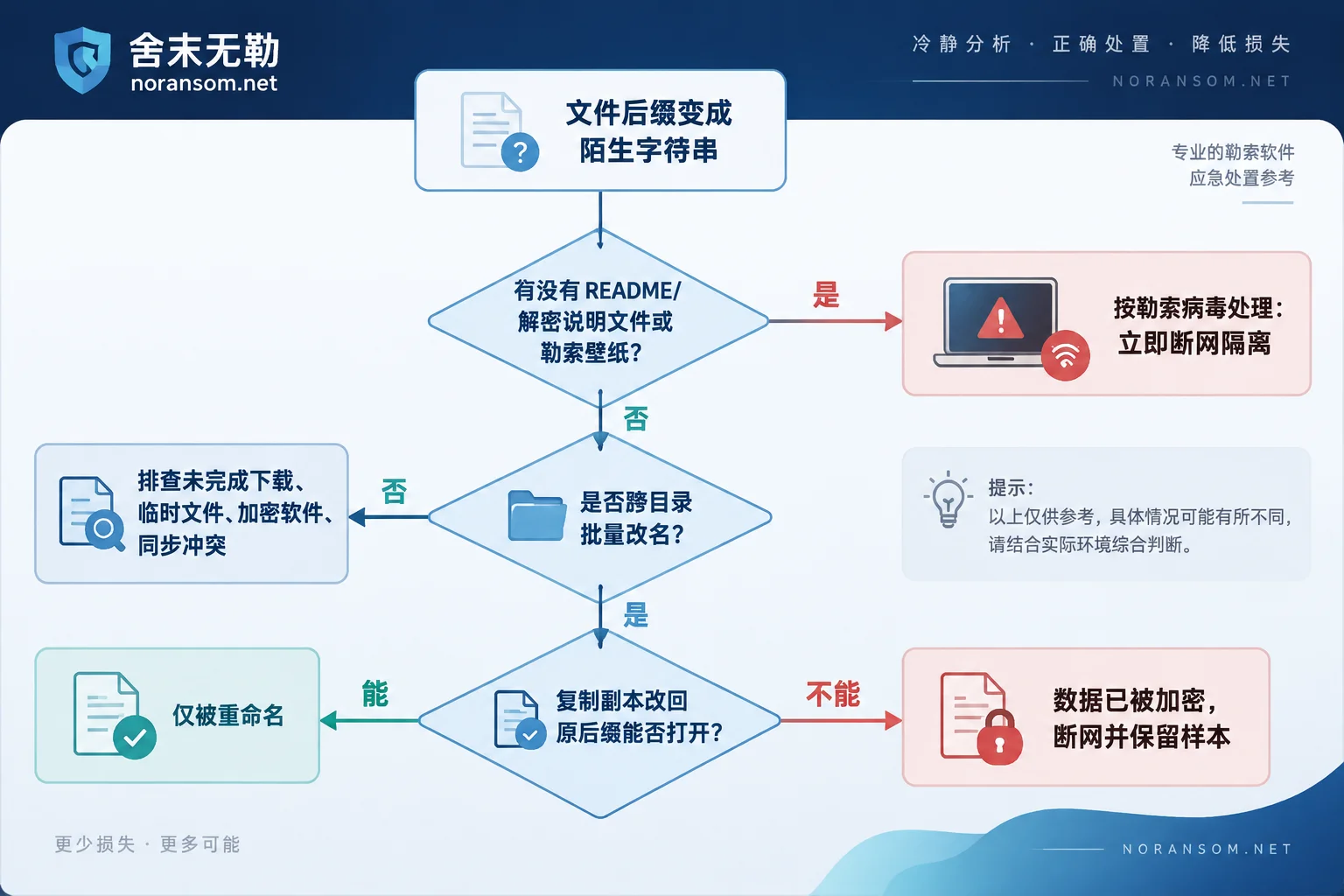
If you see README, HOW_TO_DECRYPT, decryption instructions, or similar txt/html/hta files on your desktop or in encrypted folders, or if your desktop wallpaper has been replaced with an English ransom message, treat it as ransomware and immediately unplug the network cable. If no such note is present, don't jump to conclusions, and don't attempt any "repair" on the original files—many unusual extensions are not caused by encryption, and a wrong move can destroy recoverable data.
Here is a self-check sequence you can complete on your own.
Four checks that take five minutes
First, look for a ransom note. This is the most direct evidence. After bulk encryption, ransomware usually creates a decryption note on the desktop and in every encrypted directory, containing a victim ID, contact email, dark web address or Telegram handle, and a warning not to modify files. Some variants also change the desktop background. If you find one, the diagnosis is basically settled; if not, continue.
Second, check whether the renaming is "bulk and across directories." Ransomware encryption typically sweeps through many files in a short time: documents, spreadsheets, images, and database files (.mdf, .ldf, .bak) all affected, and D drives, shared drives, and mapped network drives may also be hit. In contrast, if only one software's directory or one file type is affected, it's more likely a program glitch.
Third, copy one file and try renaming the extension back. Note: copy the file first, then rename the copy—don't touch the original. For example, copy 报表.xlsx.xxxx and rename it to 报表.xlsx. If it opens normally, it was just renamed and the data is untouched; if it shows a format error or opens as garbage, the underlying data blocks have been rewritten—most likely real encryption.
Fourth, examine the extension structure itself. Common ransomware extension patterns include: a uniform fixed word appended (like .locked, .encrypt), a long extension with random characters or a victim ID, and formats that embed the hacker's email directly in the filename (e.g., 原文件名.[id-xxxxx].[邮箱].后缀). The ones with an ID and email are almost certainly ransomware.
What looks like it but isn't
Before making a judgment, rule out these cases to save unnecessary panic:
- Incomplete browser downloads: .crdownload, .part, .download—just re-download or delete.
- Office temp and backup files: .tmp, .bak, files starting with
~$—normal. - Enterprise endpoint encryption software (transparent encryption/DLP): When a computer leaves the intranet, a certificate expires, or the client malfunctions, local files may fail to open or even change extension. If your organization uses such software, ask IT first; don't uninstall the client yourself—after uninstalling, many files become permanently inaccessible.
- Sync drive conflict copies: OneDrive, Nutstore, etc., generate filenames with conflict markers.
- File system corruption or hard drive failure: Symptoms are more chaotic—filenames become garbled, directory structures are jumbled, and usually the same extension is not uniformly appended across the entire disk.
The common thread: these cases do not leave a ransom note, nor do they uniformly add the same long extension with an ID across unrelated directories.
If it is ransomware, the order to follow
1) Block first, then think about recovery. Unplug the physical network cable, turn off Wi-Fi, and disconnect all mapped shared drives and mounted NAS. Many organizations suffer expanded damage during the tens of minutes after discovery while still connected to the intranet.
2) Whether to shut down depends on whether encryption is still ongoing. There is no one-size-fits-all answer:
- If files are still visibly increasing and changing extension, and the network cannot be fully disconnected quickly (e.g., virtual machines, remote servers), prioritize stopping the damage—force a power-off. The unencrypted data you save is more important than forensic information in memory.
- If encryption has stopped and the machine is physically isolated, it's better to keep it powered on and not restart. A running system may still hold processes, memory keys, and temporary files—clues that vanish after a reboot.
If files continue to be encrypted after disconnecting the network, it usually means a local process is still running. For urgent handling of this situation, see What to do when files are still being encrypted after disconnecting the network.
3) Preserve evidence, don't clean up. At minimum keep: the original ransom note (don't delete it), two or three encrypted file samples of different types (copy to a USB drive, leave originals in place), a corresponding unencrypted original file (if a clean version exists in email or on another machine, it's very valuable), plus system logs and antivirus alerts. If possible, make a full disk image of important drives before taking action.
4) Inventory other copies. Not just formal backups: offline external drives, unmounted NAS snapshots, VM snapshots on ESXi, automatic backup directories of financial software, copies on colleagues' computers, sent email attachments, cloud drive version history. This step often recovers more data than expected.
5) Do not try decryption tools on the only original. Many "universal decryptors" or "universal patches" circulating online are either ineffective or overwrite and corrupt file structures, making previously decryptable files undecryptable. Test only on copies.
Extensions don't equal families, and antivirus doesn't equal decryption
Two common misconceptions deserve separate mention.
The same extension can correspond to completely different families. Generic terms like .locked, .encrypt have been used by dozens of unrelated ransomware programs historically; the same goes for detection names—different antivirus products often name the same sample differently. To truly identify a family, look at the ransom note template, contact format, characteristic signatures at the head and tail of encrypted files, etc. Individuals can start by uploading an encrypted sample and the ransom note to No More Ransom's Crypto Sheriff for fingerprint matching; if it matches a family with a public decryptor, that's the easiest path. A negative match doesn't mean it's unsolvable—it just requires more detailed analysis. For details on family identification and recoverability, see our article on family identification and recoverability assessment.
Antivirus saying "cleaned" doesn't mean files will heal themselves. Antivirus removal addresses processes and autoruns to prevent further encryption and lateral spread; files already encrypted with RSA+AES won't be restored because the virus is deleted. People often see "threat handled" and assume they're safe, but the files still won't open—for a full explanation of this gap, see Why files still can't open after antivirus cleaned.
True recovery has only a few paths: hit a public decryptor, restore from an unaffected backup, extract unencrypted residual structures from databases or business systems, or perform targeted recovery on rare flawed variants. Which path works depends on the family, encryption timing, and what remains on the scene—it requires examining actual samples.
No ransom note, but the machine is clearly acting up
Another easily confused scenario: file extensions haven't changed or only a few are abnormal, but the computer shows the mouse moving on its own, antivirus disabled, strange pop-ups, chat tools sending files automatically—especially on finance or cashier machines. This is more like a remote access trojan (including the so-called SilverFox/SilverWolf), where the risk is not file encryption but accounts, sessions, and funds.
The response logic is completely different from ransomware: disconnect this machine from the network and treat it as untrusted; all password changes must be done on another clean device; log out and re-login to online banking, USB tokens, corporate email, OA, and financial software sessions; if abnormal transfers are found, contact the bank immediately and report to police through official channels, while preserving transfer records, chat logs, and system logs. Antivirus not detecting anything doesn't prove it's clean—persistence entries, scheduled tasks, and leaked credentials may still be present. For a layered approach to such issues, see What to do when the SilverFox trojan reappears after antivirus removal, or SilverFox and remote access risk special.
When to get help
Once you've determined "it really is ransomware, the machine is isolated, and backup situation is clear," you've completed the most valuable part. In the following cases, it's advisable not to continue trial-and-error on your own:
- Encrypted servers, databases (SQL Server, Kingdee/Yonyou accounting sets), or ESXi/Hyper-V virtual machine files;
- Multiple machines and shared drives hit simultaneously, and you're not sure which is the source;
- Backups are also encrypted or no usable copy can be found;
- Someone has already run an unknown decryption tool on the original files.
In these scenarios, one wrong step in the order of operations can turn recoverable into unrecoverable. Securing the scene first, then performing recoverability assessment and planning, is far safer than trying while watching. When you need to hand samples, ransom notes, and scene details to a human for judgment, you can use the incident help and data submission entry; before submitting, note: do not post database files, customer data, production passwords, or virus samples in public comment sections or random online upload sites.
A final reminder: until you have a clear family determination, anyone who says "this can definitely be decrypted" or "definitely cannot" deserves skepticism. Isolate first, preserve evidence first, inventory copies first—these three things are never wrong regardless of the final conclusion.


Comments(0)