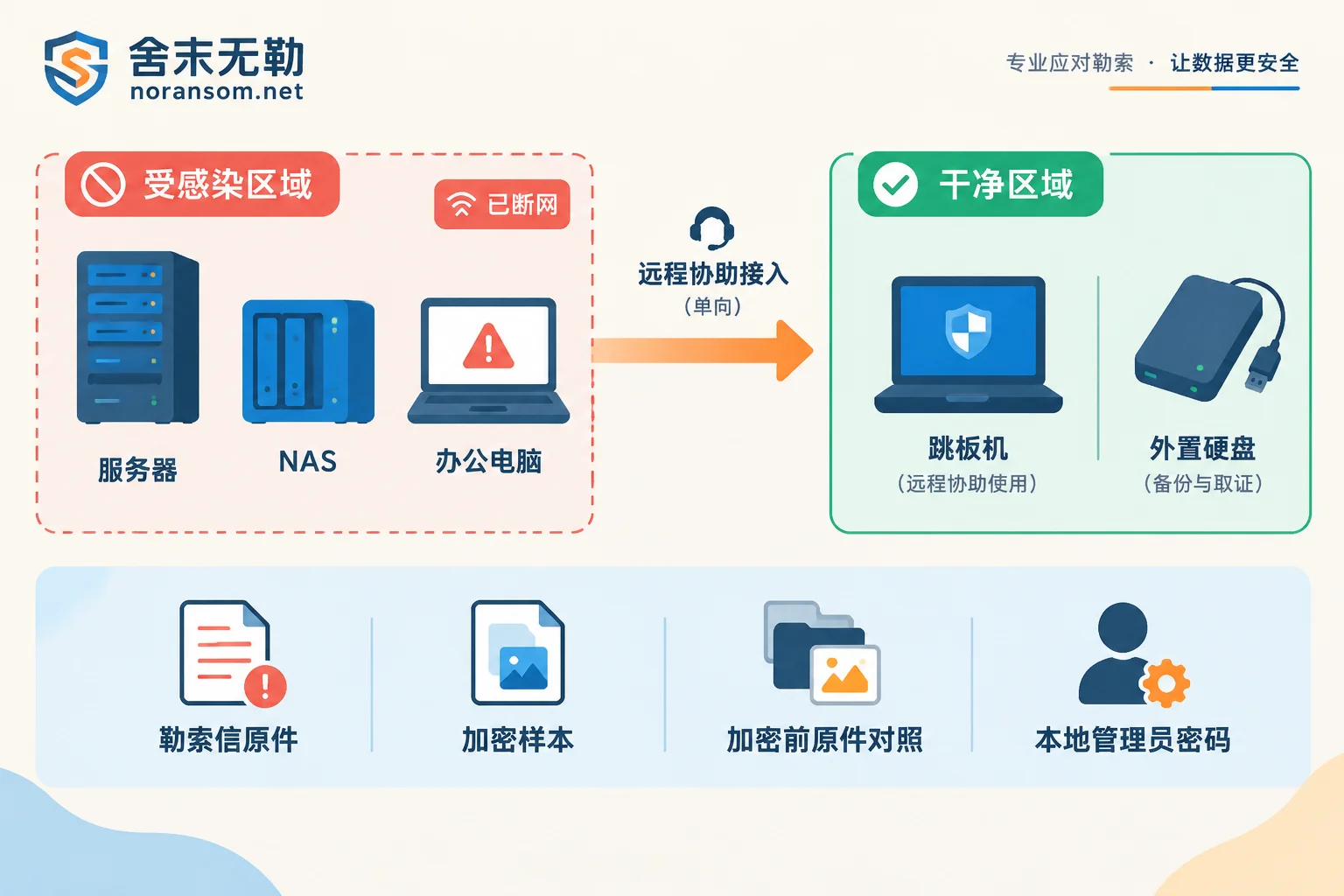
The time waiting for technical personnel to remotely access is not idle. The top three priorities are: disconnect the affected machines from the network, stop all self-initiated repairs and antivirus cleaning, and preserve the original ransom notes and a few encrypted file samples as-is. Doing these three things correctly provides the basis for subsequent family identification, recoverability assessment, and recovery plans; doing them wrong—for example, formatting and reinstalling, batch-renaming encrypted files back to their original extensions, or repeatedly running several unknown decryption tools on the only original copy—will destroy many recovery paths that might still exist.
Below is the actual sequence before access.
1. First define the isolation scope, not just unplug one machine
Unplugging the network cable (or disabling Wi-Fi) of the machine where the anomaly was found is only the starting point. Ransomware attacks usually come laterally, and the machine where encryption is discovered is often not the first one.
What usually needs to be disconnected includes: other servers on the same subnet, ESXi/Hyper-V hosts, NAS and mapped shared drives, and backup servers connected to the victim host. If multiple machines are changing extensions simultaneously, cutting off at the switch or VLAN level is faster than unplugging cables one by one.
One situation is particularly easily overlooked: files continue to be encrypted after disconnection. This indicates the encryption program is already running locally, unrelated to the network, and needs to be handled differently (see How to urgently stop files from being encrypted after disconnection).
2. Shut down or keep running: judge by conditions, don't copy slogans
Both claims can be found online, "never shut down" and "immediately cut power", and neither should be copied unconditionally. The actual judgment depends on two points:
- If isolation has been successful and encryption has stopped (the number of files is no longer increasing), tend to keep it powered on. Process information in memory, temporary credentials, current connections, and logs not yet written to disk are useful for identifying the family and tracing, and will be lost after restart.
- If encryption is proceeding at high speed and effective isolation is temporarily impossible, protecting data that has not yet been encrypted is a higher priority; at this point, powering off or hibernating is a reasonable trade-off, and you should not watch the remaining data being consumed just to "preserve the scene".
Virtualized environments require one more thought: if there are still unaffected virtual machines on the host, a brute-force power-off will drag them down as well; prioritize suspending a single VM or disconnecting its virtual NIC.
Regardless of which option you choose, do not reinstall the system, do not format, do not adjust partitions on the damaged volume, and do not let antivirus software perform "clean/delete" on encrypted files. The encryptor sample itself is valuable for determining the version; if it is directly deleted by antivirus, a clue is lost.
3. Preserve these materials as-is; they will be needed immediately after remote access
The first thing technical personnel will do after accessing is determine "what type this is and whether there is a viable recovery path for this version". So please prepare the following in advance:
- Original ransom notes: README.txt, HOW TO RECOVER.html, etc., do not rename, do not edit content, do not keep only screenshots (screenshots can supplement, but the ID, contact information, and format features in the original file are more important).
- 2-3 representative encrypted file samples: one of each different type, such as an Office document, a database file, and an image. Do not change file extensions.
- Before-and-after comparison pair: if you can find an original version of an encrypted file—historical email attachment, old copy on a colleague's computer, old version on a USB drive, backup fragment—pair the "encrypted version + unencrypted version of the same file"; this is often critical for determining the encryption method and version.
- Timeline: the earliest time the anomaly was discovered, who logged in remotely that day, whether anyone clicked a suspicious attachment or installed "financial software/customer service tool".
If you are still not sure whether this is ransomware encryption (some cases are just file corruption or extension changes), you can first look at the judgment points in How to tell if files with strange extensions are ransomware, then decide whether to treat it as an incident.
A reminder: these samples and information should be provided to the response party via point-to-point means; do not post database files, customer data, production passwords, or executable virus samples to public forums, comment sections, or any online scanning/upload sites. We have written in the material submission instructions what to send and what not to send.
4. Disconnect backups first, then inventory
This step is often done too late. In many environments, backup servers and NAS are mounted year-round, so the encryption process can directly read and write, resulting in both original data and backups being lost.
So the order is: first physically/logically disconnect the backup link, pause running backup jobs, then inventory. Especially avoid letting scheduled tasks continue running—one incremental sync can overwrite a still-clean copy with encrypted files.
When inventorying, classify by "whether connected to the victim network":
- Offline cold backups (unplugged mobile hard drives, tapes, disconnected backup machines)—highest priority;
- Offsite/cloud copies, note to confirm whether the cloud version history still retains pre-encryption versions;
- Snapshots at the storage or VM level, volume shadow copies (VSS); many families actively delete them, but not every time completely, so it's worth actually checking once;
- Exports from business systems themselves: periodic backup files of financial account sets, database .bak files, sometimes scattered on an office computer.
Even if the backup is incomplete or older, state it truthfully. A three-month-old account set plus unencrypted incremental logs may have much higher recovery value than waiting for decryption. Which recovery path to choose usually can only be determined after evaluating these copies; this part can refer to Evaluation methods for backup and database recovery paths.
5. Prepare a clean machine and a controllable remote channel
Remote handling will access the already infected environment; the channel itself must not become a second entry point.
- Prepare an unaffected clean work machine or independent jump host to run remote assistance software (Sunlogin, ToDesk, etc.) and act as a relay. Do not use the just-infected machine to download tools, log into email, or change passwords.
- Do not open port 3389 of the victim host directly to the public internet for convenience. Many ransomware incidents themselves came in through exposed remote desktop; opening it again at this time is like a second invitation.
- Prepare local administrator account and password. Domain accounts may already be compromised; during handling, try to use local administrator, and if necessary reset the domain admin password first—the reset operation should be done on a trusted device.
- Prepare external storage space, capacity at least covering critical data. Before attempting any repair, decryption, or fragment extraction, first make a read-only image of the damaged critical files or the entire volume. All experimental operations should be done on copies; the only original should not participate in any "try it".
The last point is worth emphasizing: many decryption tools online target specific versions of specific families; using the wrong one may be ineffective at best, or corrupt the file header at worst. Before confirming the family and version, do not continuously try tools on the original data. For how to confirm the family and version, and whether decryption is still possible after confirmation, see Ransomware family identification and recoverability assessment.
6. If a remote access trojan is also suspected, prepare different things
If finance or cashier computers are infected, or phenomena such as "the other party remotely operating the mouse", "session hijacked", "chat tool automatically sending files" have occurred, it's not just a file encryption problem. Host handling, account sessions, and financial risk must be handled separately:
- Host: disconnect network, preserve the scene, but do not take "antivirus didn't report" or "already cleaned" as a conclusion that it is clean. Persistence items, scheduled tasks, services, and startup items need to be checked separately (related symptoms can refer to Silver Fox trojan reappears after antivirus).
- Accounts: from another trusted device, change passwords for online banking, enterprise email, office IM, VPN, remote desktop, and force logout of all logged-in sessions. Changing passwords on a suspected controlled machine is meaningless.
- Funds: if abnormal transfers are found, immediately contact bank customer service and official channels to request handling, and report to the public security bureau, while preserving transfer records, chat records, network egress logs, and affected computers. The earlier, the more room for handling, but no one should promise you "it can definitely be recovered".
These problems and file encryption are two separate lines; if both occur simultaneously, evaluate them separately, and do not expect that cleaning the trojan files will automatically restore everything. Key points for handling remote control and financial computer risks are compiled on the Silver Fox/remote control special page.
After remote access, what sequence will roughly be followed
Once preparations are complete, the post-access process is usually: confirm whether spread has stopped → determine family and version based on ransom notes and samples → inventory available backups and unencrypted remnants → provide recoverable scope and plan, then start recovery. Assessment first, action second; reversing the order easily leads to wasted effort, which is also why handling and delivery sequence is placed first.
Two things to be mentally prepared for in advance:
First, removing the virus and recovering files are two different things. Antivirus saying "cleaned" only means the malicious program has been handled; encrypted files will not come back because of that.
Second, recovery results need acceptance. This is especially true for databases and account sets; a file can be opened but business data may not be complete. After recovery, verify according to business logic (for database verification order, see Is SQL Server usable right after recovery?).
If multiple machines are still continuously changing extensions, or the virtualization platform as a whole is affected, isolation itself can no longer be done, then don't wait—this spreading situation requires someone to simultaneously judge the cut-off point and preservation order; you can directly go to ransomware incident emergency response. In other cases, doing the above six preparations solidly can save more time after remote access than you might imagine.


Comments(0)