Having only a ransom note, with the malware self-deleted or removed by antivirus, is more common than you might think—and it doesn't mean you can't make an assessment.
Let's start with the conclusion: A ransom note can help you achieve "initial identification," but it cannot single-handedly provide the final answer to "can it be decrypted." It can narrow the scope from thousands of families down to a few, and tell you whether that family has historically had public decryption tools. But to confirm which sub-version your files belong to and whether they use an offline or online key, you usually need to examine the encrypted files themselves. The good news is you definitely have the encrypted files—they are more informative than the malware itself.
Before You Start, Do Three Things
First, stop the spread. If encryption is still ongoing, or shared drives and other machines are showing problems, family identification should wait. Disconnect the affected host from the network and shared mappings, and stop automatic synchronization of mapped drives and backup tasks to prevent encrypted results from overwriting backup copies. Whether to power off directly depends on the situation: if you can isolate via unplugging the network cable or switch port and encryption has already stopped, keeping the machine on is better for forensics and memory key extraction; if encryption is confirmed to be ongoing and cannot be quickly isolated, shutting down to reduce losses is more important. For related guidance, see what to do when files are still being encrypted after disconnecting from the network.
Second, preserve the ransom note as is. Keep its complete filename, directory, and creation time. Don't rename, edit, or use Notepad to save as. The filename itself is one identification clue. Also take screenshots recording the full names and sizes of several encrypted files.
Third, do not click any links in the ransom note. Do not open the .onion addresses, external cloud storage links, or so-called "free decryption for two files" portals on the victim machine, to avoid secondary infection or prematurely revealing your intent to contact. If you need to compare, copy the text to a clean device for processing.
Also a reminder: do not repeatedly try various "universal decryption tools" on your only encrypted original. Many tools overwrite when they don't match, completely destroying files that could still be used for fragment extraction. If you must try, make a copy first.
First Confirm: Has Encryption Actually Occurred?
There is one situation worth ruling out first—only a ransom note, but files open fine. This could be a failed encryption attempt where only the ransom module was deployed, or pure data-theft ransomware (stealing data and using public threats without encryption). The method is straightforward: randomly pick a few files of different types from different directories and try to open them, then check whether file extensions have been appended and whether file sizes have changed abnormally. If the vast majority of files are normal, focus should shift to investigating data leakage and backdoor remnants, not finding decryption tools.
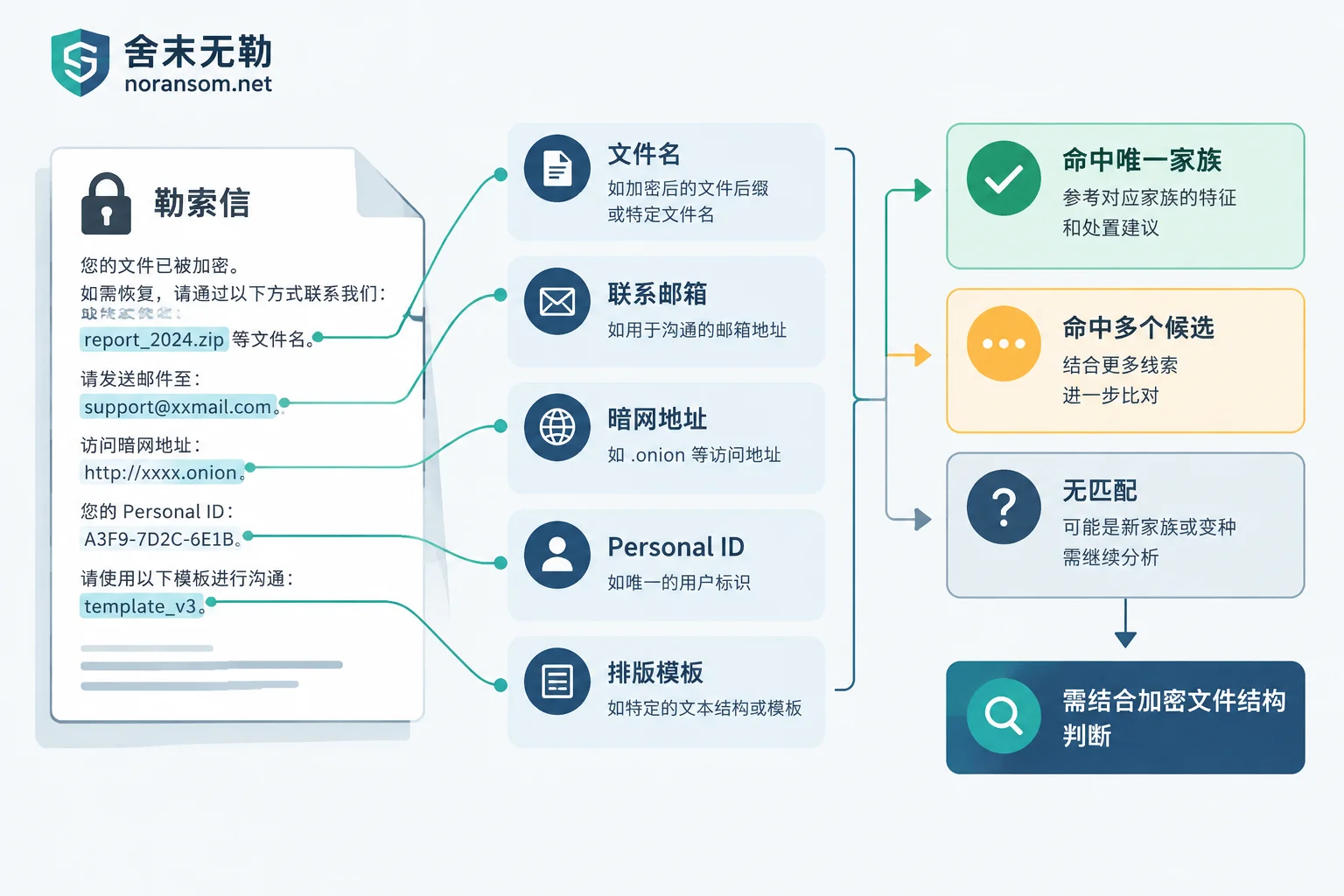
Five Types of Clues Extractable from a Ransom Note
- Ransom note filename. Many families use fixed naming, such as
xxx_readme.txt,How To Restore Your Files.txt,Encrypted Files by ...—patterns that include family identifiers. The filename is often more attributive than the body text, because the body can be copied by copycat groups. - Contact information. Email address format, Tor .onion addresses, Tox IDs, Telegram accounts—these are the attackers' "stall numbers." The same contact string often corresponds to only one group during a specific period, giving a much higher hit rate than keyword searches.
- Victim-specific ID. The Personal ID / Key ID in the ransom note is not just a number; sometimes it directly determines decryptability. A typical example is the STOP/Djvu series: the ending characters of the ID can distinguish offline from online keys. With offline keys, there are known private keys and public tools may have a chance; online keys are dynamically generated per machine, and public tools cannot decrypt them.
- Layout and wording template. Segmentation, threat phrasing, and fixed sentence patterns in payment instructions are auxiliary features for matching known templates. But this alone is most prone to misjudgment, because open-source ransomware templates are widely reused.
- Ransom wallet address (if provided). Can be used as one comparison item.
Where to Compare Using These Clues
Among public platforms, two of the more common:
- ID Ransomware: Supports uploading just the ransom note, or directly entering the email address or dark web address from the note, comparing against thousands of cataloged families and indicating whether a known decryption method exists.
- No More Ransom's Crypto Sheriff: Maintained by Europol, allows you to enter the email, Tor URL, wallet address from the ransom note, or upload a .txt/.html ransom note, matching against hundreds of official free decryption tools cataloged on the platform.
When submitting, note the scope: the ransom note text itself usually contains no business data, so upload risk is manageable; but do not upload database files, accounting ledgers, customer data, or executable programs to any public site. If you need to submit an encrypted sample, choose a small, non-sensitive file, such as a test image on the desktop.
Comparison results are generally three types: unique family match, multiple candidate matches, or no match. The latter two are normal outcomes, indicating that encrypted files are still needed for assessment.
"A Decryption Tool Exists" Does Not Mean Your Files Can Be Decrypted
This is the most easily misjudged step. Even if the platform shows a free decryptor for a family, verify three more things:
Is the version correct? Security vendors release decryption tools usually because a specific version's encryption implementation had a flaw or key leakage. Once the group discovers this, they mostly patch it, and later variants are no longer applicable. For families like Akira and Rhysida that once had public decryption solutions, the tools often specify a clear applicable time frame or version characteristics, not covering later variants.
Is the key type correct? Within the same family, offline and online keys produce completely different outcomes, and the ID check mentioned earlier does exactly this.
Does the algorithm itself have an attack surface? If the attacker properly used RSA/ECC to wrap AES keys, with no implementation flaws and no key leakage, then brute-force decryption is objectively impossible. Any claim that "all variants can be decrypted" should not be trusted.
To confirm these three points, the ransom note alone is insufficient; you need to look at the extension structure of encrypted files, marker fields in file headers and footers, the size difference relative to the original file after encryption, and sometimes an unencrypted original of the same filename for comparison. This is why "not capturing the malware" is not fatal—the encrypted files themselves carry version fingerprints. If you need to determine a specific family, such as how to confirm the LockBit series and remaining recovery paths, or several checkpoints when files suddenly get unfamiliar extensions, you can refer to them.
Beyond Decryption: What Other Paths Can Be Evaluated
Separating "decryption" from "recovery" is the most important concept at this step. Even if a family has no public decryption solution, business data may not be entirely lost. These items are still worth reviewing:
- Volume Shadow Copies and Snapshots: Local VSS is often deleted, but storage-layer snapshots, virtualization platform snapshots, and NAS snapshots sometimes remain independent of the host.
- Overlooked Copies: Offline external drives, development/test environments, export files from upstream systems, email attachments, stage versions retained locally by employees.
- Partial Encryption Residue: Many ransomware programs encrypt only file headers or skip blocks to speed up, so large files (especially database files) may still contain complete data pages in the middle. Page-level fragment extraction and reassembly can be attempted.
- Database Rebuildability: Data files and log files of SQL Server, MySQL, Oracle often have inconsistent degrees of damage; how much can be extracted must be evaluated case by case. Reassembled data must also be verified against business logic. For the specific order, see how to verify business data layer by layer after database recovery.
The feasibility of these paths depends on the scope of encrypted writes, whether the original disk has been overwritten by subsequent operations, and whether you have performed reinstallation, formatting, or repeated scans on the original disk. That's why we emphasized not tampering with the original media. For a complete inventory approach when there is no backup, see what recovery paths remain when a server is encrypted and there is no backup.
When to Hand Over to Professional Assessment
If any of the following occurs, the returns from continuing to try on your own are very low: public platforms give multiple candidate families that cannot be narrowed down; tool versions don't match your files; core data is in databases or virtual machines; encryption is still spreading or multiple machines are affected; the original disk has already been subjected to destructive operations like reinstallation or formatting.
At this point, what's needed is a recoverability assessment combining encrypted file structure, system remnants, and storage conditions—not continuing to try different tools. Shemo Wule provides ransomware family identification and recoverability assessment. You can also first read the processing order for recovery assessment and delivery to understand what to prepare; if multiple machines are affected and still spreading, emergency response is more appropriate. When submitting materials, please follow the requirements on the contact page, and do not upload production data or credentials on public channels.
One last note: "limited-time double" and "key destruction after deadline" in ransom notes are standard pressure tactics—don't let them push you into a decision. We do not pay ransoms or negotiate on your behalf—what truly determines the outcome is whether you protected the original media and available copies in the first few hours.



Comments(0)