Filenames pick up a .sorry suffix, ransom notes appear in directories, and databases refuse to start. In this situation, the first thing to do is not to hunt for a decryption tool but to stop the damage at this machine and this point in time. Below is the order of response as it actually plays out.
The First Hour: Isolate First, Don't Destroy the Scene
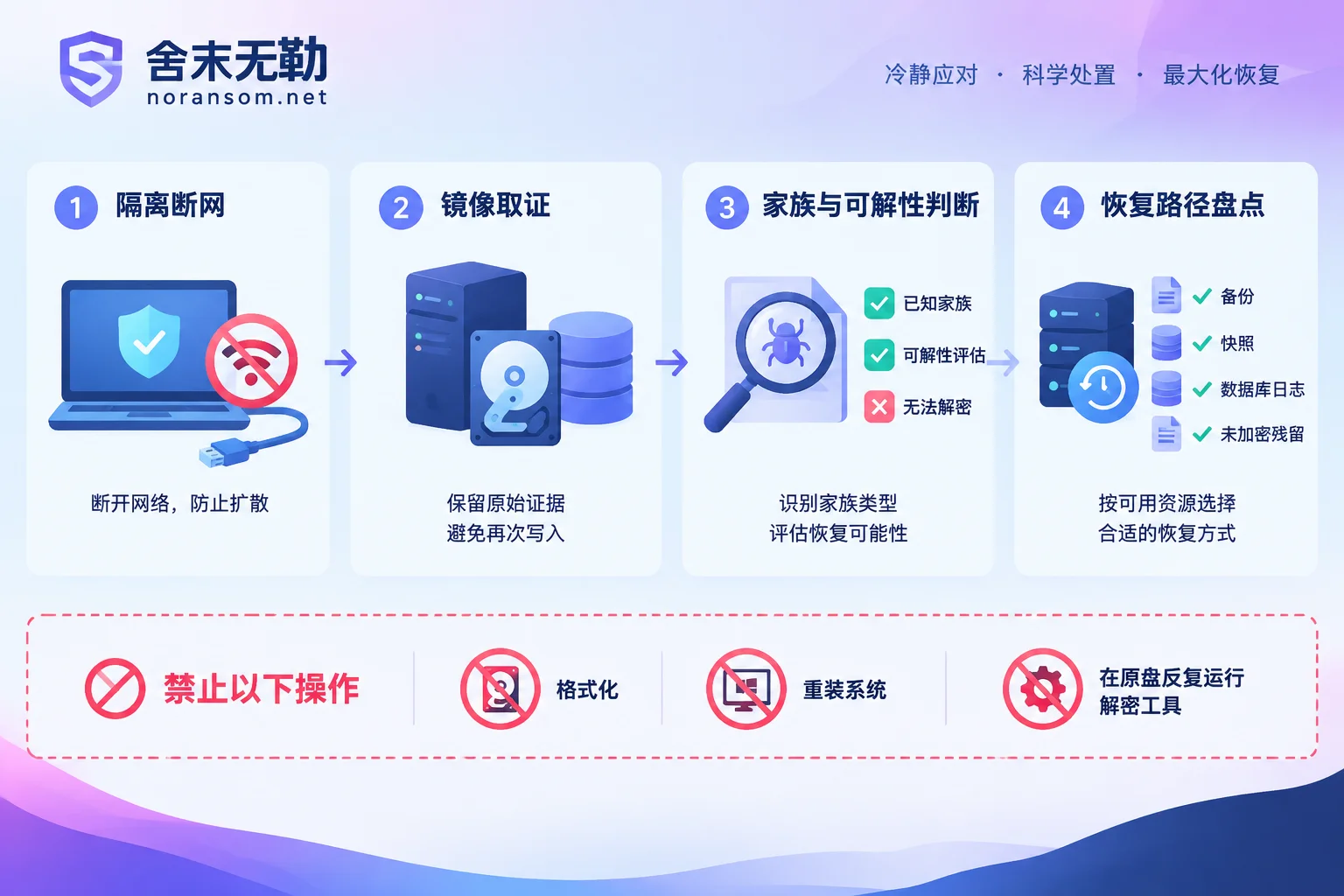
1) Take the affected host off the network. Unplug the server's network cable, disable the switch port, or use security groups to block inbound and outbound traffic in both directions for cloud instances. Do not just stop the firewall service or log out of the remote session, and do not count on antivirus to stop it on its own. Attacks like this often move laterally across the internal network: by scanning internal SSH ports and trying weak passwords to infect the next machine. So the isolation target is not only this one host but also other hosts and NAS devices on the same subnet or sharing credentials.
2) Confirm whether encryption is still ongoing. If you see files still being renamed in batches, you need to weigh "preserving evidence" against "one fewer file encrypted": if the encryption process is confirmed still running and the data is worth more than the forensic need, prioritize killing the process or cutting power; if encryption has finished and the system is still running, there is actually no rush to shut down, since in-memory information and running processes help trace the entry point later. For specifics on judging whether files are still being encrypted after disconnecting the network, see what to do when files are still being encrypted after going offline.
3) Do not perform destructive operations on the original disk. Do not format, do not reinstall, do not repeatedly install and run various "recovery master" or "decryption tool" programs on the victim disk, and do not write new data to it. If you really intend to attempt recovery, first make a full disk image, and do all attempts on the copy. Residual blocks on the original media are often the last chance.
4) Do not follow the ransom note's instructions. Institutions such as the National Computer Virus Emergency Response Center have explicitly warned in related advisories: do not download or run the so-called "encrypted communication tools" or clients provided in the ransom note, as they may bring secondary implants and expand the scope of compromise. Be equally wary of promises of "100% universal decryption" or "one-click crack the entire disk."
The Extension Is Only a Clue; It Cannot Determine the Family
The .sorry extension itself does not uniquely correspond to any single malware family, and historically many variants of Windows ransomware families have also swapped in various extensions. The judgment must be made by looking at a set of information together:
- The ransom note's filename and body format (whether it includes a victim ID, contact email, TOR address);
- The full naming rule of encrypted files (whether it is a pure appended extension or has an ID or email segment inserted);
- The file header characteristics of one or two small encrypted samples;
- System type and exposure surface: a Linux public-facing web server, or an internal Windows endpoint/file server;
- The earliest point of encryption and the login records at that time.
Save these materials well; they are more valuable for later judging recoverability than any tool scan. If you want to first clarify the family and decryptability before deciding where to invest, take the path of ransomware family identification and recoverability assessment rather than touching the data first.
Public Information About This Wave of the Sorry Family in 2026
From published advisories and analyses, this wave of relatively targeted Sorry ransomware attacks shares several traits that can help you self-check:
- The entry point is concentrated on Linux servers exposed to the public internet, especially authorization bypass vulnerabilities in web operations panels like cPanel (such as CVE-2026-41940) and weak passwords; attackers can silently obtain root without anyone opening an attachment;
- The execution phase is deliberately disguised, with malicious processes using common names like
sshdto blend into the process list; - Before encryption, they first "dismantle the defenses": terminating database services, security protection, and backup services, deleting or destroying local backups, and exfiltrating business data and credentials first;
- The encryption implementation is complete: symmetric algorithms (AES/ChaCha20) encrypt file contents, and the attacker's built-in RSA-2048 public key protects the session key. Without the attacker's private key, direct cracking by sheer computing power is mathematically infeasible, and there is currently no publicly effective free decryptor.
So one thing must be stated clearly: against this kind of encryption with no implementation flaws, the realistic way out is mainly "recovery," not "cracking." Any claim of being able to decrypt all variants is worth challenging to explain the basis. We do not pay ransoms, nor do we negotiate with attackers on your behalf.
Even Without Backups, Inventory These Copies First
Many people give up as soon as they hear "the backups were deleted," but usable data often lies scattered outside the backup system:
- Snapshot types: VM snapshots on virtualization platforms (ESXi/Hyper-V), cloud disk snapshots, NAS snapshots and previous versions, SAN point-in-time copies. Note whether snapshots have been overwritten by space reclamation; the sooner you confirm, the better.
- Database logs and fragments: MySQL binlogs, PostgreSQL WAL, SQL Server transaction logs and
.bak, Oracle archive logs; even if the data files are encrypted, logs or tablespace fragments can sometimes still support a substantial rebuild. - Unencrypted remnants: many families skip very large files to speed things up or encrypt only file headers, and may also stop midway because the disk is full or the process was killed; recycle bins, temp directories, sync drive previous versions, exported reports, email attachments, and redundant data in downstream systems can all piece together part of the business.
- Manual copies: accounting exports, month-end backups, and USB copies on the computers of finance and business staff are often more numerous than IT imagines.
Keep everything read-only during inventory; image first, then operate. Actions such as low-level database extraction and tablespace fragment reassembly are very sensitive to environment and order, and are not suitable for trial and error on the only original copy; when needed, take the backup and database-level recovery assessment path.
Two Things to Handle at the Same Time: Credentials and Entry Points
Credentials. Before encrypting, attackers have usually already obtained SSH private keys, panel passwords, database accounts, and passwords saved in browsers. Removing the malware does not mean taking back access rights. From a confirmed clean device, you need to reset relevant passwords, revoke and rotate SSH keys, and check whether new system accounts, authorized_keys entries, scheduled tasks, and startup items have been added. If at the same time you find signs of remote control on finance or office computers, abnormal account logins, or tampered transfers, that is a different class of problem: host response, account sessions, and financial risk should be looked at separately; the response approach is in the Silver Fox and remote-control trojan handling guide. For abnormal transfers, report to the bank through official channels and to the public security authorities as soon as possible, and keep complete incident materials.
Entry points. If panel vulnerabilities are not patched, weak passwords are not changed, and public management ports remain open, being re-encrypted after reinstalling the system and restoring data is a very common outcome. In the recovery order, first determine the entry point and cleanup scope, and only then decide when the business goes back online.
When Not to Tough It Out Alone
In the following situations, the risk of continuing to try on your own exceeds the benefit: multiple servers encrypted simultaneously with encryption still spreading; virtualization platform storage volumes or datastores encrypted; core databases without usable backups that require low-level extraction; the original disk already written multiple times, reinstalled, or subjected to repair attempts.
The reasonable order in such scenarios is to first perform read-only forensics and imaging, then assess the feasibility of each recovery path, and only then discuss concrete implementation. For the order of assessment and delivery, see the recovery assessment and response process guide. If the situation is still expanding and affecting multiple people and machines, the ransomware incident emergency response entry provides 7×24 response; when submitting incident information, provide samples and logs as required by the page, and do not post databases, customer data, or production passwords in public comments or arbitrary upload sites.
One final reminder: whether recovery is possible and to what extent depends on how you treat that disk in these next few hours. Stop writing, preserve samples, and avoid irreversible operations—get these three things right, and all the later paths remain open.


Comments(0)