First, the most critical thing:Disconnecting the network will not stop encryption. Unplugging the network cable and turning off Wi-Fi can cut off communication between the virus and its external command server, prevent data from being exfiltrated, and contain it from spreading across the LAN to other machines, but the encryption threads already running in memory rely on the local CPU and disk I/O and need no network connection at all to consume the remaining files one by one.
Files on screen are still being renamed and having extensions appended, which means disk writes are still ongoing. At this point the only meaningful goal is to make this disk stop writing as quickly as possible and preserve the portion of data that has not yet been destroyed. The sequence below revolves around this one task.
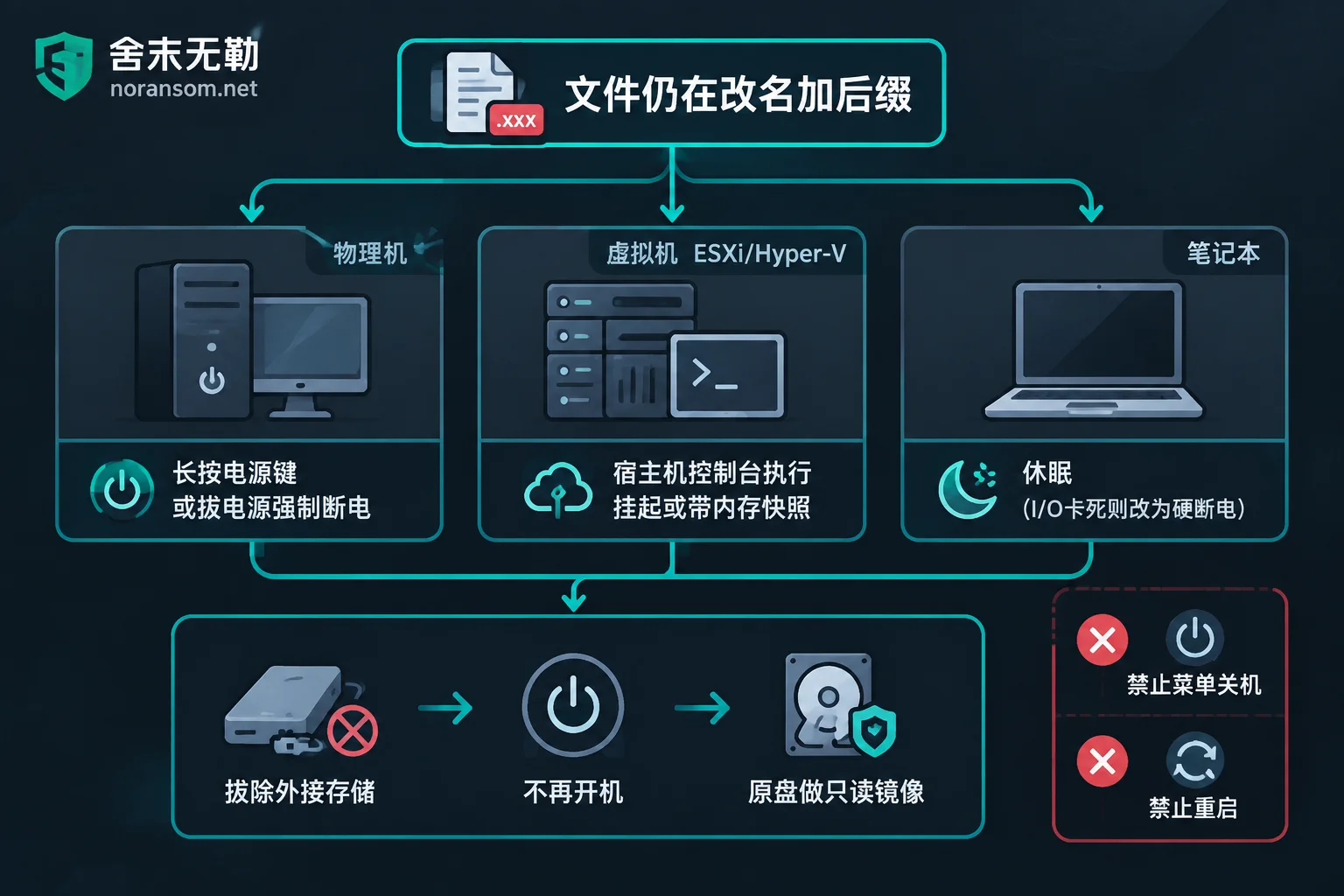
Step One: Force a Freeze by Device Type, Do Not Use Menu Shutdown
Physical machines / bare-metal servers: Hold down the power button to force a power-off, or pull the power cable directly. This is the fastest way to stop disk writes. When data is visibly still being consumed, the file system damage caused by a hard power-off is far smaller than the loss from letting it run another ten minutes.
Virtual machines (VMware ESXi, Hyper-V): On the host console, perform a "Suspend" or "Snapshot with Memory" on the victim VM. This is better than a hard power-off: the freeze is millisecond-level, and volatile data in memory (which may contain key material not yet destroyed) is fully preserved. At the same time, confirm whether the host itself and the storage volume holding the VM files have also been hit — this determines whether storage-layer snapshots are still available afterward.
Laptops or hosts you are confident you can operate quickly on: If the system supports hibernation, hibernation flushes the entire memory into hiberfil.sys, likewise preserving the memory state. But the premise is that it can actually complete within a few seconds; when the encryption process is aggressively occupying disk I/O, hibernation often gets stuck and cannot finish writing, in which case a hard power-off is the realistic choice.
Why You Must Not Click "Shut Down," and Even Less "Restart"
A normal shutdown broadcasts termination signals to all background processes and waits for them to finish writing to disk; some ransomware captures this signal and uses it to accelerate flushing or write persistence entries.
Restarting carries even greater risk. First, the encryption process may continue from where it left off after boot; second, some families trigger their most destructive actions after a restart, such as rewriting the MBR/VBR so the system cannot boot at all, or abusing built-in full-disk encryption mechanisms to lock the entire disk. What was originally only some encrypted files may become a machine that cannot even get into the system after a restart.
Also Detach External Storage
Ransomware programs typically enumerate every visible drive letter: USB drives, portable hard drives, directly attached backup disks, and mapped SMB/NFS shares. Disconnecting the network only partially addresses mapped network drives; devices physically plugged into the machine are still within range. Unplug USB devices before powering off, in whatever order is fastest on site — don't lose minutes agonizing over the sequence.
If the NAS or file server hosting the shared drive was not itself compromised but only had files corrupted by this machine, then any saved credentials on this machine that can access that share must be changed from another device confirmed clean.
After Halting: Do Not Boot Back Into That System
This step is where mistakes are most common. Many people's first reaction after a power-off is to boot up again to see how much was lost, or to install antivirus software and run a full scan. Several red lines:
- Do not reboot the victim system. To learn the scope of damage, look at a copy.
- Do not run antivirus scans, disk checks, defragmentation, or partition repairs on the original disk. These operations all write to disk and may overwrite residual data that could still be extracted.
- Do not try "universal decryption tools" downloaded from the internet on the original disk. Using the wrong version may corrupt ciphertext that could still be saved, and such download channels are themselves high-risk sources of secondary infection.
- Do not format and reinstall. Even if you have decided to rebuild the entire environment, keep the original disk first.
The correct order is: remove the hard drive, connect it to a read-only/write-protected environment, make a complete sector-level image (sector-by-sector clone), and afterward perform all signature analysis, data extraction, and decryption testing only on the copy, leaving the original disk sealed and untouched. Virtual machines are simpler — the earlier snapshot-with-memory plus the VM files themselves are the original material; copy them out before doing anything further.
Removing the virus and recovering files are two different things. Cleaning the machine thoroughly does not change the fact that already-encrypted files remain encrypted; conversely, rushing to recover without removing persistence entries may result in the recovered data being encrypted again.
Whether Recovery Is Possible Afterward Depends on These Four Things
One, family and version identification. The materials needed are the full ransom note and its filename, the encryption extension, and the file headers of several sample files. Identifying the family from just an extension or an antivirus-reported name is often wrong: the same extension has been used by multiple families, and different versions of the same family have completely different decryptability.
Two, whether a usable decryption solution exists. Some families have had decryptors published or have exploitable algorithm flaws, others do not; and many decryptors only work on specific versions and specific time ranges of samples. This conclusion must be reached after identification is done; you cannot assume a tool exists and work backward. No one can tell you whether decryption is possible before you have submitted samples.
Three, what the backups actually still contain. Offline cold backups, offsite backups, storage snapshots at the virtualization layer, historical backup files of databases — these paths are often faster and more reliable than decryption. Confirm one by one whether they were also encrypted or deleted in this incident, and whether the credentials used to connect to the backups have also been leaked.
Four, residual data. Some families only encrypt file headers or encrypt at fixed intervals, so large files (especially database files) may leave extractable fragments; other families "read the original file — write a new file — delete the original file," so the original content may still lie in unallocated space. This kind of extraction work can only be done on the image copy, which is why we emphasized not writing anything further to the original disk.
When to Bring in Someone Else
If it is just a personal computer and important files have unaffected copies in cloud storage or on a portable hard drive, then reinstalling the system and restoring from a clean copy is enough; there is no need to turn a small problem into a major project.
External intervention is usually needed in these cases: encryption is still spreading across multiple machines; the affected systems are servers, virtualization platforms, or databases; business accounting sets and shared drives such as Kingdee or Yonyou have been encrypted; backups have failed or you are not sure they can still be trusted. In these situations the order of judgment is the same — stop-loss and preservation first, then recoverability assessment, and only then discuss specific recovery plans.
If you already have a ransom note and sample files, you can start with family and version identification and recoverability assessment; if encryption is still spreading and multiple machines or servers are already affected, this falls under emergency response scenarios that need intervention as soon as possible; if the main problem is that backups are suspect, database files are encrypted, and you need to inventory which usable copies remain, the corresponding service is assessment of backup and database recovery paths. 舍末无勒 provides 7×24 remote and on-site response, assessing the recovery scope first before giving a handling plan and quote, does not pay ransoms, and does not negotiate on your behalf. For urgent matters, go directly to the contact entry.
One reminder: no party can guarantee that all families and all variants are decryptable. Claims of recovery rates and fixed turnaround times made before samples are submitted and the family is identified are not worth using as a basis for decisions. Likewise, do not submit database files, customer data, or production environment credentials on public forums or any random upload site.
If This Is a Finance or Office Computer, There Is Another Independent Risk Line
If what was encrypted is a finance or cashier's computer, or if you noticed anomalies before this encryption incident — the mouse moving by itself, chat software automatically sending files out,异地 login alerts — then in addition to file encryption, there is also the problem of remote control and compromised accounts. These two lines must be handled separately: clearing the Trojan from the host does not mean the logged-in sessions and leaked credentials are safe; the absence of an antivirus detection cannot be directly taken as proof that cleanup is complete.
Passwords for online banking, corporate email, office IM, and business systems must be changed from another device confirmed clean, and all logged-in sessions must be actively kicked offline, with USB keys and payment permissions checked as well. If abnormal transfers have already occurred, promptly apply for payment stop through the bank's official channels and report to the public security authorities, preserving transfer records, chat records, and on-site device materials; technical means cannot promise to recover funds. This type of remote-control and financial risk handling is a different set of work from file decryption and can be referenced separately in guidance related to SilverFox and remote-control Trojans.


Comments(0)